Answering the needs of keyboard users and desk workers, these ergonomic mice are designed to reduce wrist, forearm, and shoulder strain. They’re best for: office professionals and students who spend long hours at a computer; anyone new to vertical or ergonomic mice; and RSI-prone users seeking neutral hand positions. This guide highlights five top picks with clear pros and limitations to help choose quickly and safely.
| Product | Best For | Why It Stands Out |
|---|---|---|
| Logitech MX Vertical Wireless Mouse | Long sessions, posture-conscious users | Natural handshake, 57° vertical angle for wrist relief |
| ProtoArc EM11 NL Wireless Ergonomic Vertical Mouse | Multi-device setups | Triple-connection options, rechargeable |
| Anker 2.4G Wireless Ergonomic Mouse | Budget-friendly daily use | Neutral grip, multiclick web navigation |
| Perixx PERIMICE-713 Wireless Vertical Mouse | Quiet work environments | Silent left/right buttons |
| Perixx Perimice-513L Wired Vertical Mouse | Left-handed RSI users | Left-handed design with two DPI levels |
Logitech MX Vertical Wireless Mouse Ergonomic Design

The MX Vertical uses a natural handshake position to reduce muscular activity and wrist pressure. Its 57° vertical angle is designed to relieve strain while maintaining performance. Best for professionals who need all-day comfort without sacrificing precision. Caution: Some users may require a brief adjustment period to adapt to the vertical orientation.
- Natural handshake position reduces muscle strain
- 57° vertical angle improves wrist posture
- Ergonomist-approved design for posture and comfort
ProtoArc EM11 NL Wireless Ergonomic Vertical Mouse

This mouse supports up to three devices via Bluetooth and 2.4G USB-A receiver, making it ideal for users who switch between laptops, desktops, and tablets. It includes a rechargeable battery and is compatible with major OS platforms. Best for multi-device workflows. Limitation: USB-C receiver is not included, and charging uses a USB-C cable.
- Up to 3 devices via Bluetooth and USB-A
- Rechargeable with Type-C charging
- Cross-platform compatibility
Anker 2.4G Wireless Ergonomic Mouse

Positioned to reduce wrist strain with a natural neutral grip, this mouse uses a 2.4 GHz USB receiver. It offers 800/1200/1600 DPI for precise tracking across surfaces and includes convenient forward/back controls for web navigation. Best for daily tasks and browsing. Caution: Key click sounds are present, which may be distracting in quiet spaces.
- Neutral “handshake” grip reduces strain
- Multiple DPI settings for precision
- Forward/back buttons for easy browsing
Perixx PERIMICE-713 Wireless Vertical Mouse
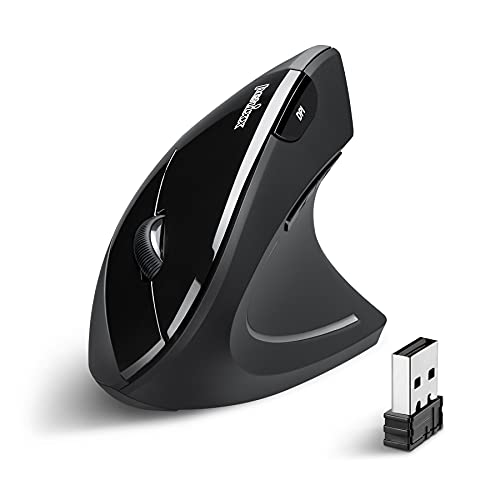
This wireless vertical mouse emphasizes an upright posture to minimize wrist and forearm strain. It features silent left and right clicks for a quieter workspace. Best for RSI-prone users who need a calm, low-noise input device. Limitation: Scroll wheel and back/forward buttons are not silent, which may affect some users.
- Vertical design promotes neutral wrist position
- Silent left/right buttons
- Suitable for RSI-focused comfort
Perixx Perimice-513L Wired Vertical Left-Handed Mouse
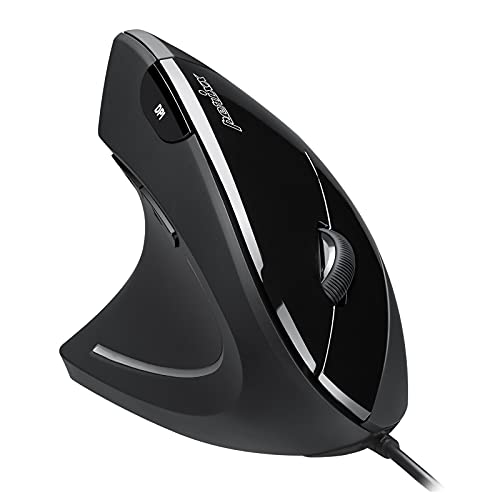
Designed for left-handed users, this wired vertical ergonomic mouse aims to fit the natural palm and wrist position. It provides two DPI levels (1000/1600) and six buttons for efficient control. Best for left-handed RSI users who need a straightforward wired option. Caution: Wired design limits mobility compared to wireless alternatives.
- Left-handed ergonomic design
- Two DPI levels for sensitivity control
- Wired reliability with six buttons
Buying Guide
Key purchase considerations help compare features across models and match choices to RSI-related needs.
Why Choose An Ergonomic, Vertical Mouse?
Vertical mice reduce forearm twisting and promote a more natural arm alignment. This can minimize repetitive strain and fatigue during long work sessions. Consider the angle, grip comfort, and whether you prefer wired or wireless for your setup.
What Features Matter Most for RSI?
- Neutral wrist posture: Look for a natural handshake position or vertical orientation
- Thumb rest and button layout: Comfortable reach reduces strain
- Connectivity: Bluetooth, USB receiver, or wired depending on device ecosystem
- Adjustable DPI: Enables precise control on different surfaces
- Quiet operation: Silent clicks can aid focus in quiet environments
Wired vs Wireless: Which Is Safer for RSI?
Wireless eliminates cable drag and keeps the desk tidy, which can reduce micro-movements that contribute to strain. Wired mice provide uninterrupted connection and may be preferred for high-precision tasks or gaming. Choose based on your workspace and latency tolerance.
How to Adapt to a New Ergonomic Mouse
Allow 1–2 weeks for your muscles to adapt to a new posture. Start with shorter sessions and gradually increase. Position the forearm and wrist so the hand rests naturally, with the elbow close to the body and the palm a slight arc away from the keyboard.
FAQ
- Q: Are vertical mice better for RSI than standard mice? A: Yes, they encourage a more neutral wrist and forearm posture, which can reduce repetitive strain during long use.
- Q: Can I use a vertical mouse with multiple devices? A: Some models, like ProtoArc EM11 NL, support multi-device connections via Bluetooth and USB receivers.
- Q: Do all RSI-focused mice have silent buttons? A: Not always; some offer silent left/right clicks, while others may have audible clicks.
- Q: Is a left-handed model necessary for RSI relief? A: Not for everyone, but handedness-aware designs can improve comfort for left-handed users, such as the Perimice-513L.
- Q: How long does it take to adapt to a new ergonomic mouse? A: Most users adapt within 1–2 weeks with consistent use.