Answering the question of the best monitors for coding, this guide compares five computer displays tailored to developers and programmers. Each pick emphasizes readability, eye comfort, and reliable color accuracy for long coding marathons. The list targets developers, data scientists, and IT pros who spend hours at a desk and need stable text rendering, reduced eye strain, and practical features like USB-C, KVM, and coding modes. Below you’ll find a quick product snapshot, followed by in-depth sections to help you choose confidently.
Summary table of selected products:
- BenQ RD280U 28.2” 4K 3:2 Programming Monitor
- BenQ GW2486TC 24″ 1080p Coding Monitor with USB-C
- BenQ GW2786TC 27″ 1080p Coding Monitor
- BenQ RD280UG 28.2″ 4K+ 3:2 Programming Monitor
- ASUS ProArt PA278QV 27″ 1440p Professional Monitor
BenQ RD280U 28.2” 4K 3:2 Coding Monitor

The BenQ RD280U is a 28.2-inch 4K monitor with a 3:2 aspect ratio, designed for developers who code for long hours. Its Nano Matte panel reduces glare and reflections, helping text stay crisp during focused sessions. It also includes MoonHalo backlighting to offer a comfortable ambient glow that minimizes eye strain. Ideal for programmers who want large, high-resolution code windows and distinct text rendering for multiple code files side by side.
Best for: Developers who need a high-resolution workspace with minimal glare and specialized coding modes. It suits programmers who frequently open multiple terminals or editors simultaneously. Caution: 4K text at 28 inches can appear very small for some users; consider font scaling or OS zoom settings.
Key features alignment:
- Nano Matte panel for reduced glare
- Advanced coding modes and MoonHalo backlight
- 90W USB-C with KVM support
Dell S3425DW 34” WQHD VA Monitor

While primarily a wide-screen option, the Dell S3425DW offers a large canvas and high refresh for coding on dual-monitor setups or for developers who prefer expansive layouts. It includes ComfortView Plus to limit blue light and 120Hz for fluid scrolling, useful when reviewing large codebases or testing UI changes. Best for: Developers who want a broad, immersive display and fast refresh for multitasking. Caution: Looks and text scaling may differ from standard 16:9 coding setups; ensure compatibility with your IDE and window layout.
Philips 24” FHD VA Monitor 100Hz

The Philips 241V8LB delivers crisp Full HD visuals with a VA panel for contrast. Its wide viewing angles help keep color consistency when you move between different coding windows or collaborators’ screens. Best for: Budget-conscious coders who want reliable color and a solid 178-degree viewing angle. Caution: Full HD resolution can be less ideal for dense text versus higher-res panels.
BenQ GW2486TC Office USB Hub Monitor 24″
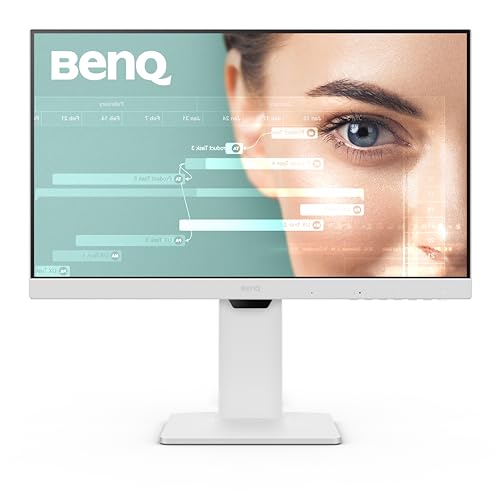
The GW2486TC focuses on office ergonomics with Eye-Care tech, adaptive brightness, and a built-in USB-C hub. It’s a practical choice for developers who want a compact 24-inch screen with comfortable viewing and easy cable management. Best for: Coders who need integrated USB-C connectivity and a compact desk footprint. Caution: 1080p resolution may feel limiting for very dense code or multimonitor setups requiring more vertical space.
BenQ GW2786TC Office USB Hub Monitor 27″ 1080p

This 27-inch BenQ GW2786TC pairs a large 1080p panel with USB-C connectivity and a built-in microphone for calls. It includes coding-focused features and adaptive brightness for long sessions. Best for: Coders who want a larger screen than 24 inches with USB-C. Caution: 1080p on 27 inches may appear less sharp than higher-resolution options for some users.
BenQ RD280UG 28.2” 4K+ 3:2 Coding Monitor

The RD280UG offers a 4K+ resolution with a 3:2 aspect ratio and MoonHalo backlight for coding comfort. Its Nano Matte panel reduces glare and supports crisp text rendering, while coding-specific modes optimize readability. Best for: Developers who want maximum vertical space and extremely clear text for large codebases. Caution: Higher pixel density might require font scaling adjustments to maintain readable code sizes.
ASUS ProArt PA278QV 27″ 1440p

The ASUS ProArt PA278QV provides a 27-inch 1440p IPS panel with Calman Verified color accuracy, ideal for developers who also work with design or documentation that requires precise color. It delivers 100% sRGB and Rec. 709 coverage for consistent visuals across workflows. Best for: Coders who value color fidelity for apps and UI design tasks. Caution: Slightly lower pixel density compared to 4K options, which might affect ultra-dense text readability for some users.
Buying Guide: What To Consider When Choosing A Coding Monitor
- Panel technology and glare control: Nano Matte or anti-glare panels reduce eye strain during long sessions.
- Resolution and aspect ratio: 4K or 4K+ with 3:2 can improve reading comfort; 27″ to 34″ sizes work well for side-by-side code windows.
- Color accuracy and viewing angles: IPS panels offer wide angles; VA panels provide strong contrast for dark UI themes.
- Ergonomics: Height adjustability, tilt, swivel, and pivot help align the monitor to your seating position.
- Connectivity: USB-C with power delivery simplifies desk setup; KVM helps switch between devices without extra cables.
- Coding features: Dedicated coding modes, backlight tuning, and low-glare engineering can enhance readability.
- Desk space and budget: Consider whether you need a compact 24″ model or a larger 27″-34″ monitor for multitasking.
Frequently Asked Questions
- What makes a monitor good for coding?
- Is 4K overkill for coding?
- Is USB-C important for a coding setup?
- What about eye care features?
- Should I prefer coding-specific monitors?
- How important is refresh rate for coding?
Key factors include text readability, low-glare surfaces, comfortable brightness levels, and options for large or dual document windows. A 3:2 or 16:9 aspect with high pixel density helps keep code readable at standard font sizes.
Not for many developers. A higher resolution can fit more code on screen and reduces scrolling. It may require font scaling adjustments to keep text legible at a comfortable size.
USB-C with power delivery simplifies cables and lets you drive a monitor from a laptop charging port, which is convenient for compact workstations.
Look for low blue light modes, flicker-free panels, and adaptive brightness. These features reduce eye strain during long sessions.
Coding-specific monitors offer features like coding modes and MoonHalo backlights that emphasize code readability and reduced glare, though many general-purpose monitors can perform very well with proper settings.
A higher refresh rate mainly benefits scrolling and motion clarity. For static code, the difference is less critical, but 60–120 Hz can still improve general usability during editing and navigation.