Answering the demand for all-in-one video meeting setups, these monitors come with integrated webcams, mics, or both. They’re ideal for remote workers, students, and teams that want a single-screen solution for video conferencing. The selections below emphasize built-in webcam quality, display size, and connectivity. This guide highlights who each model suits best and where to choose one over another.
| Product | Why It’s a Fit | Best For |
|---|---|---|
| ASUS BE24EQK 24″ | Integrated 2MP webcam, mic array, stereo speakers | Remote workers needing quick setup |
| ASUS BE279QSK 27″ | Full HD webcam, multiple inputs, frameless IPS | Online learners and small teams |
| Philips 34E1C5600HE 34″ | UltraWide with Windows Hello webcam | Productivity with immersive workflows |
| CUNPU 24″ | Pop-up 5MP 2K webcam, privacy shield | Security-conscious remote work |
| ViewSonic VG2441V 24″ | 5MP camera, privacy shutter, Windows Hello | Professional video calls and secure login |
ASUS BE24EQK 24 Inch 1080P Monitor With WebCam

The ASUS BE24EQK combines a 24-inch Full HD IPS display with an integrated 2MP webcam, mic array, and stereo speakers. It’s designed for telecommuting and online learning, enabling confident video conferences without extra peripherals. The frameless IPS panel offers wide viewing angles and stable brightness for clear on-screen collaboration. This model is best for buyers who want a compact, all-in-one conferencing setup on a 24-inch screen.
Best for: Individuals who value an integrated webcam and speakers in a space-saving package.
Caution: The webcam resolution is 2MP; users seeking higher-resolution conferencing may prefer higher-end models.
ASUS BE279QSK 27 Inch 1080P FHD Monitor With Webcam

The ASUS BE279QSK provides a larger 27-inch Full HD display, integrated webcam, mic array, and stereo speakers. It also offers a flexible connectivity set, including DisplayPort, HDMI, D-sub, USB upstream for the webcam, and audio in/out. This model is well-suited for home offices or classrooms that need a bigger screen with built-in video conferencing tools.
Best for: Users who want a bigger workspace and a dedicated webcam setup without external devices.
Caution: While the webcam is handy, those needing 4K or higher refresh rates may look elsewhere for enhanced video quality.
Philips 34E1C5600HE UltraWide With Built-In Webcam

The Philips 34E1C5600HE offers a 34-inch UltraWide QHD display with a built-in Windows Hello webcam and noise-canceling microphone. Its curved VA panel enhances immersion and can reduce eye strain during long sessions. The wide color gamut and tall productivity real estate support multi-application workflows, making it ideal for professionals who juggle multiple documents and video calls on a single screen.
Best for: Users who want expansive screen real estate and integrated biometrics for quick, secure sign-ins.
Caution: UltraWide resolution and curve may require more desk space and PC power for peak performance.
CUNPU 24 Inch Monitor With Pop-up 5MP Webcam
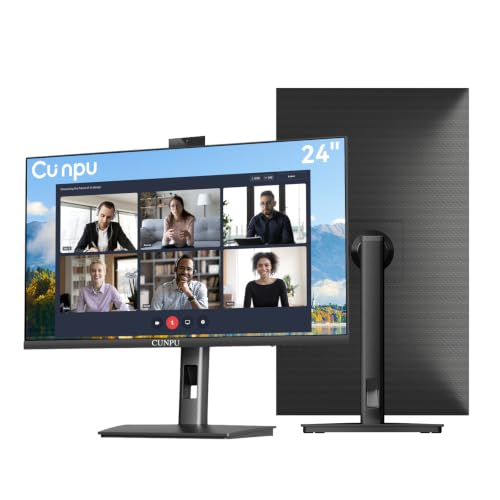
The CUNPU 24-inch monitor integrates a pop-up 5MP webcam, dual-channel mic, and built-in speakers. A 120Hz refresh rate over HDMI and 75Hz over VGA support smoother visuals for meetings and lectures. The privacy-shutter design adds a layer of security when the webcam is not in use. This model focuses on secure, all-in-one conferencing while maintaining solid color and viewing angles via an IPS panel.
Best for: Buyers prioritizing a privacy-conscious, all-in-one conferencing setup with higher frame-rate needs on HDMI.
Caution: The 5MP webcam may not match dedicated high-end webcams for professional broadcasts.
ViewSonic VG2441V 24 Inch Webcam Monitor

The ViewSonic VG2441V is a 24-inch 1080p monitor designed for professional conferencing with a built-in 5MP camera, microphone, and speakers. It includes Windows Hello integration for secure sign-in and a privacy shutter for camera control. The 120Hz refresh rate can enhance fluidity on video calls and multitasking. This model emphasizes security and reliable video collaboration in shared spaces.
Best for: Enterprises or home offices that require a secure, quickly deployable video conferencing monitor with integrated hardware for meetings.
Caution: The integrated system may be less flexible for users who want modular upgrades to webcam or mic quality over time.
Buying Guide
What should you look for when selecting a monitor with a webcam?
- Webcam quality: Consider megapixels and if the camera supports auto-focus, privacy shields, and Windows Hello integration.
- Display size and panel: 24″ to 27″ are common sweet spots for desk setups; IPS panels provide better color and viewing angles.
- Audio features: Built-in speakers and noise-canceling mics reduce the need for external accessories in small spaces.
- Connectivity: Look for HDMI, DisplayPort, USB upstream for webcam integration, and audio in/out for flexibility.
- Privacy controls: Pop-up cameras or physical shutters help protect privacy when not in use.
- Desk footprint: UltraWide models offer extra screen real estate but require more desk depth and GPU power for full resolution workloads.
- Intended use: Remote work, online learning, or frequent video calls; align the model with your primary tasks.
Frequently Asked Questions
- What is the advantage of a monitor with a built-in webcam?
- Is an UltraWide monitor worth it for video conferencing?
- Do built-in webcams offer good security?
- Which size is best for home offices?
- Can I upgrade the webcam later?
- Are these monitors suitable for online learning and meetings?
A built-in webcam reduces clutter and simplifies setup for video calls, while often including an integrated microphone and speakers for convenience.
UltraWide monitors increase multi-document productivity, but they require more desk space and can be overkill if your main use is video calls in a standard window size.
Many built-in webcams include privacy shutters and Windows Hello support for secure logins, but you may still want to disable or physically cover cameras when not in use.
24″ to 27″ is typically ideal for most desks, offering a balance of readability and fit without overwhelming the workspace.
In most cases, yes, but the monitor’s USB and video pipeline might limit the webcam’s performance if the model relies on integrated hardware with fixed outputs.
Yes. The integrated webcam, mic, and speakers support most teleconferencing platforms, reducing the need for additional peripherals in many scenarios.