The best Mini ITX motherboards balance compact size with solid power delivery, good I/O, and future-ready features. This guide focuses on compact boards that suit small form factor builds for both AMD and Intel platforms. Each product is selected for buyers seeking compact builds, quiet desktops, or home theater PCs. The top picks cover gaming, content creation, and everyday computing needs. The buyer table below highlights core specs to compare quickly.
| Product | |||
|---|---|---|---|
| Gigabyte A520I AC | AM4 | DDR4, 2 DIMMs | Direct 6 Phases Digital PWM, 55A DrMOS, Gaming GbE, Intel WiFi+BT, NVMe PCIe 3.0 x4 M.2 |
| ASRock A520M-ITX/AC | AM4 | DDR4 | 3rd Gen Ryzen support, PCIe 3.0 x16, DDR4 OC up to 4733+, compact Mini ITX |
| GIGABYTE X870I AORUS PRO ICE | AM5 | DDR5 | PCIe 5.0, 2 x M.2, WIFI7, 2.5GbE, 8+2+1 power design |
| ASUS PRIME H610I-PLUS D4 | LGA 1700 | DDR4 | PCIe 4.0, USB 3.2 Gen 1, M.2 Key E (Wi‑Fi), VRM and PCH cooling |
Gigabyte A520I AC Mini ITX Motherboard
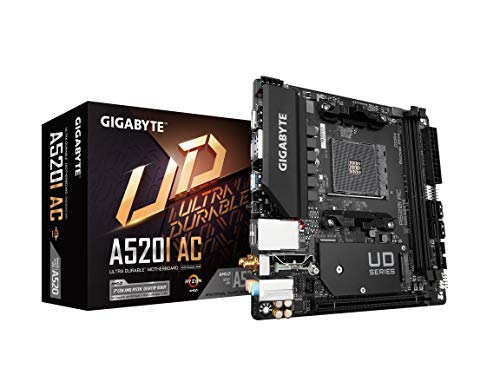
This motherboard targets compact builds using 3rd Gen AMD Ryzen CPUs. It features a 6-phase digital PWM VRM solution with 55A DrMOS for efficient power delivery to the CPU and memory. It includes dual networking options (Gaming GbE LAN and Intel WiFi+Bluetooth) and an NVMe PCIe 3.0 x4 M.2 slot for fast storage. Best for: small gaming or HTPC builds on AM4 platforms.
Caution: Limited PCIe expansion due to Mini ITX form factor; future upgrades rely on AM4 compatibility only.
ASRock A520M-ITX/AC Mini ITX Board

This Mini ITX board supports 3rd Gen AMD AM4 Ryzen processors with DDR4 memory and PCIe 3.0 x16. It’s designed for compact builds and offers DDR4 memory overclocking up to higher speeds (OC). Best for: budget-friendly Ryzen small form factor builds with a focus on upgradability within AM4.
Caution: DDR4 overclocking potential may be more modest on limited VRM designs inherent to small boards.
GIGABYTE X870I AORUS PRO ICE Mini ITX

Designed for high-end Mini ITX builds, this board uses AMD Socket AM5 and DDR5 memory. It supports PCIe 5.0, two M.2 slots, and Wi-Fi 7 with robust 2.5GbE LAN. Best for: small form-factor systems that demand top-tier performance and future-proofing for AMD Ryzen 7000/8000/9000 series.
Limitation: Higher power design and premium features come with a steeper price for compact builds.
ASUS PRIME H610I-PLUS D4 Mini ITX

With an LGA 1700 socket, this Mini ITX motherboard supports 12th Gen Intel processors and features PCIe 4.0, USB 3.2 Gen 1, and a V-M.2 Key E slot for wireless adapters. Best for: compact Intel builds that require modern PCIe and flexible connectivity without extraneous features.
Caution: DDR4 support may limit future memory bandwidth on newer CPU generations; verify memory compatibility for your chosen CPU.
Buying Guide
What does Mini ITX really offer?
Mini ITX boards maximize space efficiency for small form factor PCs. They typically provide essential PCIe slots, RAM, storage, and connectivity without the bulk of larger motherboards. Consider your case size, cooling, and upgrade plans when choosing.
Which CPU socket should I pick?
Choose based on your processor: AMD AM4 for Ryzen 1000–5000 series compatibility, AM5 for newer Ryzen generations, and LGA 1700 for Intel 12th/13th Gen CPUs. Cross-check motherboard CPU support lists to avoid compatibility issues.
RAM and PCIe considerations
Most Mini ITX boards support up to 2 DIMMs, often with DDR4 or DDR5. PCIe x16 is standard for GPUs, with NVMe M.2 slots for fast storage. If you plan heavy gaming or content creation, ensure the board has at least one PCIe 4.0/5.0 slot and adequate VRM cooling for sustained loads.
Connectivity and expandability
Look for integrated Wi-Fi (and Bluetooth) if you don’t want a separate card. Consider dual LAN options, USB-C, and enough rear I/O for your peripherals. For future-proofing, boards with PCIe 5.0, multiple M.2 slots, and robust Wi-Fi standards are advantageous.
BIOS and firmware
A user-friendly BIOS with clear overclocking controls helps beginners and enthusiasts alike. If you plan to enable RAM overclocking or CPU enhancements, verify vendor support and BIOS update history.
Choosing between AMD vs Intel Mini ITX
AMD boards (AM4/AM5) typically emphasize PCIe NVMe storage and good power delivery in compact formats. Intel boards (LGA 1700) often provide strong connectivity and PCIe 4.0/5.0 options. Your choice should align with the processor you intend to use and your desired feature set in a small build.
FAQ
- What is the main advantage of a Mini ITX motherboard?
It enables compact builds that fit in small desks or entertainment centers without sacrificing essential features. - Can Mini ITX boards support high-end GPUs?
Yes, but check the PCIe slot spacing and GPU length in your case to avoid clearance issues. - Do all Mini ITX boards come with Wi-Fi?
Not always. Some models include Wi-Fi/Bluetooth, while others require a PCIe wireless card or USB dongle. - Is DDR5 worth it on a Mini ITX board?
If you plan to upgrade soon or want the latest memory bandwidth, DDR5 offers advantages; ensure your CPU and board support it. - How important is VRM cooling on compact boards?
Very important for sustained workloads; limited space can raise temperatures, affecting performance and longevity.