Finding a reliable mid range laptop means balancing price, processing power, and practical features. This guide highlights five solid choices suited for students, remote workers, and general multitaskers who need full–day battery life, responsive performance, and comfortable screen quality. Below, each model is evaluated for who it’s best for, with concise pros and a practical limitation to consider.
| Product | Best For | Key Benefit |
|---|---|---|
| HP OmniBook 3 17.3″ | Students and home offices | Large screen, solid battery life |
| NIMO 15.6″ Gaming Laptop (Ryzen 5) | Casual gamers and creators | Strong CPU/RAM for multitasking |
| Dell 15.6″ Ryzen 5 7520U | Everyday productivity | Balanced performance and comfort |
| Lenovo IdeaPad Slim 3X | Mobile professionals with AI features | All‑day battery, privacy tools |
| NIAKUN 15.6″ Pro‑level model | Budget conscience with longevity | Long warranty and solid basics |
HP OmniBook 3 17.3″ FHD Laptop Review

The HP OmniBook 3 delivers a 17.3 inch FHD IPS display with 178-degree viewing angles, designed for comfort during long study sessions or content creation. The machine is powered by an AMD Ryzen 3 30-series processor, paired with 8 GB of RAM and a 512 GB SSD. It is a sensible pick for students and home workers who favor a large screen for readability and task switching. Battery life is described as up to 14 hours and 15 minutes, with HP Fast Charge supporting 0 to 50% in about 45 minutes, making it practical for days on the go. Best for users who prioritize a spacious display and steady everyday performance.
Who it’s best for: Students, remote workers, or casual multi‑taskers who want a larger screen and dependable endurance without spending premium prices.
Why chosen: It combines a comfortable display with adequate power for daily tasks, plus practical battery management for longer sessions away from outlets. A possible limitation is the Ryzen 3 option may feel constrained for heavy editing or gaming beyond casual use.
NIMO 15.6″ IPS FHD Light Gaming Laptop

This NIMO model centers on performance with an AMD Ryzen 5 6600H and 16 GB DDR5 RAM, well suited for multitasking, light gaming, and content work. The 15.6‑inch display and a Radeon 660M GPU provide smoother visuals than basic laptops in this tier. It offers future expansion by design, including easy RAM and SSD upgrades, and a fingerprint sensor for quick logins. This is a strong pick for users who want a budget-conscious machine that remains upgrade-friendly. A potential limitation is that storage starts at 256 GB in this variant, which may require careful file management or an external solution for large media libraries.
Who it’s best for: Casual gamers, students, and professionals who expect solid multitasking and easy future upgrades without a premium price.
Why chosen: The Ryzen 5 6600H and 16 GB RAM deliver responsive performance for everyday tasks and some GPU‑accelerated work, while the upgrade path adds long‑term value. Avoid this if you need maximum storage right out of the box without adding external drives.
Dell 15.6″ Ryzen 5 7520U Laptop

This Dell notebook emphasizes an approachable blend of efficiency and everyday productivity. The Ryzen 5 7520U and Radeon 610M integrated graphics provide reliable performance for tasks like document work, video calls, and light photo editing. The design focuses on comfortable typing and practical connectivity, including essential I/O options for business use. Best for general office duties or students who need dependable daily performance without premium features. A caution is that gaming or heavy rendering may run slower compared to higher‑tier processors.
Who it’s best for: Professionals and students who want a straightforward, reliable Windows 11 Home laptop for school and work tasks.
Lenovo IdeaPad Slim 3X 2026

The Lenovo IdeaPad Slim 3X focuses on mobility and all‑day use. It features a 15.3 inch WUXGA display, 16 GB of memory, and a 512 GB storage option, all housed in a metal chassis. This model emphasizes privacy with a physical webcam shutter and a fingerprint reader for easier secure logins, alongside an AI‑specialized platform touted as a smart choice for mobile work and light content creation. Best for buyers who value privacy features and a brighter display in a portable chassis. The trade‑off can be that higher‑end gaming or heavy multitasking may require a more powerful processor.
Who it’s best for: Mobile professionals and students who want extended battery life and built‑in privacy controls.
NIAKUN 15.6″ Windows 11 Pro Laptop
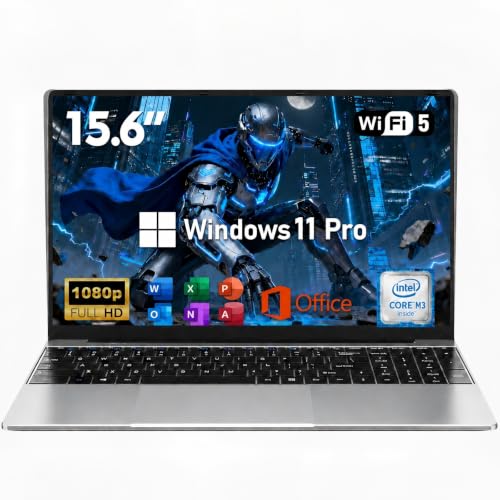
The NIAKUN model targets budget‑conscious buyers seeking Windows 11 Pro features at a reasonable price. It offers 16 GB RAM and a 256 GB SSD in a slim 0.77-inch chassis, with a 15.6 inch FHD display, a 2‑year warranty, and a generous return window. It suits students or professionals who need a basic but capable machine with enhanced warranty coverage. A potential limitation is more modest internal storage, so plan for cloud or external storage if needed.
Who it’s best for: Budget‑minded buyers who still want a pro‑level OS and solid warranty coverage for work or school tasks.
Buying Guide
What to consider when choosing a mid range laptop:
- Display size and quality: Larger screens are easier for productivity and content, but may reduce portability.
- Processor and RAM: For everyday tasks, a Ryzen 5 or comparable CPU with 8–16 GB RAM supports multitasking and light editing.
- Storage: 512 GB SSD balances speed and capacity; add external storage if needed.
- Battery life: Look for models with long endurance if you travel or work remotely away from outlets.
- Graphics: Integrated graphics are sufficient for most tasks; dedicated or higher‑tier GPUs help with light gaming and creative work.
- Privacy and security: Features like webcam shutters and fingerprint readers enhance security for work and school use.
- Upgrade path: Some models allow RAM/SSD upgrades, extending usable life and performance over time.
Frequently Asked Questions
- What is considered a mid range laptop? – Typically models priced between entry‑level and premium, with balanced CPU, RAM, storage, and display features suitable for everyday tasks and moderate multitasking.
- Is 8 GB RAM enough for general use? – Yes for most daily tasks; 16 GB is preferable for heavier multitasking, photo editing, or light video editing.
- Should I prioritize display size over weight? – If you do a lot of reading or content creation, a larger display aids productivity; if you travel often, a lighter chassis may matter more.
- Are upgrade options important? – Upgradability adds longevity and value, especially for RAM and storage as needs grow.
- Is Windows 11 Pro necessary? – Pro editions add advanced features for business use; Windows 11 Home covers standard daily tasks well.
- What about battery life? – Look for laptops rated for all‑day use if you work remotely or commute frequently.