Looking for reliable micro SD cards that deliver solid read speeds, good capacity, and compatibility across Android devices, cameras, and laptops? This guide highlights five solid choices and explains who they’re best for, along with practical buying tips. Each option is suited for different use cases—from high-speed apps and 4K video bursts to everyday storage expansion.
Overview of top picks:
| Product | Best For | Key Benefit |
|---|---|---|
| SanDisk 128GB Ultra microSD Card + Adapter | Android phones, tablets, cameras | Up to 195 MB/s read speeds |
| Amazon Basics 128GB microSDXC | Budget-friendly, reliable performance | Solid real-world capacity with U3 and A2 features |
| SanDisk 64GB Ultra microSD Card + Adapter | Compact storage need, everyday use | Fast transfer speeds and broad compatibility |
| SanDisk 128GB Extreme microSD Card + Adapter | 4K/RAW video, high-demand apps | Very high read speeds up to 245 MB/s |
| Lexar E-Series 32GB microSDHC | Security cams, dash cams, older devices | UHS-I with dependable performance |
SanDisk 128GB Ultra microSD Card + Adapter

Best for high-capacity, everyday Android use and portable media libraries. This card supports up to 1.5TB capacities in the family and can store hours of Full HD video, music, games, and photos. When paired with the SanDisk QuickFlow USB-A reader, users can reach up to 195 MB/s read speeds, which speeds up offloading files. Best for: Android devices, digital cameras, and laptops seeking fast transfers and large storage.
Limitation: performance is most beneficial in devices that support UHS-I; real-world speeds may vary by host device and formatting.
Why selected
- High capacity line with future-friendly expansion.
- Strong read speeds at up to 195 MB/s for quick data transfer.
- Widely compatible with many creators’ gear and mobile devices.
Amazon Basics microSDXC Memory Card

Best for budget-conscious buyers who still need reliable storage with U3, A2 class features, and full-size adapter compatibility. This card is designed for broad device support, including Nintendo Switch (not specific to newer models) and various Android devices. It emphasizes real-world capacity and steady performance for high-bitrate video and burst photography. Best for: everyday storage, entry-level cameras, and tablets where price per gigabyte matters.
Limitation: device compatibility and maximum capacity should be verified on your specific model; actual usable space can vary due to formatting.
Why selected
- Cost-effective option with dependable UHS-I performance.
- Includes full-size adapter for compatibility with standard readers.
- Good balance of capacity, speed, and everyday reliability.
SanDisk 64GB Ultra microSD Card + Adapter

Best for compact storage upgrades when budget or space is a priority. This card mirrors the same Ultra family advantages, with up to 1.5TB family expansion and fast transfer speeds using the included adapter. It suits devices needing a reliable microSD solution for cameras, phones, and portable gaming. Best for: small devices with limited storage, budget-conscious photographers, and travelers who need reliable scratch space.
Limitation: lower capacity means less long-term storage for large media libraries; consider higher-capacity models if you frequently shoot 4K video.
Why selected
- Compact capacity suitable for everyday use and lighter projects.
- Same fast transfer ecosystem as higher-capacity siblings.
- Solid reliability for standard Full HD recording and photography.
SanDisk 128GB Ultra microSDXC UHS-I

Best for users who need a reliable 128GB option with solid transfer speeds for Android devices, Chromebooks, and Windows laptops. This card offers up to 140 MB/s transfer speeds and is optimized for 4K and Full HD playback. Best for: everyday shooters and mobile workers who want dependable performance without overspending.
Limitation: may not deliver the absolute fastest speeds for the most demanding 4K workflows compared with premium Extreme lines.
Why selected
- Balanced speed and price point for broad use cases.
- UHS-I performance suitable for smooth app loading and media transfers.
- Widely compatible with a broad set of devices.
Lexar E-Series 32GB Micro SD Card
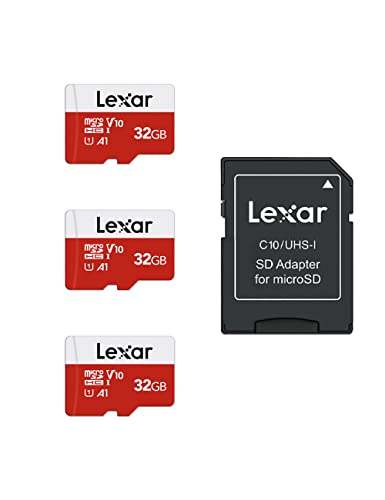
Best for budget-oriented setups like security cameras, dash cams, and older devices requiring dependable UHS-I performance. The Lexar E-Series card provides up to 100 MB/s transfer speeds and A1-rated app performance, helping with quick app launches and responsive media handling on supported devices. Best for: security and dash cams, or devices that don’t need the highest-speed cards.
Caution: actual speeds vary with device compatibility and usage scenarios; lower-capacity cards may fill quickly with large media libraries.
Why selected
- Low-cost option that still delivers reliable UHS-I performance.
- A1-rated for smoother app operations on capable devices.
- Useful for security cameras and dash cams where capacity is less critical than reliability.
Buying Guide: Micro SD Card Essentials
What to consider when choosing a micro SD card for your devices:
- Capacity: Choose based on your media needs. 32GB–128GB covers many users, while 256GB–1TB suits expansive media libraries and longer videos.
- Speed class: Look for UHS-I Speed Class (U3) for 4K and high-bitrate video; A1/A2 ratings improve app performance on mobile devices.
- Device compatibility: Verify your device’s maximum supported capacity and whether it benefits from higher speeds.
- Adapter inclusion: Cards with adapters are convenient for use in cameras and laptops that require a standard SD slot.
- Durability and reliability: For travel or extreme environments, consider cards designed for durability and consistent performance.
- Price per gigabyte: Higher capacity cards often reduce cost per gigabyte; compare total value rather than just price.
Frequently Asked Questions
- What is the difference between UHS-I and UHS-II?
Answer: UHS-I offers speeds up to about 104–195 MB/s typical for consumer devices, while UHS-II uses a second row of pins to reach higher speeds in compatible devices. - Do micro SD cards work in all phones?
Answer: Most Android phones accept micro SD cards, but some recent devices have removed micro SD expansion. Check your model’s specs. - Is 128GB enough for 4K video?
Answer: It depends on the recording duration and bitrate; 4K video uses significant space, so higher capacities (256GB–1TB) are often preferable for long shoots. - Should I use an SD adapter?
Answer: If your device lacks a micro SD slot, an adapter enables compatibility with SD card readers and cameras that require standard SD. - What about fake cards?
Answer: Buy from reputable sellers and verify card capacity and performance with a reliable testing tool after purchase. - Do high-speed cards matter for everyday photography?
Answer: For burst shooting and 4K video, faster cards reduce wait times; for simple photo capture, lower speeds may be sufficient.