Looking for a mechanical keyboard that performs well with macOS and feels great to type on? This guide highlights five Mac-friendly options, chosen for compatibility, layout, and ease of use. Each product is described with who it’s best for, plus practical considerations like layout, connectivity, and keycap compatibility. Whether you’re a writer, programmer, or gamer who uses a Mac, these choices balance Mac-ready features with mechanical precision.
| Product | Best For | Key Highlights |
|---|---|---|
| Keychron C2 Full Size | Mac users needing full-size, Mac-friendly keys | 104-key layout, Mac-optimized, USB-C, incl. Mac/Windows keycaps |
| AULA 99 Key Purple Keyboard | Compact versatility with multi-device use | 96% layout, Bluetooth 5.0 and 2.4G, USB-C wired, macro capable |
| Logitech MX Mechanical | Quiet, low-profile mechanical typing | Tactile switch, backlighting, ergonomic feel |
| Keychron K3 Version 2 | Ultra-portable Mac-focused wireless | 75% layout, Mac keys, multi-device Bluetooth 5.1 |
| Logitech Alto Keys K98M | Gasket-like feel with white backlight | Gasket-inspired, hot-swappable switches, compact |
The following sections present five carefully chosen options. Each entry notes who the product is best for and why it was selected, plus one practical caution. Use this to compare layout, connectivity, and Mac compatibility at a glance.
Keychron C2 Full Size Wired Mechanical Keyboard

The Keychron C2 is a full-size wired keyboard designed to maximize productivity on Mac and Windows. It uses a 104-key layout with a dedicated Mac-optimized setup and included Mac/Windows keycaps. The USB-C connection with a braided cable provides reliable power for daily typing and light gaming. The angled bottom frame and two-height feet (6° and 9°) improve typing comfort. Best for Mac users who want a traditional full-size feel with easy keycap swaps for Mac-specific keys. Caution: Num Lock works with Windows only, which may affect some users switching between OS prompts.
AULA 99 Key Purple Keyboard
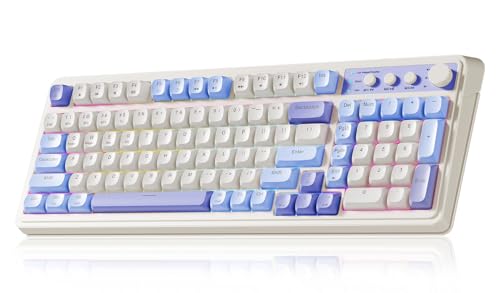
The AULA 99 Keys Purple Keyboard is a versatile multi-device wireless keyboard with a compact 96% layout and a built-in numeric keypad. It supports Bluetooth 5.0, 2.4GHz wireless, and USB-C wired modes, making it easy to switch between devices. It includes a dual-mode rotary knob for quick volume, lighting, and other controls. Best for users who want macro capability and flexible connectivity across Mac, PC, and mobile devices. Choose this if you value a colorful aesthetic and compact footprint. Caution: The compact 96% layout may reduce desktop space for some users who prefer a dedicated full-height keypad.
Logitech MX Mechanical Wireless Illuminated Keyboard

The Logitech MX Mechanical offers tactile, quiet mechanical switches and low-profile keys for comfort. It features smart illumination that responds as hands approach and adjusts to lighting conditions. The full-size form factor supports extensive typing sessions and productivity tasks. Best for Mac users seeking a subtle tactile feel with responsive backlighting and a more ergonomic experience. Caution: Backlighting is adaptive, which may be less predictable in bright environments.
Keychron K3 Version 2 QMK 75% Keyboard

The Keychron K3 Version 2 is a compact 75% wireless keyboard built for high productivity and a tactile typing experience. It supports multi-device connections via Bluetooth 5.1 and can pair with up to three devices. It includes a Mac-friendly layout with necessary multimedia keys, plus extra Mac/Windows keycaps. Best for Mac users who want a portable, flexible keyboard for travel or compact desks. Caution: Smaller layout may require more function-key reliance for some macOS shortcuts.
Logitech Alto Keys K98M Wireless Mechanical

The Logitech Alto Keys K98M combines a gasket-inspired design with hot-swappable Marble switches and white backlighting. This 98-key compact layout preserves a number pad while keeping a small footprint. Best for users who want a premium typing feel with a lighter gasket-like vibration dampening, suitable for long typing sessions. Caution: The 98-key 1800-style layout may take time to adapt for users accustomed to full-size boards.
Buying Guide
Key purchase considerations help you choose the right Mac-friendly mechanical keyboard. Below are practical questions and answers to guide your decision.
- What layout fits my space and workflow? Consider full-size for number pads, 75% or 96% for desk space, or 60% for portability. Mac users often prefer Mac-ready key layouts and included Mac/Windows keycaps.
- Do I need wireless compatibility across devices? If you multitask across Mac, Windows, and mobile devices, look for Bluetooth options with multi-device pairing and a stable connection.
- Is backlighting important? For dim workspaces, look at smart backlighting or consistent illumination, but note that some models use adaptive lighting that may vary with environment.
- Are keycaps Mac-friendly? Keycap sets included for Mac and Windows reduce friction when switching between OSes and shortcuts.
- What about typing feel and noise? If you need quiet operation in shared spaces, prioritize tactile switches with lower actuation noise.
- Is firmware support or customization meaningful? Some models offer QMK or web-app customization, enabling per-key macros and Mac-specific mappings.
Frequently Asked Questions
- Do these keyboards work with macOS out of the box? Yes, all listed options provide Mac-optimized layouts or keycap sets intended for macOS.
- Can I use these keyboards with Windows too? Most options include Windows compatibility and optional Mac keycaps for easy switching.
- Are wireless keyboards stable on macOS? Bluetooth 5.x and USB-C wired options provide reliable connectivity, though interference can occur with many devices nearby.
- Do these keyboards require drivers? Typically no driver installation is required; some models support firmware updates or web-app customization for advanced users.
- Which keyboard is best for travel? The compact 75% or 96% layouts balance portability with essential function keys and Mac compatibility.
- What is the best value? Value depends on layout preference and features like macro support, backlighting, and multi-device connectivity; compare these aspects across the five picks.