For readers with low vision or age-related sight changes, the right magnifier can transform daily tasks like reading, labeling, and hobbies. This guide breaks down five top-rated magnifiers, highlighting who they’re best for, what makes them stand out, and practical limits. Use these options to compare features such as light intensity, magnification, and ease of use. The list prioritizes ergonomic designs, long battery life, and readable displays, helping seniors, students, and busy adults select a model that fits their needs.
| Product | Best For | Key Benefit |
|---|---|---|
| JMH Magnifying Glass with Light | Seniors and readers needing portable illumination | 18 LEDs with 3 light modes for night or dark places |
| MagniPros 5X LED Page Magnifier | Elderly and low-vision readers at desks | 4.5″ x 7″ anti-glare lens with up to 500% magnification |
| MoreDisp Digital Magnifier 5 Inch | Users needing digital zoom and color modes | 2X-32X zoom with 26 color modes and autofocus |
| Shelepro Rechargeable 5X Magnifying Glass | Lightweight, rechargeable everyday use | 4.5″ x 7.09″ viewing area with anti-glare lens |
| Soltrex 8″ Electronic Digital Magnifier | High-contrast reading and document viewing | 8″ LCD, 2-99X zoom, multiple display modes |
Below, five detailed product sections compare each model’s strengths, who benefits most, and practical trade-offs. Use this to determine the best fit for reading text, labeling, or hobby activities.
JMH Magnifying Glass With Light
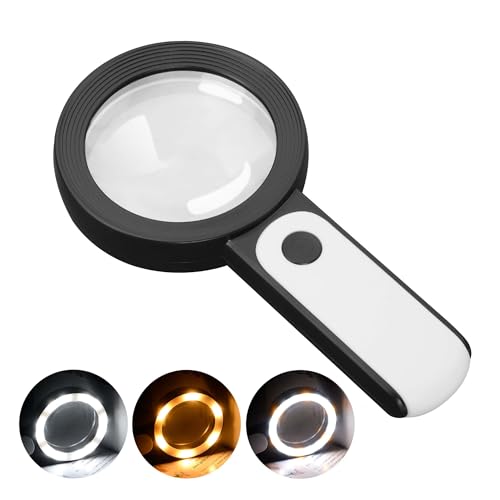
The JMH magnifier features an 18-LED lighting system with three dimmable modes (cold, warm, mixed), designed to reduce eye strain in low-light areas. It provides optical high magnification to aid reading text of varying sizes. The unit is simple to operate with an on/off switch and requires 3 AAA batteries (not included). This model is best for seniors or readers who value a ready-to-use handheld option with variable lighting for night reading or dim rooms. A practical caution: the brightness depends on battery power, so performance may vary as batteries deplete.
Best for: Seniors and readers who need adjustable illumination for reading small print in low light.
MagniPros 5X LED Page Magnifier

MagniPros offers a 5X magnification with a generous 4.5″ x 7″ optical-grade lens and 24 SMD LEDs for even, glare-free illumination. The anti-glare lens helps reduce eye strain during extended reading sessions. It’s ideal for users who need strong magnification at a desk without frequent repositioning. A potential limitation is the heavier feel compared to compact models, which might matter for users with limited hand strength.
Best for: Desk-based readers who want strong magnification and comfortable, long reading sessions.
MoreDisp Digital Magnifier 5 Inch

This 5.0-inch digital magnifier delivers 2X–32X zoom with an HD color LCD screen at 800×480 resolution and a professional image processing DSP. The device supports simple, one-tap operation suitable for the elderly and amblyopic users who prefer straightforward controls. It can connect to a television or computer for larger viewing. Limitations include dependence on a built-in battery and potential USB connectivity requirements for full features.
Best for: Users needing digital magnification with easy controls and screen sharing to larger displays.
Rechargeable 5X Magnifying Glass

This lightweight handheld magnifier emphasizes a large 4.5″ x 7.09″ viewing area with anti-glare Fresnel lenses. It is USB rechargeable, making it convenient for frequent use without frequent battery changes. The ergonomic handle suits seniors with weaker grip strength. Best used for prolonged reading sessions with stable lighting. A caveat: USB charging availability may affect when you can recharge away from power sources.
Best for: Daily readers who want a rechargeable, light handheld option with a large viewing area.
Soltrex 8″ Electronic Digital Magnifier

The Soltrex 8″ digital magnifier combines a large anti-glare display with 2–99X zoom and multiple viewing modes. It supports both far and near tasks, including reading newspapers and identifying small text. The touchscreen interface, 26 display modes, and memory function aim to reduce repetitive setup, aiding long reading sessions. A potential downside is the larger footprint, which may be less convenient for travel or small workspaces.
Best for: Users who benefit from a large display and versatile display modes for reading and document viewing.
Buying Guide
How to choose a magnifier for visual impairment depends on how you intend to use it. Consider these questions:
- What magnification do you need most often? Higher magnification helps with small print, but can reduce field of view and require steadier hands.
- Do you prefer a handheld, stand, or digital model? Handhelds are portable; electronic magnifiers offer larger screens and memory features.
- Is built-in lighting important? LED illumination reduces shadows and improves contrast, but battery life matters for frequent use.
- Will you use it for reading, crafting, or labeling? Choose a model with the right balance of lens size, color modes, and display clarity for tasks you perform regularly.
- How important is battery life and charging convenience? Rechargeable options reduce ongoing costs but need accessible charging.
Practical Comparison At a Glance
- Best for quick, everyday reading: JMH Magnifying Glass With Light
- Best for desk reading with glare-free lens: MagniPros 5X LED Page Magnifier
- Best for digital zoom and color modes: MoreDisp Digital Magnifier 5 Inch
- Best for light, long sessions: Rechargeable 5X Magnifying Glass
- Best for large-screen viewing: Soltrex 8″ Digital Magnifier
FAQ
- Q: Which magnifier is best for macular degeneration patients? A: Models with high magnification and glare-free lenses, such as MagniPros or MoreDisp, tend to help with reading tasks common in macular degeneration.
- Q: Do these devices require a power source? A: Most handheld models use replaceable batteries; several digital models include USB rechargeability or built-in batteries.
- Q: Can I use these for reading and viewing photos? A: Yes; many models support reading text and viewing images, with modes to enhance contrast or color.
- Q: Are larger screens always better? A: Larger screens improve viewing comfort for long sessions but may reduce portability. Choose based on your main use.
- Q: What should I check before buying? A: Magnification range, lens quality, lighting options, weight, grip ergonomics, and whether it fits your typical reading distance.