Looking for a low profile keyboard that combines quiet typing with ergonomic design and smart features? This guide highlights five top options ideal for office setups, students, and home users who want a slim footprint without sacrificing functionality. Each product is selected for its low-profile keys, build quality, and practical perks like macro support, backlighting, or wireless versatility. Read on to see which model best fits your workspace, workflow, and device ecosystem.
| Product | Brand | Key Benefit |
|---|---|---|
| Logitech MX Keys S Wireless Keyboard Low Profile Fluid Precise – Graphite | Logitech | Fluid, laptop-like typing withSmart Actions and adaptive backlighting |
| Arteck 2.4G USB Wireless Keyboard Full Size | Arteck | Ultra-slim, full-size layout with 6-month battery life |
| HP 230 Wireless Keyboard – Low-Profile | HP | Low-profile chiclet keys with integrated number pad and shortcuts |
| Keychron K3 Version 2 QMK 75% Wireless Low-Profile Mechanical Keyboard | Keychron | Ultra-slim 75% layout with multi-device Bluetooth and Mac/Windows compatibility |
| Razer Ornata V3 Gaming Keyboard | Razer | Low-profile keys with mecha-membrane switches for precise keystrokes |
Logitech MX Keys S Wireless Keyboard Low Profile Graphite

Best for: Professionals who value precise, quiet typing and smart shortcuts. The spherically-dished keys deliver a laptop-like feel, and Logi Options+ enables programmable actions to streamline workflows. The backlighting adapts to your environment, helping visibility in varied lighting. Limitation: feature-rich software prerequisites may require occasional updates for full customization.
Arteck 2.4G USB Wireless Keyboard Full Size

Best for: Budget-conscious users needing a full-size, slim option with reliable wireless performance. The nano USB receiver makes setup quick, and the keyboard’s stainless steel frame provides a sturdy feel. Limitation: battery life is strong in general use, but heavy daily backlighting use can shorten it.
Logitech MK470 Slim Wireless Combo

Best for: Windows users who want a compact, quiet keyboard with a matching, precision-focused mouse. The low-profile keys, modern design, and ambidextrous mouse suit shared workstations and small desks. Limitation: preset Windows-centric layout may need adjustments for Mac users.
HP 230 Wireless Keyboard Low-Profile
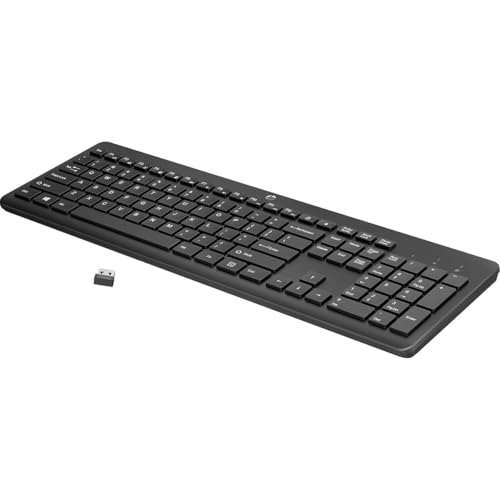
Best for: Office setups that require a quiet, ergonomic typing experience with a numeric keypad. The built-in shortcuts simplify common tasks, and wireless connectivity reduces desk clutter. Limitation: deeper key travel can feel different to users who prefer ultra-flat keys.
Keychron K3 Version 2 QMK 75% Wireless Low-Profile Mechanical Keyboard

Best for: Users who want a compact, highly portable keyboard with mechanical switches and multi-device Bluetooth 5.1 support. It includes Mac-specific keycaps and firmware update options for deeper customization. Limitation: 75% layout means fewer dedicated function keys, which may require habit adaptation.
Razer Ornata V3 Gaming Keyboard

Best for: Gamers and typists who want a tactile switch experience in a low-profile form factor. The mecha-membrane switches provide a satisfying click with lighter actuation. Limitation: not the lightest keyboard for long document work, as switches can require more force than laptop-style membranes.
Buying Guide: Low Profile Keyboard Essentials
- What matters most: key feel, travel, and noise. If you type a lot, consider a model with low-profile, scissor or mechanical switches that fit your preferred touch.
- Work setup: prioritize wireless to reduce desk clutter and multi-device compatibility if you switch between laptop and desktop systems.
- Layout and ergonomics: 75% or 65% layouts save space but may limit function keys. Full-size with number pad benefits numeric-heavy workflows.
- Connectivity: Bluetooth versus USB dongle impacts latency and battery life. Some keyboards offer multi-device pairing for quick device switching.
- Backlighting and smart features: backlit keys aid visibility in dim rooms. Software-supported actions (like macro shortcuts) can boost productivity.
FAQ: Quick Answers For Buyers
- What is a low-profile keyboard? A keyboard with shorter key travel and slimmer keycaps designed to resemble laptop keyboards for comfortable, compact use.
- Are low-profile keyboards suitable for gaming? Some models offer responsive switches, but dedicated gaming keyboards may favor mechanical switches with specific actuation you may prefer for games.
- Do low-profile keyboards require software? Some do for customization and smart actions; others are plug-and-play with basic function keys.
- Which is best for Windows or Mac users? Many models support both, but some keyboards ship with Mac-specific key layouts or Windows defaults—check compatibility and included keycaps.
- Can I connect these keyboards to multiple devices? Yes, several listed options support multi-device Bluetooth connections or USB receivers.
- Is wireless better for desk space? Wireless keyboards reduce cable clutter and improve mobility, but ensure you’re comfortable with battery charging intervals.