Yes, low profile CPU coolers can fit compact cases without sacrificing cooling performance. This guide highlights five top options that balance height, airflow, and compatibility for ITX, HTPC, and compact builds. Each cooler is suited for users who need quiet operation, easy installation, and reliable heat dissipation in tight spaces. The buyer types best served by these selections include multimedia enthusiasts, small form factor builders, and budget-conscious DIYers who still demand strong cooling.
| Product | Best For | Height | Key Strength |
|---|---|---|---|
| Noctua NH-L9x65 | Ultra-compact builds; near-socket accessibility | 65 mm | Quiet operation; RAM/PCIe clearances |
| Thermalright AXP90 X36 | Very small ITX systems; minimalist setups | 36 mm | All-metal platform; corrosion resistance |
| Thermalright AXP-90 X53 Black | Balanced compact system; AM4/AM5 ready | 53 mm | Solid heat transfer; 92 mm fan compatibility |
| be quiet! Pure Rock Low Profile | Flexible socket support; compact design | Not specified in listing | Wide Intel/AMD socket compatibility; ultra-compact |
| Noctua NH-L9x65 chromax.Black | Black aesthetics; easy maintenance | 65 mm | Low noise; RAM/PCIe clearance; all-black finish |
Noctua NH-L9x65: Quiet, Low-Profile Power
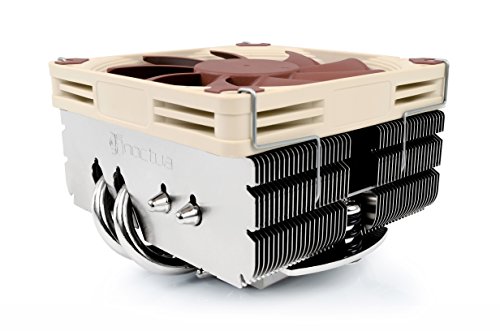
The Noctua NH-L9x65 is a compact cooler with a total height of 65 mm, designed for HTPCs, ITX builds, and other small form factor systems. It uses a slim NF-A9x14 92 mm fan with PWM support and a Low-Noise Adaptor to maintain ultra-quiet operation. Best for users who require near-socket clearance and unobstructed RAM/PCIe slots, this model emphasizes quiet cooling in tight spaces. A potential limitation is the cooler’s relatively modest cooling capacity, which may be less ideal for higher-TDP CPUs under heavy sustained loads. Best for: small form factor builds prioritizing quiet operation and clearances.
Thermalright AXP90 X36: Ultra-Compact Performance

The Thermalright AXP90 X36 features a 36 mm total height, offering one of the smallest footprints among low-profile coolers. Its all-metal platform and back plate fastener support solid installation on ITX boards. The design emphasizes low thermal resistance and good adaptability for compact builds. It’s best for ultra-slim systems where space is at a premium and modest cooling needs exist. Limitation: with such a tiny height, it’s most effective with CPUs that don’t generate excessive heat under load.
Thermalright AXP-90 X53 Black: Balance Of Size And Power

The AXP-90 X53 Black offers a 53 mm total height with a 92 mm PWM fan. It provides a balanced approach for compact builds needing better cooling than the smallest options but without exceeding typical ITX limits. It supports Intel 115X/1200 and AMD AM4/AM5 sockets, making it versatile across current platforms. Best for: users who want a slightly taller but notably more capable cooler than the smallest options. Caution: ensure your case has enough clearance behind the motherboard tray for the fan’s cable routing.
be quiet! Pure Rock Low Profile: Broad Socket Compatibility

The be quiet! Pure Rock Low Profile is designed for small form factor systems with broad socket compatibility, covering Intel 1700/1200/1150/1151/1155 and AMD AM5/AM4. Its compact design makes it an accessible choice for many ITX builds, delivering practical cooling without excessive height. Choose this if you need a versatile option that remains compact yet capable. Limitation: exact total height isn’t specified in the listing, so verify fit in your case before purchase.
Noctua NH-L9x65 chromax.Black: Aesthetic And Quiet

The chromax.Black version delivers the same low-profile efficiency with an all-black surface for a cohesive build look. It retains the 65 mm height, RAM/PCIe clearance, and the high-quality Noctua fan system for quiet operation. Best for: builders who value a stealthy aesthetic and simple maintenance. Caution: finishing options may impact color-matching with other components in some themed builds.
Buying Guide
- Key considerations: CPU socket compatibility, total height, RAM and PCIe clearance, and noise targets. Verify case clearance and motherboard layout before selecting a cooler.
- How to choose by use-case: For HTPCs and ultra-compact builds, prioritize the smallest heights (36–53 mm) and low noise. For small desktops that still run modest workloads, a 53–65 mm cooler with strong fan efficiency is a good balance.
- Performance vs. footprint: Taller low-profile coolers generally offer better heat dissipation, but may collide with tall RAM modules or PCIe slots. When possible, examine motherboard clearance diagrams or product images in context.
- Material and build quality: All-metal or copper cores often provide better heat transfer and durability in compact designs. Look for back plate fasteners and solid mounting systems to ensure secure installation.
- Maintenance and aesthetics: If you prefer a uniform look, chromax/black variants can help with color matching. PWM support and Low-Noise Adapters aid in maintaining quiet operation across load levels.
FAQ
- Q: Are these coolers suitable for gaming mini PCs? A: Yes, many are designed for ITX cases and can handle moderate gaming workloads depending on the CPU and case airflow.
- Q: Do these require a taller RAM module? A: Most low-profile designs minimize RAM overhang, but check your RAM height to ensure clearance with the cooler.
- Q: Will I need a special mounting kit? A: Most come with back plates and necessary mounting hardware for Intel and AMD sockets listed in their specs.
- Q: Which cooler is best for silent operation? A: The Noctua options (NH-L9x65 and chromax.Black) are known for quiet performance, especially with the Low-Noise Adaptor.
- Q: Can I install these in a standard mini-ITX case? A: Yes, these are specifically designed for ITX and other small form factor builds with low profile requirements.
- Q: Are there any compatibility caveats I should know? A: Always verify CPU socket compatibility and 1) RAM clearance, 2) PCIe slot access, and 3) overall case clearance before purchasing.