Find affordable tablets that balance price and performance for typical uses like streaming, reading, light work, and classroom tasks. This guide highlights five solid options each suited to different buyers—from students and casual viewers to remote workers. Below is a quick comparison table of the selected models to help you decide at a glance.
| Product | Best For | Why It Stands Out |
|---|---|---|
| HOTTABLET 7″ Android 14 Tablet | Casual users, families | Compact, expandable storage, dual-band WiFi |
| COLORROOM 11″ Android 16 Tablet | Media consumers, students | Large screen, AI features, good speakers |
| Gleeso 10″ Android 15 Tablet | Multitaskers, light gaming | High RAM, Widevine L1 for streaming |
| COTGOD 10.1″ Android 16 Tablet | Remote workers, storage lovers | Massive storage, octa-core, Bluetooth 5.4 |
| aiprotablet 10″ Android 15 Tablet | Students, casual power users | 12GB RAM combined, large expandable storage |
Note: All models are budget-friendly and suitable for everyday tasks. Consider screen size, storage expansion, and multitasking needs when choosing the best fit for your routine.
HOTTABLET 7-Inch Android Tablet With Case

Best for: entry-level users and families seeking a compact tablet for streaming, reading, and light multitasking. This model pairs a 7-inch HD IPS display with up to 8GB total RAM via 3GB base + 5GB expansion and 32GB storage expandable to 1TB. Dual-band WiFi (2.4G/5G) supports reliable streaming and browsing.
Why selected: The combination of a modern Android 14 OS, expandable RAM, and a sizable microSD option makes it a versatile starter tablet at a low cost. The eye-caring display helps reduce fatigue during longer sessions.
Caution: The small 7-inch screen may feel cramped for productivity tasks like document editing. Ideal for media consumption and light web use rather than heavy multitasking.
COLORROOM Android 16 Tablet, 11-Inch
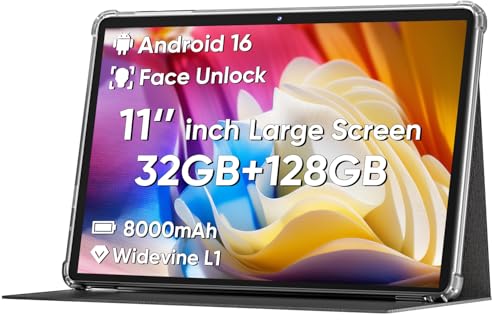
Best for: students and casual movie watchers who prefer a larger display and stable performance. This 11-inch tablet runs Android 16 with an octa-core CPU, 32GB RAM combined (4GB + 28GB) and 128GB ROM, plus 11-inch HD resolution. It emphasizes eye comfort with anti-blue light protection and a wide viewing angle.
Why selected: The bigger screen and speakers support better multimedia experiences, while the solid storage and future-ready OS provide smooth multitasking. The face unlock feature adds a simple security layer for everyday use.
Caution: The price point for this model is higher within the budget range, and battery life can vary with aggressive multitasking and high brightness settings.
Gleeso 10-Inch Tablet, Android 15

Best for: multitaskers who want solid performance for streaming, light gaming, and productivity on the go. The 10-inch display with Widevine L1 ensures true HD streaming on major platforms, and 20GB RAM plus 64GB ROM supports smooth multitasking.
Why selected: Its strong RAM for a budget device helps with split-screen and background apps, while the Widevine L1 certification preserves streaming quality from popular services.
Caution: Battery life is serviceable but not industry-leading; consider charging habits for long travel days or heavy media use.
COTGOD 10.1-Inch Android 16 Tablet
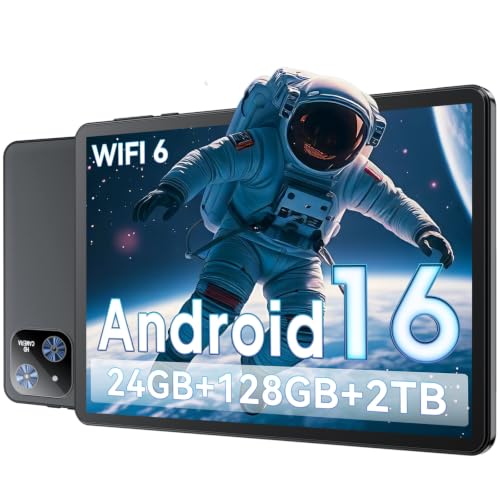
Best for: power users who want expansive storage and robust multitasking. It offers 24GB RAM total (4+20GB), 128GB ROM, and expandable storage up to 2TB via microSD. Bluetooth 5.4 and Wi-Fi 6 enhance connectivity.
Why selected: The high RAM and large internal storage make this tablet suitable for office tasks, media storage, and light content creation. The Android 16 platform is optimized for smoother app performance and multitasking.
Caution: The high RAM count is beneficial, but battery life could be a limiting factor during heavy workloads; plan for additional charging opportunities.
aiprotablet 10-Inch Android 15 Tablet

Best for: students and casual power users who want a balance of memory and expansion. This 10-inch tablet ships with 12GB RAM combined (8GB base + expansion), 64GB ROM, and supports Wi-Fi 5 plus Bluetooth 5.0, with a sizable 6000mAh battery.
Why selected: The high RAM helps with multitasking and smooth app switching, while the microSD expansion supports large media libraries and documents. The newer Android 15 OS improves app compatibility and security.
Caution: Internal storage is modest by today’s standards; rely on expansion for heavy app libraries or media collections.
Buying Guide: Key Considerations For Low-Cost Tablets
- Screen size and resolution: Choose a display that fits your usage—smaller screens excel in portability, larger displays boost video and reading comfort.
- RAM and storage: Look for at least 4GB RAM for smooth multitasking and expandable storage if you plan to store many apps or media offline.
- Processor and OS: An up-to-date Android version and a capable chipset improve app compatibility and performance for everyday tasks.
- Battery life: Budget tablets vary in endurance; check typical usage times and whether the battery can handle a full day of school, work, or travel.
- Connectivity: Dual-band WiFi and Bluetooth are common; WiFi 6 or Bluetooth 5.x offer better stability in busy environments.
- Camera and input: If you’ll video call or scan documents, prioritize front/rear cameras and features like stylus support or a responsive touch screen.
- Expandability: MicroSD or TF card support expands storage and can be a differentiator for media-heavy use.
- Portability vs. usability: Very small tablets are ultra-portable; larger screens improve productivity but reduce pocketability.
Frequently Asked Questions
- What is the best budget tablet for streaming movies?
Look for Widevine support (for HD streaming) and a larger screen in the 10–11 inch range with strong RAM for smooth playback. - Do budget tablets run multiple apps well?
Yes, if they have sufficient RAM (4GB or more) and a capable processor; avoid models with limited RAM for heavy multitasking. - Is expandable storage important on budget tablets?
Yes, expandable storage helps you keep apps and media without constantly managing space. - Which tablet offers the best balance of price and performance?
That depends on your priority: larger screens and more RAM for productivity, or compact size for portability and light use. - Should I avoid budget tablets with Android 12 or older?
Avoid older OS versions if possible; newer Android versions provide better security and app compatibility. - Are dual-band WiFi tablets worth it?
Yes, they maintain stable connections in busy networks and improve streaming reliability.