Whether you’re a content creator, educator, or remote worker, the right live streaming camera setup can dramatically提升 video quality and audience engagement. This guide highlights five top options that balance image clarity, autofocus, audio, and flexibility. Each pick is suited for a distinct streaming need—from portable on-the-go shooting to fixed studio setups—so you can choose confidently based on your use case and environment.
Buyer’s summary table:
| Product | Best For | Key Strength | Limitations |
|---|---|---|---|
| Logitech for Creators Mevo Start Wireless Live Streaming Camera | YouTubers and travel vloggers | 1080p HD, wireless streaming anywhere | Limited to 1080p out of the box |
| EMEET S600 4K Webcam | Quality-focused live streamers | 4K at 30FPS, advanced PDAF | 4K performance may rely on software |
| Logitech Brio 101 Full HD Webcam | Professional meetings and hybrid work | RightLight, privacy cover | 1080p, not 4K |
| EMEET PIXY Dual-Camera AI-Powered PTZ Kit | Multi-angle presentations | AI tracking, dual cameras | Complex setup, higher cost |
| EMEET NOVA 4K Webcam | Business and education with sharp visuals | 4K with PDAF, dual mics | 4K upscales from software |
Logitech for Creators Mevo Start Wireless Live Streaming Camera

The Mevo Start is designed for on-the-go live streaming with built-in wireless capabilities and 1080p HD output. Best for aspiring vloggers and mobile content creators who need to broadcast from anywhere with Wi-Fi, Ethernet, or a mobile network. The device includes an intelligent app control system that lets you adjust shots, start streams, and apply automated directing features from your phone. A potential limitation is that the camera streams in 1080p by default, so those seeking 4K portability should consider alternatives.
EMEET S600 4K Webcam for Streaming

The EMEET S600 targets creators demanding true 4K clarity with a Sony 1/2.55″ sensor and PDAF autofocus. It offers versatile resolutions, including 4K at 30FPS and 1080p at 60FPS. Balanced lighting and advanced autofocus deliver crisp images, while the adjustable FOV supports broad or tight framing. Note that some 4K features may depend on software like OBS, so readers should verify compatibility with their streaming stack. Best for: high-detail streams and multi-scene content.
Logitech Brio 101 Full HD Webcam

The Brio 101 focuses on professional meetings and reliable home office use. It includes features like RightLight processing to enhance brightness and reduce shadows, plus an integrated privacy cover for security. While it emphasizes 1080p output for streamlined performance, its strong exposure control and privacy features make it a solid choice for hybrid workers who need dependable video in varying lighting environments.
EMEET PIXY Dual-Camera AI-Powered PTZ Kit
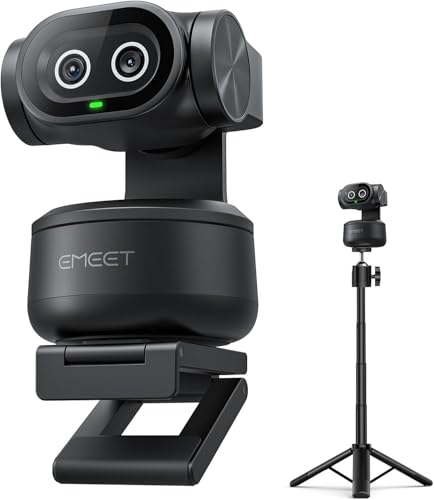
PIXY Kit combines a 4K main camera with an AI-assisted second camera and a 360° pan/180° tilt PTZ system. The adjustable tripod supports versatile angles, and AI tracking helps keep subjects centered—even in dynamic scenes like tutorials, fitness, or live product demos. Best for multi-angle broadcast needs; choose this if you require hands-free framing and smooth transitions. Limitation: setup complexity and higher price may be a consideration for casual streamers.
MWIRB 8K Video Camera Camcorder

The MWIRB camera presents an ambitious 8K option with multiple resolution modes, including 6K, 5K, and 4K, along with 18x digital zoom. It features a 6-axis stabilization system and a 3-inch touchscreen for easy self-recording. This option suits advanced creators who need extremely high-resolution capability and flexible framing. Caution: 8K performance may require robust processing and compatible software; not all streaming setups will natively support 8K workflows.
EMEET NOVA 4K Webcam for PC

EMEET NOVA 4K delivers 4K performance with PDAF autofocus and dual built-in mics for improved capture. It supports automatic light adjustment and a fixed 73° field of view, ensuring consistent framing across different lighting conditions. It’s broadly compatible with major meeting platforms and operating systems. Best for: professional meetings and educational streams that require clear visuals and solid audio without extra hardware.
Buying Guide
What should you consider when choosing a live streaming camera?
- Resolution and frame rate: Do you need 4K detail, or is 1080p sufficient for your audience and bandwidth?
- Autofocus and exposure: PDAF and automatic light adjustment help keep subjects sharp in changing lighting.
- Audio quality: Built-in mics vs. external mics; dual mics can improve voice clarity.
- Streaming flexibility: Wi‑Fi, Ethernet, or mobile data support; ease of setup with dedicated apps.
- Mounting and angles: Tripod compatibility, PTZ controls, and field of view influence framing options.
- Compatibility: Software support (OBS, PotPlayer, Zoom, Teams) and OS compatibility.
How to choose by use case
Travel or on-location creators should prioritize wireless streaming and portability, as seen with the Mevo Start. Office-based presenters may favor Brio 101 or NOVA 4K for reliable audio and consistent image quality in varied lighting. For multi-angle live streams or teaching, the PIXY Kit’s dual cameras and AI tracking offer a dynamic setup, while the S600 provides high-detail 4K for polished broadcasts.
Setup tips for better streaming
- Test lighting in advance to minimize harsh shadows.
- Use a stable internet connection or wired Ethernet for consistent streams.
- Calibrate autofocus and exposure before going live to reduce on-air adjustments.
FAQ
- What resolution should I choose for live streaming? – 1080p is typically sufficient for most audiences; 4K offers higher detail but requires more bandwidth and processing power.
- Do these cameras work with OBS or Zoom? – Yes, most listed models are compatible with common streaming and conferencing software, but verify each device’s software requirements.
- Is a privacy cover important? – Yes, it provides physical privacy when not streaming or during meetings.
- Can I use these cameras with a smartphone? – Some devices support app-based control for mobile streaming; check the product’s app capabilities.
- What’s the advantage of a PTZ kit? – PTZ (pan/tilt/zoom) allows dynamic framing and multi-angle shots without manual repositioning.