Answering the top questions from left-handed buyers, this guide highlights five left-handed mice that prioritize comfort, precision, and everyday usability. Each pick targets specific needs—ergonomic verticals for wrist relief, compact ambidextrous options, or trackball stability for minimal hand movement. This selection suits left-handed professionals, students, and gamers seeking long-session comfort without sacrificing performance. Use the quick summary table to compare core traits at a glance.
| Product | Best For | Key Benefit |
|---|---|---|
| Logitech Lift Left-Handed Vertical Ergonomic Wireless Mouse | Wrist-friendly all-day use | Natural forearm posture |
| MEETION Left-Handed Ergonomic Vertical Wireless Mouse | Multi-device workflow | Dual connectivity with DPI options |
| Logitech M185 Compact Ambidextrous | Budget-friendly ambidextrous option | Long battery life, universal compatibility |
| MEETION Left-Handed Wireless Vertical Mouse (Purple) | Style plus versatility | RGB lighting with rechargeable battery |
| ELECOM EX-G Left Handed Trackball M-XT4DRBK-G | Minimal hand movement | Accurate trackball control |
| Logitech Left Handed Signature M650 L | Full-size comfort for larger hands | SmartWheel with two-handed precision |
Logitech Lift Left-Handed Vertical Ergonomic Wireless Mouse

The Logitech Lift Vertical Ergonomic Mouse is designed for left-handed users seeking a natural wrist posture. Best for small to medium left hands, this model features a raised upright design, a softly textured grip, and a snug thumb rest tailored to left-hand use. Its 57-degree vertical angle supports comfortable forearm alignment for extended work sessions. Choose this if you want a distinctly ergonomic shape that reduces wrist strain for daily tasks; avoid if you prefer a compact, traditional grip.
Best for: left-handed professionals who work long hours at a desk and value wrist relief. Why: vertical ergonomics and left-specific sculpting promote a natural forearm posture.
Caution: The vertical form is larger than standard ambidextrous mice, which may feel unfamiliar to users with very small hands.
MEETION Left-Handed Ergonomic Vertical Wireless Mouse

MEETION’s BTM008 offers a multi-faceted connectivity bundle, including 2.4G wireless and dual Bluetooth, plus four DPI settings (800, 1200, 1600, 2400). This makes it ideal for users who switch between devices, whether a PC, laptop, or tablet. The left-handed vertical design reduces wrist strain and promotes a natural grip. Best for: multi-device users who want flexible wireless options. Better for: those who value adjustable sensitivity. Caution: Some users may prefer a more compact form factor if traveling frequently.
MEETION Left-Handed Wireless Ergonomic Vertical Mouse (Purple)

This purple variant mirrors the BTM010 design with a vertical grip that reduces wrist and forearm strain. It supports Bluetooth 5.0, Bluetooth 3.0, and 2.4G wireless connections for broad device compatibility, including Windows, Mac, and Linux. RGB lighting adds style while the rechargeable battery lowers disposable battery usage. Best for: users who want a stylish vertical mouse with broad OS compatibility. Limitation: Not all Android-based environments support every wireless protocol equally.
ELECOM EX-G Left Handed Thumb Control Trackball M-XT4DRBK-G

The ELECOM EX-G trackball is designed for left-handed users who prefer minimal hand movement. It uses optical tracking for precise cursor control and features six programmable buttons via ELECOM’s software. It offers 750–1500 DPI options for sensitivity tweaks. Best for: users seeking a trackball for reduced hand motion and high precision. Caution: Trackballs can have a steeper learning curve for new users, and software availability may vary by OS.
Logitech Left Handed Signature M650 L
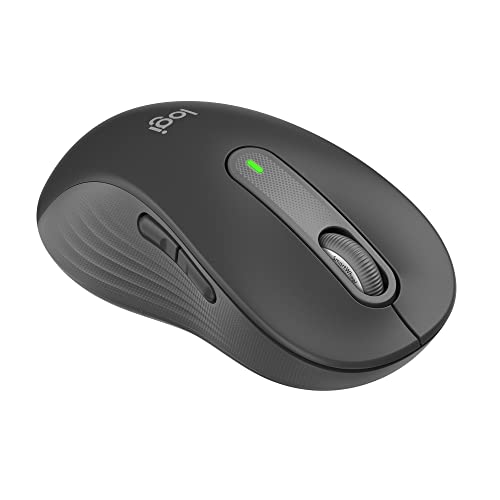
The Logitech Signature M650 L is a full-size wireless option tailored for larger left hands. It emphasizes line-by-line scrolling with SmartWheel and a contoured shape featuring a soft thumb area and rubber side grips for secure placement. Best for: left-handed users who want a comfortable, larger form factor for documents and long web pages. Why selected: it combines comfort with efficient scrolling. Caution: The full-size design may feel oversized for users with smaller hands.
Buying Guide
What to consider when choosing a left-handed mouse:
- Grip style: Do you prefer a vertical ergonomic shape, a compact ambidextrous design, or a trackball?
- Hand size: Smaller hands may favor compact models; larger hands benefit from full-size shapes with generous thumb rests.
- Connectivity: Windows, Mac, and Linux compatibility; Bluetooth vs. USB receivers; multi-device pairing.
- Sensor and DPI: Higher DPI for precise cursor control or lower DPI for comfortable everyday use; consider adjustable DPI if you switch tasks.
- Special features: RGB lighting, rechargeable batteries, software-driven button customization, or SmartWheel for faster scrolling.
- Learning curve: Trackballs and vertical mice often require adaptation time; factor this into your decision.
FAQ
- Are left-handed mice truly ambidextrous? Some are designed specifically for left-hand use, while others are ambidextrous and perform well in either hand.
- Do vertical mice help with wrist pain? Many users report reduced forearm twist, but comfort varies by hand size and grip.
- Is a trackball easier to use than a regular mouse? Trackballs reduce hand movement but may require time to master precise cursor control.
- Can I use these mice with multiple devices? Several models offer Bluetooth and 2.4G wireless connectivity for multi-device workflows.
- Do all left-handed mice support macOS? Most listed models support Windows and macOS, but check driver availability for Linux or other OSs.
- What is DPI? DPI indicates cursor sensitivity; higher DPI means faster cursor movement at the same physical distance.