Looking for reliable laptops around £500? This guide highlights five budget-friendly options that balance performance, storage, and display quality for everyday computing, remote work, and study. Each pick targets a different buyer type—from students to professionals on a tight budget—so you can choose confidently without overpaying. Below is a quick table comparing the featured models to help you decide at a glance.
| Product | CPU | RAM | Storage | Best For | |
|---|---|---|---|---|---|
| Dell Latitude 7300 (Renewed) | i7 8th Gen Quad-Core | 16 GB | 500 GB NVMe | 13.3” FHD | Business on a budget |
| HP 17 Laptop (2026) | 8-Core i3-N305 | 16 GB | 1 TB total (SSD + external) | 17.3” HD+ | Large screen for notes |
| Lenovo 15.6″ FHD (2026) | N150 Quad-Core | 8 GB | 128 GB + 500 GB external | 15.6” FHD | Student budgeting |
| Dell Latitude 5480 (Renewed) | i5-6300 | 8 GB | 500 GB HDD | N/A | Value-focused workhorse |
| Dell Latitude 5410 (Renewed) | i7 10th Gen Quad-Core | 16 GB | 500 GB NVMe | 14” FHD | Business with portability |
Dell Latitude 7300 Business Laptop Renewed
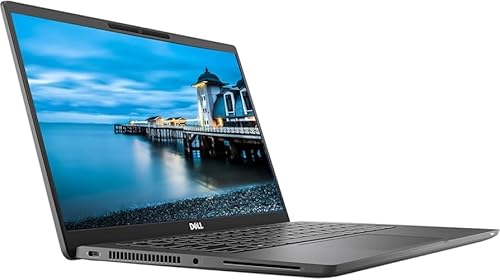
Best for budget-conscious professionals who need solid multitasking without new-device prices. This model pairs an 8th Gen Intel Core i7 with 16 GB RAM and a 500 GB NVMe SSD, delivering fast boot times and smooth app switching. The 13.3” Full HD display offers clear visuals for emails, spreadsheets, and conferencing. The Windows 11 Pro license supports domain work, security features, and business apps. A backlit keyboard aids late shifts and dim meeting rooms. Caution: Renewed devices may have signs of prior use; verify condition and return options before purchase.
HP 17 Laptop Business 2026

Best for users who prefer a large display for studying, note-taking, and streaming. It features 16 GB RAM and 1 TB total storage (512 GB SSD plus external drive) for multitasking and abundant file storage. The 17.3” HD+ screen reduces eye strain on long sessions. It runs Windows 11 Pro for professional features and comes with PHP-style convenience items like long battery life. Caution: The 17.3” screen means less portability; consider a lighter alternative if you travel frequently.
Lenovo 15.6″ FHD Laptop (2026)

Best for students and budget-conscious buyers who value reliable daily performance. The Lenovo model uses an Intel N150 Quad-Core CPU with 8 GB RAM and 128 GB SSD, plus an external 500 GB drive for extra storage. The 15.6” FHD anti-glare display reduces glare during online classes and streaming. It is suitable for web browsing, word processing, and light multimedia. Caution: Storage is modest by modern standards; plan to use external or cloud storage for large files.
Dell Latitude 5480 Laptop (Renewed)

Best for value-focused buyers who want a traditional laptop setup. The i5-6300 processor with 8 GB RAM and a 500 GB HDD delivers dependable everyday performance and ample local storage. The 14” display provides comfortable viewing for work tasks and video calls. Caution: HDD storage is slower than SSDs; if you can, upgrade to an SSD for faster start times and responsiveness.
Dell Latitude 5410 Laptop Renewed

Best for portable business use with strong multitasking. This model features a 10th Gen Intel Core i7 Quad-Core, 16 GB RAM, and a 500 GB NVMe SSD, plus Windows 11 Pro and a fingerprint reader for added security. The 14” Full HD display provides clear visuals for meetings and documents. Caution: Renewed devices vary in cosmetic condition; confirm warranty and return policy before purchase.
Buying Guide
What to consider before buying
Key factors for under-£500 laptops include CPU power, RAM capacity, storage type, and display size. For daily tasks like word processing, web browsing, and video calls, aim for at least 8 GB RAM and a solid-state drive for quick boot times and responsiveness. If you frequently work with multiple apps, prioritize 16 GB RAM when possible.
Storage decisions
SSD storage offers faster load times and system responsiveness, while HDDs provide larger capacities at lower cost. In this price range, you’ll often find a mix of SSDs and larger HDDs. External drives or cloud storage can supplement local storage if needed.
Display and form factor
A 14–15.6” display is a good balance of portability and productivity. Larger 17.3” screens are excellent for reading and editing but reduce portability. Anti-glare or matte finishes help in bright environments or classrooms.
Renewed vs. new
Renewed laptops can offer substantial savings and still provide solid reliability. Check the seller’s warranty, return window, and the device’s cosmetic condition. If you require the latest hardware, a new model may be worth the higher cost.
Operating system and security
Windows 11 Pro provides business-grade features like BitLocker device encryption and remote work tools. If you don’t need Pro, Home editions can be sufficient for basic tasks. Consider devices with fingerprint readers or TPM security where available.
Connectivity and ports
Ensure the laptop has a practical number of USB ports, an HDMI output, and Wi-Fi 6 if you value future-proof wireless performance. External keyboards or docking stations can enhance usability for home offices or classrooms.
Who should buy these?
- Students who need a larger screen for note-taking: HP 17 Laptop option.
- Professionals on a budget requiring portability and solid multitasking: Dell Latitude 7300 Renewed and Latitude 5410 Renewed.
- Budget-conscious buyers prioritizing storage flexibility: Lenovo 15.6″ FHD with external drive option.
Quick comparison snapshot
- Best balance of performance and portability: Dell Latitude 7300 Renewed.
- Best display size for study and media: HP 17 Laptop.
- Best value for basic tasks with durable hardware: Dell Latitude 5480 Renewed.
- Best for portable work with strong security: Dell Latitude 5410 Renewed.
- Best for students needing ample RAM and zip for multitasking: Lenovo 15.6″ FHD (2026).
FAQ
- Are renewed laptops reliable at this price range? Yes, Renewed models can offer solid performance, especially for basic to moderate tasks. Verify warranty terms and return options.
- Is 8 GB RAM enough for daily use? For web browsing, documents, and light multimedia, 8 GB is usually sufficient; 16 GB helps with multitasking and future-proofing.
- Should I prioritize SSD storage over a larger HDD? Yes. An SSD improves boot times and app launches; HDDs offer more space but slower performance.
- What display size is best for studying? A 14” to 15.6” display balances readability with portability; 17.3” can be great for home use if you don’t travel often.
- Is Windows 11 Pro worth it on a budget laptop? Pro adds security and management features; for casual use, Windows 11 Home may be sufficient.
- What ports are essential on a budget laptop? At minimum: USB-A, USB-C, HDMI, and a microSD/SD card reader or sufficient external storage options.