Finding the right laptop for photography coursework means balancing display quality, processing power, and portability. This guide highlights five laptops that suit photography students at different budgets and needs. The selections favor machines with solid displays, adequate RAM, and fast storage for editing in apps like Lightroom or Photoshop. Each option includes who it’s best for and why, plus practical trade-offs to help you decide.
| Product | Why It’s a Fit |
|---|---|
| Dell XPS 15 9520 | Strong display, capable CPU/GPU for editing, professional-grade specs |
| HP 14 Student-Laptop (16GB / 256GB) | Budget-friendly, ample RAM, solid everyday performance |
| Omnica Gaming Laptop i5 16″ | Large screen, good RAM and storage for multitasking |
| AKCHART 15.6″ AI Laptop | Good balance of RAM, SSD, and AI features for productivity |
| HP 14″ HD Renewed | Ultra-portable and affordable for students on the go |
Dell XPS 15 9520 15.6″ FHD+ Laptop

The Dell XPS 15 9520 combines a large, high-contrast display with strong overall performance. It features an Intel Core i7 family CPU, 32GB DDR5 RAM, and a 1TB SSD, designed for demanding photo editing workflows. Best for students who routinely work with RAW files, need reliable color accuracy, and run multiple editing programs simultaneously. A potential limitation is higher weight and cost, which may affect portability and budget considerations.
HP 14 Student-Laptop With 16GB RAM And 256GB Storage
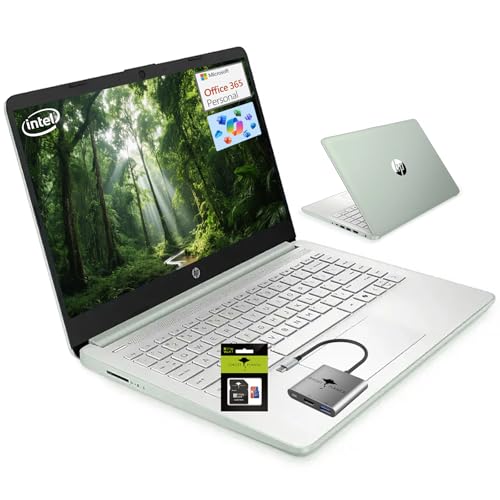
This HP model offers a practical blend of speed and capacity for photo students. With 16GB of DDR4 RAM and 256GB of storage (plus a 128GB SD option in some configurations), it handles editing tasks, schoolwork, and cloud work reasonably well. Best for students who prefer Windows efficiency and a lighter chassis, while needing enough RAM to keep Lightroom or Photoshop responsive. The trade-off is that integrated graphics and entry-level CPU may limit high-end editing or video tasks.
Omnica Gaming Laptop i5, 16″

For students needing a larger display and robust multitasking, this 16″ i5 laptop provides 16GB RAM and a 512GB SSD. It supports heavy editing sessions and can handle organizing large photo libraries. Best for photography students who edit on campus with multiple apps open and require a bigger screen. A caution: the RAM type and overall build are less premium than high-end creator laptops, which may affect long-term reliability for intense workloads.
AKCHART 15.6″ AI Laptop With Office 365

This AKCHART model balances a 15.6″ Full HD display with a 12GB RAM configuration, a 256GB SSD, and Windows 11 with Office 365. It suits students who value productivity tools and AI-assisted features for writing and organizing photo projects. Best for learners who want a versatile all-around device with room to expand storage. Limitation: entry-level GPU may not excel in more demanding image processing tasks.
HP 14″ HD Student Laptop (Renewed)

This renewed HP model offers portability and essential features at a lower price point. It suits photography students who need a lightweight device for class notes, light editing, and on-the-go reviewing of images. Best for budget-minded learners who can tolerate slower performance and basic editing tasks. Caution: renewed devices may have shorter remaining warranty and potential reliability variability.
Buying Guide: Key Considerations For Photography Students
- Display quality and color accuracy: Prioritize IPS panels with at least 1080p resolution and wide color support for accurate photo editing.
- CPU and RAM: For Lightroom and Photoshop, aim for at least 8–16GB RAM and a capable multi-core processor; higher RAM helps with multitasking and batch processing.
- Storage: SSD storage speeds up boot times and file access. 256GB–512GB is common; add external storage or SD card expansion if needed.
- Graphics: Dedicated GPUs improve photo editing performance, especially with large RAW files. If budget-constrained, ensure enough RAM and a capable integrated GPU.
- Portability: Lighting and gym-class work require a balance between screen size and weight. 14–15.6 inches is a practical range for photography students.
- Software readiness: Windows 11 compatibility ensures access to current photo-editing apps and AI-assisted productivity features.
Frequently Asked Questions
- What specs matter most for photo editing on a student laptop?
– A good display, at least 8–16GB RAM, a solid CPU, and fast SSD storage are most impactful for editing RAW files and multitasking. - Is a larger screen worth it for students?
– Yes, a 15.6″ screen provides more workspace for editing timelines and Lightroom panels, though it may reduce portability. - Should I prioritize a dedicated graphics card?
– A dedicated GPU helps with advanced edits and exporting large files, but for entry-level editing, a strong CPU and ample RAM can also suffice. - Are renewed laptops a good idea for students?
– Renewed devices offer budget savings but may come with shorter warranties and variable reliability; check return options. - What about color accuracy out of the box?
– Look for displays with good color reproduction, or plan to calibrate the screen using a colorimeter for accurate edits. - Do I need a laptop with Office 365 included?
– Office 365 can be convenient for coursework and documentation; some models include a subscription or an educational license.