Looking for a versatile laptop-tablet combo that fits both productivity and entertainment? This guide highlights five well-rounded 2-in-1 devices, each chosen for a specific buyer type. Whether you’re a student, remote worker, or on-the-go professional, you’ll find options that balance portability, display quality, and processing power.
Buyer types at a glance:
- Best for ultra-light travel: a compact 12″ to 12.5″ model with solid all-day battery and lightweight build.
- Best for students: a budget-friendly 2-in-1 with reliable performance and essential compatibility.
- Better for multimedia and note-taking: a larger, responsive touchscreen with ample RAM and fast storage.
- Best for everyday office tasks: a flexible 2-in-1 with reliable processor and comfortable typing experience.
- Best for creative work or multitasking: a 15.6″ or larger display with robust RAM and fast SSD.
| Product | Best For | Key Strength |
|---|---|---|
| 2-in-1 Laptop Tablet, 12″ 2K Touchscreen (Jumper) | Travel-friendly professionals | Ultra-light metal body, detachable keyboard |
| Lenovo IdeaPad Flex 3i Chromebook 12.2″ | Students and casual users | Versatile x360 hinge, long battery |
| Tylvx 15.6″ 2-in-1 | Creatives and multitaskers | Large display, 16GB RAM, convertible modes |
| HP 14 2-in-1 Chromebook 14in | Budget-conscious buyers | FHD display and full 2-in-1 flexibility |
| QAZIPO 2-in-1 10.1″ | Students on a budget | Office 365, detachable keyboard |
2-in-1 Laptop Tablet, 12″ 2K Touchscreen

The Jumper 2-in-1 blends tablet portability with laptop productivity. The detachable magnetic leather keyboard and adjustable stand offer flexible usage for meetings, study sessions, and daily tasks. With a 12-inch 2K IPS touchscreen, visuals are crisp for documents, video, and light editing. The device runs on an Intel Gold 6500Y processor with 12GB RAM and a 512GB SSD, supporting smooth multitasking and fast boot times. Best for frequent travelers or professionals who need quick transitions between tablet and laptop modes.
Who it’s best for: professionals who prioritize portability and a premium-feel keyboard, students who need reliable multitasking while commuting. Limitation: performance may lag with heavy software compared to higher-end cores.
Lenovo IdeaPad Flex 3i Chromebook 12.2″
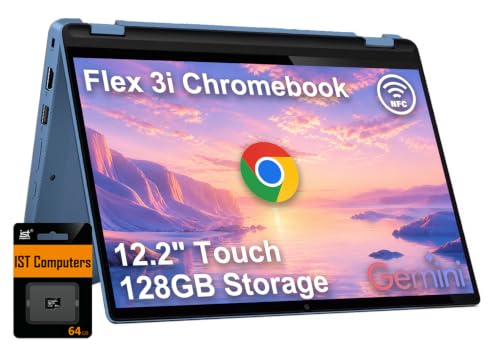
The IdeaPad Flex 3i Chromebook uses a 12.2″ touch display with 1920×1200 resolution and a versatile x360 hinge. Powered by an Intel N100 processor and 4GB RAM, it offers dependable performance for homework, video calls, and web browsing. Battery life can reach up to a full day of study or classes. Best for students and light multitaskers who value long battery life and quick, comfortable everyday use. Caution: limited local storage and Chrome OS-focused app ecosystem may affect some software choices.
Tylvx 15.6″ 2-in-1 Laptop/Tablet

The Tylvx 15.6″ model delivers a larger, immersive display with a 360° hinge for four modes. It pairs a Core m3-8100Y processor with 16GB RAM and a 512GB SSD, designed for multitasking, light creative work, and media consumption. Best for students, designers, or professionals who need more screen real estate and robust RAM in a 2-in-1 form factor. Limitation: the m3-8100Y is an older processor, which may not handle very heavy workloads as efficiently as newer generations.
HP 14 2-in-1 Chromebook 14in

This 14-inch 2-in-1 Chromebook offers a full 2-in-1 experience with a 360-degree hinge, suitable for students and casual professionals. It uses an Intel processor and provides a compact, budget-friendly option with a touchscreen display and flexible modes. Best for budget-minded buyers who want a practical device for web browsing, classes, and light document work. Caution: limited local storage and app availability compared to Windows devices.
QAZIPO 2-in-1 Laptop/Tablet, 10.1″

The QAZIPO 2-in-1 combines a compact 10.1″ touchscreen with a detachable keyboard, ideal for note-taking, reading, and light productivity on the go. It is powered by an Intel Pentium Gold 6500Y processor with 8GB RAM and a 256GB SSD, plus expandable storage via microSD. Best for students in coffee shops or libraries who need portability and a basic Office workflow. Caution: smaller display may feel cramped for heavy multitasking or extended typing sessions.
CUPEISI Android 16 Tablet with Keyboard

The CUPEISI Android 16 tablet pairs a 10.1-inch display with a robust 20GB RAM and 128GB ROM, expandable up to 2TB. It runs Android 16.0 and includes a keyboard, mouse, and stylus in the bundle. Best for Android app users who want a 2-in-1 package for work and play while on the move. Limitation: Android tablets may have less productivity familiarity for desktop-class software compared to Windows or Chrome OS.
AWOW 10.1″ Tablet With Keyboard

The AWOW Aibook 11 (10.1″) provides a compact 2-in-1 solution with an Intel N150 processor, 12GB RAM, and a 256GB SSD. It supports 36W PD fast charging and WiFi 6 for better network performance. Best for students or professionals who want a small, efficient device for document work and media consumption. Caution: screen size may be limiting for long typing sessions or detailed design tasks.
QAZIPO 2-in-1 Laptop/Tablet (2026)

This 2026 edition by QAZIPO emphasizes productivity with 1-Year Office 365 and 1TB cloud storage. It features a 10.1″ Full HD IPS touchscreen and a detachable keyboard for quick switch between laptop and tablet modes. Best for students and remote workers who want built-in software and cloud storage. Limitation: on-device storage is modest; cloud use is recommended for data-heavy projects.
Buying Guide
Key considerations when choosing a laptop-tablet combo:
- Display size and resolution: Larger screens improve multitasking and design work; higher resolutions deliver crisper text and images.
- Processor and RAM: For light productivity, 4–8GB RAM may suffice; for multitasking and creative apps, 12–16GB RAM is preferable.
- Storage: SSDs speed up boot and app launches. Consider at least 256GB with optional expansion.
- 2-in-1 form factor: Detachable keyboards are lighter; 360° hinges offer flexible modes for different tasks.
- Operating system: Windows/Chrome OS/Android each have advantages depending on software needs and ecosystem.
- Battery life and weight: Prioritize devices that balance all-day battery with portability for travel or commute.
- Connectivity and ports: Ensure USB-C/USB-A, microSD, and HDMI options match your accessories.
FAQ
- What is a 2-in-1 device best for? Best for users who need laptop-like productivity with tablet-style versatility for note-taking, drawing, or media.
- Is RAM more important than CPU for 2-in-1 laptops? Both matter; RAM affects multitasking, while CPU impacts overall responsiveness and heavier apps.
- Are Chromebooks good as 2-in-1s? Yes for web-based work and light app usage; consider software needs before choosing.
- Should I choose a 10.1″ screen or a 15.6″ screen? A 10.1″ display is ultra-portable; a 15.6″ screen is better for extended typing and multitasking.
- Is 2-in-1 with detachable keyboard more convenient than a 360° hinge? Detachable keyboards save weight and space; hinges provide sturdier laptop-style use.
- Do 2-in-1s support Office software and productivity apps? Yes, many come with pre-installed suites or compatibility with Office 365 and similar apps.