If you’re shopping for a laptop dedicated to online classes, this guide highlights five solid options that balance performance, portability, and affordability. These picks are best for students who need reliable web conferencing, smooth multitasking with multiple tabs, and clear displays for reading and note-taking. The top choices vary from lightweight ultrabooks to budget-friendly workhorse laptops, so you can pick based on your workload, storage needs, and preferred operating system. Below is a quick buyer’s snapshot to help you compare at a glance.
Summary table of selected products:
- Tylvx 15.6″ FHD Laptop (16GB RAM, 256GB SSD) — Best for heavy multitasking and quick boot times.
- Tylvx 15.6″ FHD Laptop (12GB RAM, 256GB SSD) — Best for balanced performance and value.
- HP Rose Pink Student Laptop (8GB RAM) — Best for light to moderate workloads and portability.
- HP Rose Pink Student Laptop (16GB RAM) — Best for students who multitask and use productivity apps.
- HP Royal Blue Student Laptop (8GB RAM) — Best for budget-conscious users needing Windows 11 efficiency.
Tylvx 15.6″ FHD Laptop With 16GB RAM
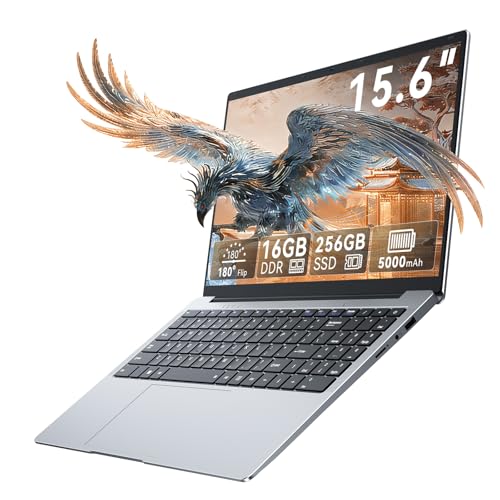
Best for heavy multitasking and online class workflows. This Tylvx model runs Windows 11 and pairs a powerful 16GB RAM with a 256GB SSD. The 15.6″ Full HD display provides a clear, comfortable viewing experience for long study sessions, video calls, and document work. The slim chassis adds portability for daily commutes and campus use. The Micro SD expansion offers flexible storage options if you need room for projects and media.
Who it’s best for: students juggling many browser tabs, video conferences, and classroom apps. Why selected: high memory capacity supports smoother multitasking and faster app launches. Caution: storage is solid-state but moderate in capacity; consider cloud storage or a microSD expansion if you handle large files.
Tylvx 15.6″ FHD Laptop With 12GB RAM

Best for balanced performance and everyday online classes. This model pairs 12GB of RAM with a 256GB SSD on a 15.6″ Full HD display for clear visuals and snappy multitasking. It’s well-suited for streaming lectures, note-taking apps, and web-based learning platforms. The expandable microSD slot adds storage flexibility for assignments and media. Windows 11 Essential keeps things secure and modern.
Who it’s best for: students who need adequate memory without overinvesting. Why selected: robust RAM improves multitasking during video calls and research. Caution: Celeron-based configurations may feel slower under heavy compute tasks compared with higher-tier CPUs.
HP Lightweight 14″ Laptop For Students

Best for entry-level online classes and daily productivity. This HP Stream laptop uses an Intel Celeron N4120 with Windows 11 Home, offering a simple setup for browsing, emails, documents, and streaming. It includes 1 year of Office 365 to help with coursework and basic productivity. Clear light-use performance means it’s best for straightforward tasks and not heavy editing or gaming.
Who it’s best for: students who need an affordable device for basic tasks and class attendance. Why selected: value-added Office 365 and a compact design. Caution: 4GB RAM may limit multitasking with many tabs or apps running concurrently.
HP Rose Pink 16GB RAM Student Laptop

Best for multitasking-heavy online classes and productivity tasks. This 14″ HP Rose Pink laptop features 16GB RAM and Windows 11, designed for students who run multiple programs, browser tabs, and conferencing apps simultaneously. The device is portable and suitable for daily commuting. Storage and performance balance make it an attractive option for students who handle large documents or media-rich coursework.
Who it’s best for: students who frequently multitask and keep several apps open. Why selected: ample RAM supports smooth multitasking; caution: 14″ display may feel cramped for long reading sessions if you prefer larger screens.
HP Royal Blue Student Laptop With 8GB RAM

Best for budget-conscious students needing Windows 11 efficiency for everyday tasks. The 14″ HP model uses an Intel N4102 processor and 8GB RAM, suitable for online classes, email, and light productivity. It offers a portable footprint and Windows 11, balancing cost with essential features for schoolwork. A caution: storage options may be limited if you store large media locally.
Who it’s best for: students who want a low-cost, reliable Windows 11 laptop for daily classwork. Why selected: budget-friendly yet capable for standard online learning tasks; caution: plan for cloud storage or external drives if you keep many files locally.
Buying Guide: How To Choose The Right Laptop For Online Classes
- What display size and quality should I prioritize? A 14–15.6″ full HD (1920×1080) display offers a comfortable balance between readability, weight, and price for long online sessions.
- How much RAM do I need? For multitasking with multiple browser tabs and video calls, 8–12GB is a practical baseline; 16GB is ideal for heavier workloads and future-proofing.
- What about storage? 256GB SSD is common and fast; consider 512GB if you handle large media files or install many programs. Expandable microSD or external drives add flexibility.
- Which processor matters most? For online classes, integrated or entry-level processors (like Intel N4000/N4120) handle basic tasks. If you multitask heavily, look for models with 8–16GB RAM and solid state storage.
- Is Windows or other OS preferable? Windows 11 provides modern features and broad software compatibility; Chrome OS can be simpler for light tasks and quick boot times.
- What about portability and battery life? Lighter laptops (under 3.5 lbs) with at least 6–8 hours of real-world battery life suit daily commuting and long classes.
- What features help online classes specifically? A reliable webcam, clear microphone quality, and stable Wi-Fi are essential; some models include integrated audio enhancements or privacy features.
Frequently Asked Questions
- What RAM size is best for most online classes?
– 8GB is adequate for standard tasks; 12GB or 16GB is better for multitasking with multiple apps and tabs. - Is a bigger display always better for online learning?
– Larger displays improve readability and reduce eye strain, but weigh against portability and cost. - Should I prioritize SSD storage or RAM?
– RAM affects multitasking; SSD speed affects boot and app load times. For most online classes, a balanced 8–16GB RAM with 256GB SSD is solid. - Do I need Windows 11 on a student laptop?
– Windows 11 offers modern security and compatibility; if you rely on specific software, verify compatibility before buying. - Are there budget options that still perform well for classes?
– Yes. Budget models with 8GB RAM and a solid-state drive can handle most class tasks and video calls. - What accessories are useful for online classes?
– A good webcam, noise-canceling headset, and a reliable mouse can improve conferencing comfort and productivity.