Answering the question, these laptops are ideal for everyday web browsing, streaming, and light productivity. They’re best for students, casual home users, and remote workers who want a reliable device without heavy workloads. Below are five Amazon-listed options that balance price, performance, and portability for focused browsing use. A quick summary table follows to compare key fit points at a glance.
| Product | Best For | Key Specs (Browsing Focus) | Storage |
|---|---|---|---|
| HP Laptop 2026 Student Business | Students & remote workers needing solid multitasking | Intel N150, 4GB RAM, 128GB UFS, 14″ HD | 128GB |
| HP 14 Laptop for Students | Casual users, light multitasking | N150, 16GB RAM, 128GB UFS + 256GB expansion | ~384GB total |
| Lenovo IdeaPad 1i | Budget browsing on a 14″ display | Core i3, 4GB RAM, 128GB | 128GB |
| HP Rose Pink 14″ Student Laptop (N4120) | Students on a tight budget | N4120, 8GB RAM, 64GB eMMC | 64GB |
| HP 14″ Laptop (Celeron N4500) | Minimalist daily browsing | N4500, 4GB RAM, 64GB eMMC | 64GB |
HP Laptop 2026 Student Business
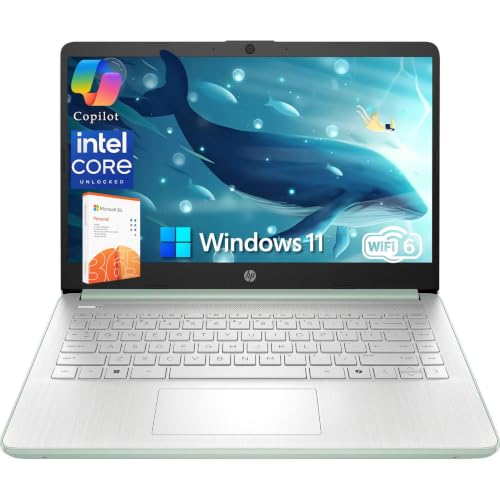
Best for students and professionals who need reliable multitasking with a compact 14″ form factor. The Intel N150 processor and 4GB RAM provide smooth web browsing and document work, while 128GB UFS storage keeps files accessible and fast. Includes 1-year Microsoft 365 Personal for word processing and cloud storage with OneDrive. A 14″ HD display and AI-assisted camera help with online classes and meetings. Caution: 4GB RAM may limit heavy multitasking with many browser tabs.
HP 14 Laptop For Students

Best for casual users who want a straightforward laptop for browsing and light productivity. It uses Intel N150 with 16GB RAM, which improves responsiveness for many browser tabs and streaming. Storage is 128GB UFS plus a 256GB expansion option, offering flexible space for documents and media. Caution: 16GB RAM is good, but avoid heavy multitasking with many memory-intensive apps running simultaneously.
Lenovo IdeaPad 1i
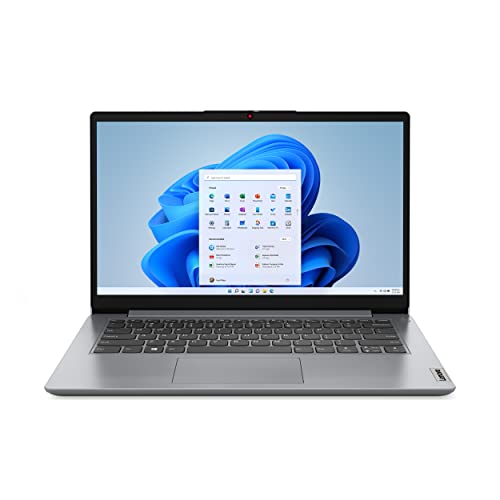
Best for budget-conscious buyers who still want a 14″ screen for browsing. The Intel Core i3-1215U provides better single-core performance than entry-level options, suitable for smoother web navigation and video calls. 4GB RAM and 128GB storage keep things simple and affordable. Caution: 4GB RAM can bottleneck with many tabs; consider upgrading if available.
HP Rose Pink Student Laptop (N4120)

Best for students needing a compact, lightweight device at a low price. The Celeron N4120 processor supports everyday tasks and web browsing comfortably. 8GB RAM improves multitasking compared with 4GB configurations. Storage is 64GB eMMC, which keeps the device affordable but limits large offline file storage. Choose this if light use and portability are the priorities; avoid if you need substantial local storage.
HP Rose Pink Student Laptop (16GB RAM)
Best for students who want more memory for browsing with many open tabs and background tasks. The 16GB RAM helps with smoother multitasking, while Windows 11 and Microsoft 365 support study and collaboration. Caution: Storage sits at 64GB eMMC; plan accordingly for offline files or rely on cloud storage.
HP 14 Inch Laptop With Celeron N4500

Best for minimalist daily browsing and light tasks. The Intel Celeron N4500 keeps costs down while handling web pages, email, and streaming. 4GB RAM and 64GB eMMC storage define an entry-level experience. Caution: Not suited for heavy multitasking or large offline media libraries; consider cloud storage and lightweight extensions for efficiency.
Buying Guide: Key Considerations For Browsing Laptops
- Processor speed and efficiency: For smooth browsing, prioritize modern entry-level CPUs (eg, Intel N100/N150 or Core i3) over older models.
- Memory matters: 8GB RAM is preferable for many tabs and streaming; 4GB works but may slow with many tasks.
- Storage needs: 128GB is common on budget models; look for expandable storage or strong cloud options if you store lots locally.
- Display and portability: A 14″ display with a comfortable brightness (around 250 nit) balances readability and travel-friendly size.
- Connectivity and peripherals: Wi‑Fi 6 and multiple ports (USB-C, USB-A, HDMI) improve compatibility with accessories and external displays.
- Operating system and software: Windows 11 provides familiar productivity apps and online collaboration features; consider 365 subscriptions if included.
- Storage expansion and cloud options: Some models offer microSD or internal expansion; cloud storage can offset smaller local drives.
Frequently Asked Questions
- What is the best laptop for browsing on a tight budget?
– A model with at least 4GB RAM, 128GB storage, and a modern CPU is a practical starting point; consider models with expandable storage if needed. - Is 8GB RAM worth it for browsing only?
– Yes, it helps with many open tabs and better multitasking, providing a smoother browsing experience. - Should I prioritize a larger display for browsing?
– A 14″ screen offers portability and readability; a higher brightness helps in bright environments. - Is storage size important for cloud users?
– If you rely on cloud storage, smaller local storage is acceptable, but ensure quick access and backup options. - Do these laptops support video calls well?
– Models with a good webcam and mic, especially AI noise reduction, improve video conferencing quality. - Can I upgrade RAM or storage later?
– Some models support upgrades; check the exact RAM and storage expandability for each device.