Answering the common buyer question, these laptops deliver solid performance, ample storage, and modern connectivity for under $500. They suit students, remote workers, and casual multitaskers who need reliable systems without premium-price compromises. The selections emphasize (1) sufficient RAM for multitasking, (2) fast storage or sizable SSD/hybrid options, (3) practical screen sizes for portability, and (4) up-to-date or workable operating systems. Below is a quick table highlighting the five chosen products and what they’re best for.
| Product | Best For | Key Strength |
|---|---|---|
| HP 17 Laptop (2026) – 17.3″ | Home, light multitasking | 16GB RAM, 1TB storage |
| Dell Latitude 7300 (Renewed) – 13.3″ | On-the-go productivity | i7, 16GB RAM, NVMe |
| Lenovo 15.6″ FHD Laptop – 2026 | Students, daily tasks | 8GB RAM, 500GB external |
| HP OmniBook 7 AI – 16″ OLED | Creative work on a budget | 32GB RAM, 1TB SSD |
| Dell Latitude 5410 – 14″ | Business tasks, remote work | 8/16GB RAM, 500GB NVMe |
HP 17 Laptop Business 2026

Best for home and classroom use with robust multitasking. This HP model offers 16GB RAM and 1TB total storage (512GB SSD plus 500GB external), enabling smooth browser multitasking, document editing, and light media work. The 17.3″ HD+ display provides ample screen real estate for productivity and learning. An 8-core Intel i3-N305 processor balances efficiency and affordability for everyday tasks, while Wi-Fi 6 supports reliable classroom and home networks. The inclusion of Windows 11 Pro adds enterprise-grade features suitable for remote learning and business use.
Who it’s best for: students, remote workers, and home users who need large-screen real estate and generous storage without paying premium for performance. Why selected: best balance of RAM, storage expansion, and screen size among under-$500 options on the list. Caution: the i3-N305 is not a high-end gaming or professional creator chip; expect solid everyday performance with light workloads.
Dell Latitude 7300 Business Laptop
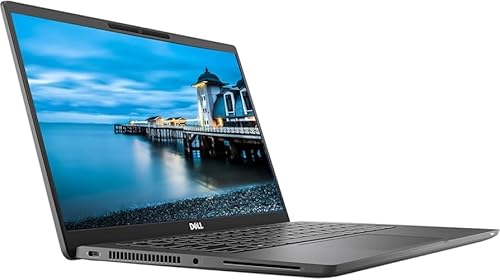
Best for portable productivity with business-class features. This Dell Latitude 7300 uses an 8th Gen Core i7 Quad-Core and 16GB RAM, paired with a 500GB NVMe SSD, delivering fast boot times and smooth multitasking for productivity apps, spreadsheets, and video calls. The 13.3” Full HD screen keeps the device compact for travel or commuting. Windows 11 Pro enhances security and collaboration tools for remote work. Caution: Renewed devices vary by seller; confirm battery health and warranty coverage before purchase.
Who it’s best for: professionals who need on-the-go performance with strong multitasking capability. Why selected: high-end processor and memory in a compact chassis, making it a strong “work-ready” option among budget choices. Limitation: renewed status may come with shorter warranty windows and subjective battery life.
Lenovo 15.6″ FHD Laptop (2026)

Best for students and budget-conscious buyers who want reliable daily performance. This Lenovo configuration features an 8GB LPDDR5 RAM setup and a dual storage strategy that includes a 128GB internal drive plus a portable 500GB external drive plus a 500GB external option in the description. The 15.6″ Full HD anti-glare display reduces eye strain for long study sessions. The 2-in-1 connectivity and USB-C/SD card support expand versatility for coursework and media. Caution: storage mix may require external expansion for larger media libraries.
Who it’s best for: students and home users needing dependable everyday performance and flexible storage options. Why selected: strong balance between display size, multitasking capacity, and expandable storage. Choose this if you value a larger screen and flexible storage rather than the smallest footprint.
HP OmniBook 7 AI Laptop

Best for creators and professionals on a budget. This model showcases 32GB DDR5 RAM and 1TB SSD, paired with a 16″ OLED 2K touchscreen and high brightness. The 14-core Intel Core 9 chip offers strong performance for design tasks, video editing, and multitasking, while the OLED panel provides vibrant color and contrast for creative workflows. Caution: higher RAM and GPU-related benefits are most noticeable with memory-intensive or graphics-focused tasks; general daily use will still perform well but may not need the top-tier specs for casual users.
Who it’s best for: creators and power users seeking a large, vivid display and robust RAM for memory-heavy applications. Why selected: the standout combination of 32GB RAM and a 1TB SSD at a budget-friendly price point among premium features. Better for: heavy photo/video editing relative to other budget options. Avoid this if you mostly browse and do light tasks, as you may not need ultrafast capabilities.
Dell Latitude 5410 Laptop

Best for business tasks and remote work with a compact footprint. The Latitude 5410 blends an efficient 10th Gen Core i7 with 16GB RAM and a 500GB NVMe SSD, delivering quick app launches, smooth multitasking, and reliable storage for business documents. The 14″ Full HD display supports long work sessions, and the fingerprint reader adds an extra layer of login security. Caution: performance may vary with less demanding tasks on lower-end configurations. Ideal for: remote workers and business travelers who favor a compact, secure laptop with solid performance.
Who it’s best for: professionals needing dependable productivity and modern connectivity in a portable form. Why selected: strong balance of CPU power, memory, fast NVMe storage, and security features in a compact business-class chassis. Limitation: as a renewed model, warranty and battery life specifics depend on the seller.
Buying Guide
What should you look for in a budget laptop under 500? Prioritize RAM, storage, and processor type. 8GB RAM is a practical minimum for smooth multitasking; 16GB is preferable if you run multiple programs or browser tabs. An SSD (with at least 256GB) improves boot times and responsiveness, while larger totals (1TB) offer room for media, documents, and apps. Consider screen size and weight for portability, and ensure modern Wi-Fi (Wi‑Fi 5 or 6) for reliable connectivity. Windows 11 or an equivalent OS is common and supports current software updates.
What configuration choices matter most? If you’ll multitask heavily, lean toward 16GB RAM (if available) and a fast NVMe SSD. For students with library access and cloud storage, an external drive or cloud storage can supplement internal space. If you want portability, a smaller 13–14″ chassis with good battery life may matter more than screen size. For creators, you may find models with higher RAM and better displays but check for thermal limits and bottlenecks in budget builds.
How do Renewed models compare to new ones? Renewed devices can offer substantial savings, but battery life and warranty terms vary. Always verify battery health, be aware of cosmetic wear, and review return windows. For business or remote work, security features like fingerprint readers and Pro editions of Windows can enhance productivity and protection.
Frequently Asked Questions
- Q: Is 8GB RAM sufficient for everyday tasks? A: Yes, for standard browsing, office apps, and media streaming; 16GB is better for heavier multitasking.
- Q: Do budget laptops have good display quality? A: Many offer 1080p FHD panels with anti-glare coatings; larger displays may vary in brightness and color accuracy.
- Q: Is a 512GB SSD better than a 256GB SSD? A: Yes, for faster boot times and more space, especially if you store many files locally.
- Q: Are renewed devices reliable? A: They can be, but check battery health, seller warranty, and return policy before purchase.
- Q: Which features add the most value for students? A: Adequate RAM, reliable storage, a comfortable keyboard, and long battery life.
- Q: Should I prioritize processor speed or RAM? A: For multitasking and productivity, RAM has immediate impact; a capable processor helps with heavier apps but is less critical for standard tasks.