If you’re searching for keyboards that optimize typing comfort and efficiency, you’re in the right place. This guide highlights five top options across wired and wireless styles, focused on snappy keystrokes, quiet operation, and ergonomic design. Ideal for students, office workers, writers, and remote professionals, these picks emphasize long-term comfort and reliable compatibility with Windows systems. Below, find concise product summaries, a quick buyer’s table, and clear guidance to choose the best fit for your typing style.
| Product | Best For |
|---|---|
| Logitech K120 Full Size Wired Keyboard | Budget-friendly, plug-and-play reliability |
| Logitech K270 Full Size Wireless Keyboard | Desk setups needing wireless freedom |
| Amazon Basics Wired QWERTY Keyboard | Broad Windows compatibility, easy media shortcuts |
| TECKNET Wired Keyboard, Silent Typing | Quiet environments and long sessions |
| X9 Wired Ergonomic Keyboard | Integrated wrist support and multimedia control |
Logitech K120 Full Size Wired Keyboard

The Logitech K120 is a standard, full-size wired keyboard designed for easy plug-and-play use. It features a familiar F-key and number pad layout, aimed at comfortable all-day typing. Best for budget-conscious buyers needing dependable Windows compatibility with minimal setup. Notable limitation: basic feature set without dedicated multimedia controls.
Logitech K270 Full Size Wireless Keyboard

This wireless keyboard offers a full-size layout with an eight-hotkey setup and a Unifying receiver for connecting multiple devices. Best for users who want desk mobility and a clutter-free workspace. Limitation: depends on battery life and USB receiver reliability; may require driver updates for some setups.
Amazon Basics Wired QWERTY Keyboard

This wired keyboard emphasizes easy setup with USB plug-and-play and media shortcuts for quick access to volume, mute, and calculator. Best for Windows users seeking broad compatibility across Vista, 7, 8, and 10. Caution: fewer ergonomic features and a standard layout may be less comfortable during long sessions.
TECKNET Wired Keyboard, Silent Typing
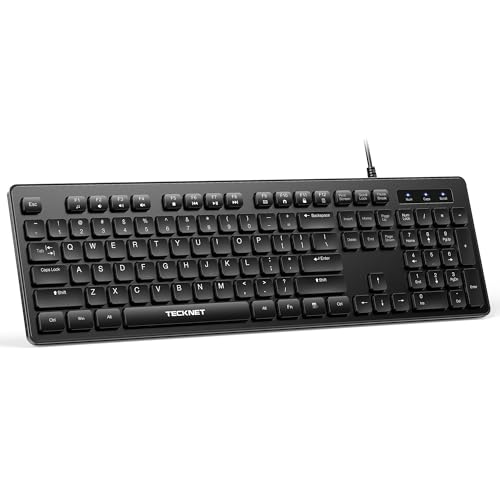
This TECKNET model targets quiet operation with low-profile membrane keys and a 3-zone layout for efficient data entry. Best for shared workspaces, libraries, and late-night typing where noise matters. Limitation: not explicitly marketed for high-end gaming or heavy-duty mechanical-style feedback.
Logitech MK295 Silent Wireless Keyboard & Mouse

Designed for quiet operation with SilentTouch technology, this wireless combo reduces typing and clicking noise by up to 90% while providing full-size comfort and handy shortcuts. Best for users who want a low-noise, integrated setup for productivity tasks. Caution: separate mouse included may not suit all desk spaces if you already own a preferred mouse.
Arteck 2.4G Wireless Keyboard

The Arteck 2.4G wireless keyboard offers a slim, stainless-steel build with built-in rechargeable battery and a numeric keypad. Best for users seeking a durable, compact full-size wireless option with long standby life. Caution: battery life depends on usage and Bluetooth performance may vary across devices.
X9 Wired Ergonomic Keyboard

The X9 Ergonomic Keyboard features a built-in wrist rest, a full-size layout, and multimedia keys. Best for users who want extra wrist support and convenient media controls during long typing sessions. Limitation: wired connection reduces flexibility compared to wireless options.
Buying Guide: How To Choose Your Typing Keyboard
What type of connection works best for you—wired or wireless? Wired keyboards provide steady latency and plug-and-play simplicity, ideal for desktop setups and shared workstations. Wireless options offer desk freedom but rely on batteries or USB receivers. Consider your desk space and potential interference when deciding.
Key Considerations
- Typing feel: Do you prefer membrane quietness or tactile feedback? Ergonomic designs with wrist rests can reduce strain during long sessions.
- Layout and size: Full-size keyboards with numeric pads speed up data entry; compact layouts save space but may slow numeric entry.
- Noise level: Quiet keyboards are better for offices, libraries, or late-night work environments.
- Media controls: Quick access to volume, mute, and playback enhances productivity for multimedia tasks.
- Compatibility: Ensure Windows support and, if needed, Unifying receivers or Bluetooth compatibility for your devices.
- Battery life: For wireless models, battery life and charging method matter for ongoing use.
How To Compare For Your Use Case
- Frequent writers or students: Choose a comfortable, full-size keyboard with good key travel and a wrist rest option.
- Office workers: Look for models with quiet typing, reliable Windows shortcuts, and easy media controls.
- Shared spaces or libraries: Prioritize silent operation and compact design to minimize distractions.
- Frequent movers or multi-device users: A wireless keyboard with a stable Unifying or Bluetooth connection provides flexibility.
FAQ
- What is the main difference between wired and wireless keyboards? Wired keyboards avoid battery management and latency issues, while wireless keyboards offer desk freedom but rely on batteries or USB adapters.
- Are quiet keyboards less responsive? Not necessarily; many quiet keyboards use membrane switches that provide smooth, low-noise typing without sacrificing responsiveness.
- Do I need an ergonomic keyboard for comfort? An ergonomic design with wrist support and a natural key layout can reduce wrist strain during long typing sessions.
- Can I use these keyboards with non-Windows devices? Some keyboards support multiple Windows versions and may work with other operating systems, but verify compatibility listed by the manufacturer.
- Do multimedia keys require extra software? Most models provide built-in hotkeys accessible via Fn or dedicated keys without extra software.
- Is keyboard size important for productivity? A full-size keyboard with a numeric keypad can speed up data entry, while a compact layout saves desk space and reduces reach.