Your search for the best keyboard for writing aims to maximize comfort, reduce fatigue, and keep your typing quiet and accurate. This guide highlights five well-suited options, spanning full-size, compact, and specialized layouts. Each pick aligns with different writing needs—from effortless long-form typing to readable large-print keys for visibility. The selections emphasize reliability, ergonomics, and practical features to help you choose with confidence.
Product Comparison Table
| Product | Brand | Best For | Key Feature Highlight |
|---|---|---|---|
| Logitech MK270 Full Size Wireless Keyboard and Mouse Combo | Logitech | All-day typing with a reliable wireless connection | Spill-resistant, full-size with number pad |
| Amazon Basics Wired QWERTY Keyboard | Amazon Basics | Budget-friendly Windows typing with easy setup | Plug-and-play USB, media keys |
| SABLUTE Large Print Wired Keyboard | SABLUTE | Clear, large-letter keys for visibility | 7-color backlight; ergonomic wrist support |
| GEODMAER 65% Wired Gaming Keyboard | GEODMAER | Compact, space-saving option with reliable wired connection | 65% layout; no-conflict keys |
| Camiysn Typewriter Style Mechanical Keyboard | Camiysn | Retro styling with tactile feedback for satisfying typing | Blue switches; RGB lighting |
Logitech MK270 Full Size Wireless Keyboard and Mouse Combo

The Logitech MK270 is a full-size wireless keyboard with a built-in number pad and a reliable USB receiver that supports up to 33 feet. It is best for writers who prefer a traditional layout with quiet, low-profile keys and a spill-resistant design. The included mouse completes a standard desk setup, suitable for long writing sessions in home offices or shared spaces. A potential limitation is the need to use the USB receiver rather than Bluetooth, which can limit multi-device flexibility.
Amazon Basics Wired QWERTY Keyboard

The Amazon Basics wired keyboard offers straightforward, plug-and-play operation with Windows-compatible hot keys for media control and easy access to commonly used shortcuts. It is best for writers who want a dependable, no-fruss setup with broad Windows compatibility and no need for software installation. The simple design means fewer distractions, but it lacks modern wireless conveniences and specialized ergonomic features found in premium models.
SABLUTE Large Print Wired Keyboard
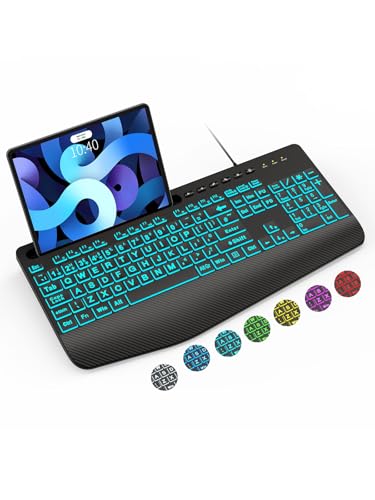
The SABLUTE Large Print keyboard is designed for readability, featuring oversized font keys and seven backlight colors to improve visibility in low-light environments. It includes a palm rest to reduce wrist fatigue during long writing sessions. This model is best for writers who need high-contrast keys or work in dim environments. A limitation is that backlight memory is not retained after power off, so brightness settings may need reapplication each use.
GEODMAER 65% Wired Keyboard

The GEODMAER 65% keyboard emphasizes compactness with a 65% layout and 11 media buttons, while maintaining a stable wired connection and a 10,000,000+ keystroke lifespan. It is best for writers who want more desk space without sacrificing function. It is lighter on features like a numeric keypad and is not ideal for users who rely on full-size typing layouts for data entry or complex shortcuts.
Camiysn Typewriter Style Mechanical Keyboard
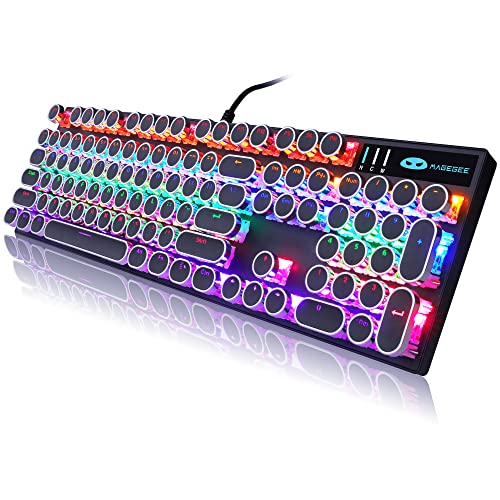
The Camiysn Typewriter Style Mechanical Keyboard combines retro aesthetics with tactile blue-switch feedback, delivering a satisfying, clicky typing experience. It supports Windows, Mac, and other PC platforms via USB plug-and-play. This option is best for writers who enjoy tactile feedback and a distinctive look, though it may be noisier than membrane options—an important consideration for shared spaces or quiet offices.
Buying Guide: Key Purchase Considerations
Keyboard Layout and Size
Decide between a full-size keyboard with a numeric keypad and a compact 65% or 60% layout. Full-size keyboards are better for data entry and comfort, while compact models save desk space and reduce reach distance for long typing sessions.
Connectivity Type
Wired keyboards offer zero-latency typing and no battery management, ideal for writers who need consistency. Wireless models add flexibility but require battery management and occasional syncing. Consider your desk setup and whether you frequently switch devices.
Typing Comfort and Noise
Low-profile, quiet keys reduce fatigue and distractions. If wrist comfort matters, look for built-in wrist rests or adjustable tilt feet. Mechanical switches provide tactile feedback but can be louder; consider membrane or quiet mechanical options if you work in shared spaces.
Visibility and Accessibility
Large-print keycaps or high-contrast backlighting help with readability and accuracy for some writers. Backlighting should be adjustable to suit ambient lighting and reduce eye strain during long sessions.
Durability and Build
Spill resistance, keycap durability, and reinforced frames extend keyboard life in daily writing tasks. For frequent travel, a compact, rugged design may be preferable.
Compatibility and Features
Ensure Windows or Mac compatibility with your system. Media keys, programmable shortcuts, and dedicated function keys can improve workflow, but evaluate whether you’ll actually use them.
FAQ
What keyboard is best for long-form writing?
Full-size keyboards with quiet, comfortable keys and a durable build are typically best for long-form writing. Look for ergonomic features and stable wireless or wired connections.
Should I choose wired or wireless for writing?
If you prize reliability and zero latency, a wired keyboard is ideal. For flexibility and fewer cords, a wireless model with a stable connection works well.
Are mechanical keyboards good for writing?
Yes, many writers enjoy the tactile feedback of mechanical switches. However, they can be noisier; consider quieter switches or a membrane option if noise is a concern.
What should I look for in a keyboard for low-light work?
Backlit keys with adjustable brightness or large-print keys aid visibility. Ensure the backlight has straightforward controls and suits your lighting environment.
Do backlit keyboards save energy?
Backlit keys consume more power, especially in wireless models. If you type mainly in daylight, lower brightness or turning off backlight can conserve battery.
Can I use these keyboards with multiple devices?
Some wireless keyboards support multi-device pairing, but verify compatibility and pairing methods before purchase.