Finding a keyboard that fits long coding sessions, fast typing, and a clean desk setup is essential for developers. This guide highlights five keyboards that excel for programming, debugging, and multitasking across Windows, Mac, and more. Each pick offers features like hot-swapping, programmable keys, tri-mode connectivity, and comfortable typing profiles. Read on to see which model best matches your workflow, desk space, and preferred switch feel.
Buyer note: the top picks below are targeted at developers who value reliability, customizability, and multi-device workflows. Each entry includes who it’s best for and why it stands out for coding, testing, or project work. A quick summary table is provided to compare core capabilities at a glance.
| Product | Layout/Key Count | Connectivity | Special Feature | |
|---|---|---|---|---|
| Kisnt KN85 | 75% (85 keys) | USB-C, Bluetooth 5.0, 2.4 GHz | Hot-swappable, RGB, software macros | Compact coding stations, multitaskers |
| AULA F108 PRO | Full size | BT5.0, 2.4 GHz, USB-C | Smart display screen and multi-function knob | Multi-device coding setups, quick toggling |
| RK ROYAL KLUDGE S98 | Full size | BT5.0, 2.4G, USB-C | Smart display & knob | Multi-device workflow with visual feedback |
| EPOMAKER x Aula F75 | 75% | BT, 2.4 GHz, USB-C | Five-layer padding for quiet typing | Quiet, compact coding keyboard |
| AULA F99 | Full size | BT5.0, 2.4 GHz, USB-C | Hot-swappable, macro support, RGB | Macro-heavy coding and gaming mix |
Kisnt KN85 Wireless Mechanical Keyboard

The Kisnt KN85 is a compact 75% layout keyboard designed for space-saving setups while maintaining essential keys like F1–F12, arrows, and shortcuts. It offers Tri-mode connectivity (USB-C, 2.4 GHz, Bluetooth 5.0) and a large 4000 mAh battery for all-day wireless use. Programmability is supported via Windows software for remapping and macros, making it a strong pick for developers who rely on shortcuts and automation. Best for developers with small desks or those who type across multiple devices.
Best for: coders who need a compact board with robust wireless options and programmable keys. Better for: laptop-dominated desks where space is at a premium. Caution: Windows-only driver for full programming features may limit macOS users.
AULA F108 PRO — Wireless Mechanical Keyboard
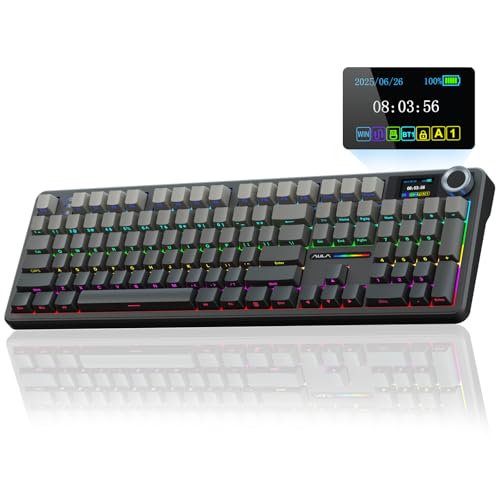
The AULA F108 Pro combines a full-size layout with a smart TFT color display and a multifunction knob, ideal for users who want on-screen status and quick in-keyboard control. It supports BT5.0, 2.4 GHz, and USB-C wired connections, with a software-enabled ability to switch between Windows and Mac systems. The hot-swappable base makes it easy to customize switches and keycaps, while pre-lubed stabilizers promise smoother typing. Best for developers who want a feature-rich, multi-device keyboard with quick system switching.
Best for: developers who benefit from on-device status info and easy access to hardware-level customization. Caution: Linux driver compatibility may vary, which could affect certain functions.
RK ROYAL KLUDGE S98 Wireless Mechanical Keyboard

The S98 offers a compact yet feature-packed experience with a smart display and a configurable knob, plus tri-mode connectivity (BT5.0, 2.4G, USB-C). Its gasket-style construction helps produce a consistent keystroke and anti-ghosting across all keys, which can be advantageous for fast typing and coding accuracy. Best for developers who value a clear on-display readout and easy cross-device use. Caution: Some users may prefer a different switch feel for longer sessions.
EPOMAKER x Aula F75 Gasket Keyboard

The EPOMAKER x Aula F75 focuses on a 75% gasket design that delivers a quiet, cushioned typing experience. It features a five-layer padding system, a hot-swappable PCB, and pre-lubed switches, along with a 1.2 mm PCB that supports stable actuation. This model is best for developers who want close-to-silent typing with strong key feel in a compact footprint. Caution: Gasket setups can feel different to users who prefer a very stiff or very light switch.
AULA F99 Wireless Mechanical Keyboard

The AULA F99 is a tri-mode keyboard with hot-swappable switches, micro-macro support, and a fully customizable RGB system. It supports multiple devices (up to five) and allows macro recording and editing, enabling developers to automate repetitive tasks. The keyboard includes pre-lubed linear switches for smooth action and a gasket-like structure to reduce noise and vibration. Best for developers who need macro-heavy workflows and multi-device switching. Caution: RGB customization requires driver software and may be hardware-intensive.
Buying Guide: Key Considerations For Developers
- Layout and desk space: If you code across multiple devices or have limited desk real estate, a 75% or 65% layout saves room without sacrificing essential keys.
- Connectivity: Look for tri-mode options (Bluetooth, 2.4 GHz dongle, USB-C) to switch between laptop, desktop, and tablet setups.
- Switch type and feel: Hot-swappable keyboards let you swap switches without soldering. Consider pre-lubed or gasket setups for smoother or quieter keystrokes during long sessions.
- Programmability: Macros and remapping boost productivity for repetitive coding tasks. Windows-based software often governs full programming capabilities on many boards.
- On-board status and controls: Displays and knobs can provide real-time feedback for volume, battery, and mode, reducing the need to alt-tab for status checks.
- Ease of use across OSes: Some keyboards offer seamless Windows/Mac layouts; others may require driver tweaks for full functionality.
- Durability and reliability: Look for sturdy construction (gasket designs or reinforced plates) and quality keycaps to withstand long coding sessions.
FAQ
- Q: What layout is best for developers with limited desk space? A: A 75% or 65% layout balances compactness with essential keys for coding.
- Q: Are hot-swappable keyboards worth it for developers? A: Yes, they allow trying different switches and customizing feel without soldering.
- Q: Do these keyboards support multiple devices at once? A: Many do, including tri-mode keyboards that can pair with several devices and switch easily.
- Q: Is a built-in display useful for programming? A: It can display status, battery, or system info, which reduces on-screen interruptions.
- Q: What should I consider for macOS compatibility? A: Check driver availability and whether key remapping works on macOS in addition to Windows.
- Q: Do gasket keyboards significantly improve typing comfort? A: Gasket designs dampen keystroke resonance and can reduce fatigue over long sessions.