Answering common buyer questions, these car heads-up displays (HUDs) project speed and essential data into your line of sight, helping you keep eyes on the road. They’re ideal for drivers who want quick, glanceable readings, improved daytime visibility, and easy USB or OBDII integration. The top picks here suit different needs—from straightforward speed readouts for daily commuting to feature-rich units for tech enthusiasts or commercial drivers.
Summary table of selected products:
- KUOWEIHUD Heads Up Display for Cars — Best overall for reliability and auto-brightness
- wiiyii Heads Up Display for Cars A8 — Best large display for easy readability
- wiiyii OBD2 Gauge Display Head Up Display P6 — Best for quick setup and multiple data readouts
- Smart in-Car Hud Co-Pilot Navigation Windshield Display — Best for dual positioning and readability
- AKWDSL GPS Heads Up Display — Best for strong GPS+BDS tracking and 199 mph readout
KUOWEIHUD Car HUD With GPS Speedometer

The KUOWEIHUD heads-up display uses dual-mode GPS plus Beidou (BDS) technology with a 10Hz refresh rate. It supports up to 32 satellites for real-time speed tracking and provides a clear projection on the windshield so you don’t need to look down. An built-in light sensor automatically adjusts brightness for day and night driving, reducing glare and eye strain. Best for drivers who want accurate, fast updates without attention-diverting reflections.
- Best for: daily drivers who seek stable speed data and automatic brightness.
- Why selected: strong GPS/BDS support, large visibility, and glare-reducing brightness control.
Caution: If your vehicle lacks an accessible OBDII port or requires a data-free installation, ensure it uses GPS-only mode as needed.
KUOWEIHUD Car HUD (Second Version)

This second KUOWEIHUD model reiterates the same core advantages: GPS + BDS dual-mode positioning, a 10Hz refresh rate, and a true windshield projection for speed. It emphasizes readability and consistent performance in changing lighting. It’s best for drivers who want redundancy in display technology and a straightforward setup.
- Best for: drivers who want a reliable, easy-to-read HUD with GPS accuracy.
- Why selected: consistent performance and simple user experience.
Caution: Similar to the first model, ensure vehicle compatibility with the HUD’s mounting and power options before purchase.
wiiyii Heads Up Display A8
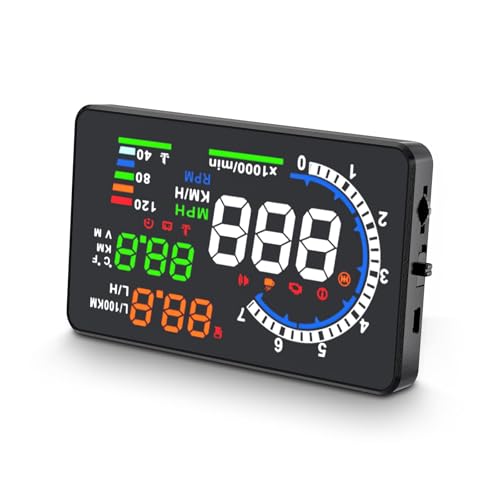
The wiiyii A8 HUD focuses on a large 5.5-inch HD display, offering clear speed readings and multiple display modes. It supports typical OBDII vehicles and provides a choice of data fields. Best for drivers who want a big, legible readout and straightforward operation while monitoring key metrics like speed and other vitals.
- Best for: drivers who prioritize a large, easy-to-read display.
- Why selected: expansive screen improves readability in all lighting conditions.
Caution: If your vehicle isn’t OBDII-compatible in your region, you may need a different HUD option or a data-free setup.
wiiyii OBD2 Gauge Display P6

The wiiyii P6 OBD2 Gauge Display emphasizes quick setup and multiple data readouts. It supports two installation methods (dashboard or windshield) and displays a range of data beyond speed, including temperature and voltage. Best for drivers who want a flexible, plug-and-play HUD with broad data access and easy mounting options.
- Best for: flexible mounting and broader data readouts beyond speed.
- Why selected: dual installation options and rich data set improve situational awareness.
Caution: Data availability depends on the vehicle’s OBDII compatibility; performance may vary for some models.
Smart In-Car HUD Co-Pilot Navigation

This model highlights dual-mode GPS positioning with 10Hz updates and a windshield-facing display that presents large MPH digits for quick checks on city streets and highways. Auto brightness control helps maintain visibility without glare. Best for drivers who value a co-pilot-like experience with clear, immediate speed awareness.
- Best for: drivers seeking continuous speed awareness in a wide viewing area.
- Why selected: large digits, stable updates, and adaptive brightness support safe daytime and nighttime driving.
Caution: The unit relies on GPS/BDS signals; signal loss in tunnels or garages is possible and quickly recovers when available.
AKWDSL GPS Heads Up Display

The AKWDSL HUD features dual GPS+BDS tracking with automatic brightness control, supporting speeds up to 199 mph. It offers a clear, high-contrast display and reliable speed updates, making it well-suited for performance-minded drivers or those who require precise data at high speeds. Best for: performance-oriented driving and accurate speed readings.
- Best for: high-speed awareness and precise speed data.
- Why selected: robust GPS tracking and bright, legible display in varying light.
Caution: The high-speed readout is theoretical for most everyday vehicles; confirm the unit’s compatibility with your car’s display system and power port.
Buying Guide: Key Considerations For Your HUD Choice
- Purpose and use case: Choose based on whether you mainly need speed data, navigation prompts, or broader vehicle data readouts. If you commute daily, a compact unit with auto-brightness may suffice. If you’re a tech enthusiast or a professional driver, a larger display with multiple data fields is advantageous.
- Display size and readability: A larger display improves legibility, especially in bright daylight. Look for anti-glare screens and adjustable brightness for day and night use.
- Data sources: Dual GPS+BDS systems offer better satellite coverage. Ensure the HUD supports your vehicle’s OBDII port if you want engine data and diagnostics in the readout.
- Installation and mounting: Determine whether you prefer dash-munging installation or windshield mounting. Ensure the device comes with a stable bracket and a straightforward USB power option.
- Power and compatibility: Confirm your vehicle’s year, make, and model compatibility with the HUD’s data stream and power requirements. Some units work universally via USB, others rely on the OBDII interface.
- Reliability and updates: Look for models with stable firmware and reputable manufacturers. Consistent updates can improve accuracy and feature support over time.
FAQ
- What is a car HUD and how does it help driving safety? — It projects essential data onto the windshield so drivers can keep their eyes on the road, reducing the need to glance down at the dashboard.
- Do all HUDs require an OBDII connection? — Not all do. Some rely on GPS-only data, while others use OBDII for additional information like engine status and voltage.
- Can HUDs affect night driving glare? — Many models include auto-brightness to minimize glare, but brightness settings should be adjusted to comfort.
- Will a HUD work in any vehicle? — Most units are universal, but fit and power options vary. Check mounting and power port compatibility with your car.
- What is the difference between GPS and OB DII HUDs? — GPS-only HUDs display speed using satellite data, while OBDII HUDs pull data directly from the vehicle’s computer for more details.
- Which HUD is best for high-speed driving? — Models with large, high-contrast displays and reliable GPS/BDS tracking are best for high-speed awareness.