Answer: This guide highlights top handheld game consoles ideal for kids, casual gamers, and on‑the‑go play. It covers devices with kid-friendly designs, powerful retro emulation, and cloud/streaming options. The top picks are chosen for portability, screen quality, and ease of use, with buyer notes to help you choose what fits best. A quick product comparison is provided below to help you decide at a glance.
| Product | Best For | Key Benefit | Limitations |
|---|---|---|---|
| Handheld Game for Kids, Blue | Kids who want a compact, preloaded library | Preloaded 220 games, kid-friendly 3.0″ display | Limited to preloaded titles |
| Retroid Pocket 5 | Retro and modern indie titles on Android | 5.5″ touchscreen, strong hardware for retro/indie gaming | No preloaded games by default |
| ASUS ROG Xbox Ally | PC/console gamers on the go | Xbox experience with Windows 11, large 7″ screen | Premium device, higher price |
| PlayStation 5 Portal Remote Player | PS5 library and cloud streaming | Remote Play and cloud streaming across catalog | Requires PS5 and internet connection |
| 32 Bit Handheld Games, Blue | Compact, colorful retro handheld | 139 games, 3.0″ IPS display | Emphasis on older titles |
Handheld Game for Kids, Blue
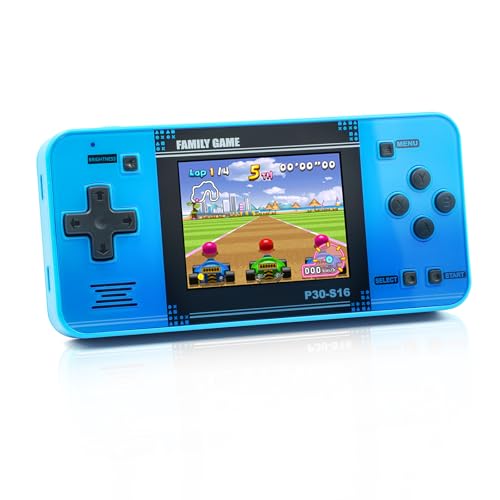
This kid-focused handheld emphasizes a compact 3.0″ high‑definition screen and a lightweight, ergonomic design. It ships preloaded with 220 games across entertainment, sports, and adventure genres, helping children develop hand‑eye coordination and problem solving as they play. The blue model is best for younger players who appreciate an arcade‑style form factor and simple controls. A potential limitation is the fixed game library, which means newer games require another device or download to expand the catalog.
Best for: Young children who want immediate, simple entertainment without setup. This device suits parents seeking a low‑friction, travel‑friendly toy that supports casual play and quick pick‑up sessions.
Retroid Pocket 5 Retro Handheld

The Retroid Pocket 5 blends Android power with a 5.5‑inch touchscreen for retro and modern indie gaming. It’s best for players who want flexible software access, including emulators, streaming services, and a broad game library once configured. It does not come with preload games, so users should plan time for initial setup and potential game downloads. The device supports WiFi 6/BT5.1 and features an Adreno 650 GPU for smoother gameplay on legacy and newer titles.
Best for: Retro enthusiasts and mobile gamers who want a versatile device with strong on‑the‑go performance. Choose this if you’re comfortable with initial setup and expanding your library over time.
ASUS ROG Xbox Ally Gaming Handheld

The ROG Xbox Ally integrates Xbox experience with Windows 11 in a handheld form, enabling access to Xbox Game Pass, Steam, Epic Games, and native Windows titles. It provides a large 7″ display, enabling immersive play and seamless library access across multiple game stores. A practical note is that this premium device targets gamers seeking an all‑in‑one PC‑console hybrid option, which may be overkill for casual handheld use.
Best for: Serious on‑the‑go gamers who want PC‑level access and a wide game library. Choose this if you prioritize a robust ecosystem and a larger screen, and you’re willing to invest in a higher‑end device.
PlayStation 5 Portal Remote Player

The PlayStation 5 Portal Remote Player enables cloud streaming and remote Play of PS5 titles. It is ideal for PlayStation households where the catalog is prioritized and when distributed access is needed across rooms. Data streaming quality depends on your network, and the device relies on a working PS5 library and active PlayStation Plus Premium access for full catalog streaming. It’s best for those who want to extend their PS5 experience beyond the TV screen.
Best for: PS5 owners who want to stream and access their library remotely. Avoid this if your internet connection is limited or you don’t own a PS5 console.
32 Bit Handheld Games for Kids, Blue

This handheld focuses on 139 32‑bit games with a 3.0″ IPS display offering vibrant visuals and a straightforward arcade joystick for precise control. Its compact form and colorful options target young players who enjoy a broad selection of casual, puzzle, and sports titles. A potential limitation is game variety limited to classic 32‑bit era titles, which might not satisfy players seeking modern releases.
Best for: Young gamers who want a bright, compact device with a large game library of classic titles. Choose this if you prefer a simple, travel‑friendly console over cutting‑edge performance.
Buying Guide: Key Purchase Considerations
- Content library: Do you want preloaded games, expandable libraries, or cloud streaming? Preloads are convenient for kids; open systems suit retro or indie fans better.
- Display and comfort: Screen size, resolution, and ergonomics affect long sessions. Larger screens are nicer for extended play; smaller ones are more portable.
- Platform ecosystem: Nintendo/PS/Xbox ecosystems offer dedicated libraries, while Android or PC‑oriented devices provide broader game access via emulators or stores.
- Battery life and charging: Look for reasonable battery life and easy charging, especially for handheld travel use.
- Portability vs. power: Balance the desire for compactness against the need for processing power and multitasking capabilities.
- Network requirements: Cloud streaming and remote play require reliable Wi‑Fi; consider your home network quality.
- Target user: Kids may prioritize simple controls and durability; adults may want performance and a broad library.
Frequently Asked Questions
- What is a handheld game console? A handheld game console is a portable device designed for playing video games on the go, with built‑in controls, a screen, and battery power.
- Do handhelds require an internet connection? It depends. Some rely on offline preloaded games, while others use Wi‑Fi for cloud streaming or online stores.
- Are emulators allowed on handhelds? Emulators can be used on compatible devices, but legality depends on the source of the ROMs and local laws.
- Which is better for kids: preloaded or expandable libraries? Preloaded options provide instant play with no setup; expandable libraries suit players who want a growing collection.
- Can these devices replace a home console? They are designed for portability and casual play; for exclusive titles or graphically intensive games, a home console or PC remains essential.
- What should I consider before buying? Screen quality, library access, comfort, battery life, and ecosystem compatibility are key factors to evaluate.