Answering the VR shopper’s question: these GPUs are selected for solid virtual reality performance, future-proof DLSS/FS features, and strong cooling. The top picks suit different buyers—from enthusiast gamers seeking raw frame rates to pros needing reliable VR-ready acceleration. The table below highlights the five chosen products and what they’re best for.
| Product | Best For | |
|---|---|---|
| ZOTAC Gaming GeForce RTX 5080 Solid | High-End VR Gaming | 16GB GDDR7, DLSS 4, strong cooling |
| ZOTAC Gaming GeForce RTX 5070 Solid | Mid-Range VR Builds | 12GB GDDR7, DLSS 4, compact/efficient |
| ASUS ROG STRIX GTX 1080 Ti (Renewed) | Legacy VR Enthusiasts | 11GB GDDR5X, OC headroom, broad compatibility |
| ZOTAC Gaming GeForce RTX 5070 White Edition | Stylish VR Setup | 12GB GDDR7, DLSS 4, compact cooling |
| MSI RX 6600 XT MECH 2X 8G OC | VR on a Budget | 8GB GDDR6, FreeSync, solid VR performance |
ZOTAC Gaming GeForce RTX 5080 Solid – 16GB DLSS 4 VR Ready

Best for: gamers who want ultra-smooth VR with the latest DLSS 4 and ample VRAM. This card brings 16GB of GDDR7 on a 256-bit bus, 30 Gbps memory speed, and PCIe 5.0 support for faster data transfer. IceStorm 3.0 cooling and multiple fans help maintain steady performance in long VR sessions. Choose this if you prioritize maximum texture detail and future-proofing for demanding VR titles.
Why selected: It combines a high-capacity memory subsystem with advanced cooling for sustained VR frames. The 30 Gbps memory supports higher bandwidth for VR workloads, and DLSS 4 assists with upscaling without sacrificing image quality. Best for users who want a premium VR experience and plan to run high-resolution headsets or future titles.
Caution: The card is power-hungry; ensure your case and PSU support the required wattage and clearance for the triple-fan cooler. VR performance also depends on system CPU and RAM balance.
ZOTAC Gaming GeForce RTX 5070 Solid OC – 12GB DLSS 4

Best for: mid-range VR builds that still demand DLSS 4 acceleration. Features include 12GB GDDR7 on a 192-bit bus and PCIE 5.0, with IceStorm 2.0 cooling and Pass-thru Airflow Design. This card is a strong balance of price-to-performance for VR gaming and development workloads.
Why selected: The 12GB memory provides ample VRAM for many modern titles at comfortable resolution scales. The compact IceStorm 2.0 cooler supports quieter operation while maintaining temps under load, making it a practical choice for standard VR setups.
Caution: Memory bandwidth is lower than the 5080’s; very high-res VR titles might push it, so pairing with a capable CPU and adequate RAM remains important.
ASUS ROG STRIX GTX 1080 TI VR Ready (Renewed)
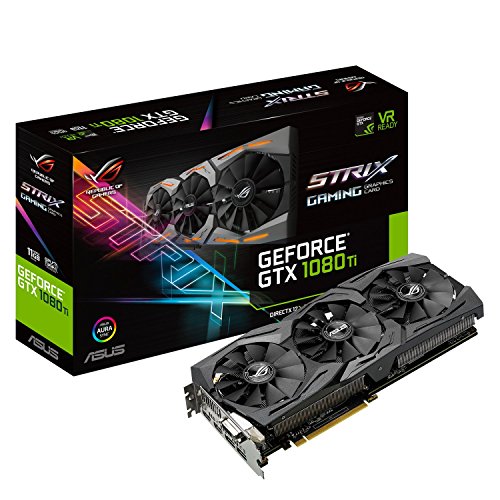
Best for: users needing broad VR compatibility on a budget with legacy titles or older VR engines. The GTX 1080 Ti’s 11GB GDDR5X offers robust performance for many VR titles, with OC potential and strong driver support for older VR ecosystems.
Why selected: It remains a practical option for VR setups that do not require the latest architecture but still demand reliable frame rates. The ROG branding implies robust cooling and stability in longer sessions.
Caution: This is a refurbished/renewed card, so consider seller warranty and potential cosmetic imperfections. Power efficiency and feature set lag behind newer RTX cards.
ZOTAC RTX 5070 White Edition – DLSS 4

Best for: VR setups with a preference for a stylish, compact design. The 12GB GDDR7 memory and 192-bit bus provide solid VR performance with DLSS 4, while the IceStorm 2.0 cooling system maintains cooler operation in extended sessions.
Why selected: This model offers a balance of price, performance, and aesthetics for users who want a VR-capable card that looks as good as it performs. The White Edition is a design-conscious choice for enthusiasts building a visually cohesive rig.
Caution: For very demanding titles at the highest detail levels, you may push memory bandwidth limits more quickly than larger-bus cards.
MSI RX 6600 XT MECH 2X 8G OC

Best for: VR on a budget without sacrificing essential VR readiness. The RX 6600 XT MECH 2X delivers solid VR performance with FreeSync and 8GB GDDR6, ideal for entry-to-midrange VR headsets and titles.
Why selected: It provides a good level of VR frame rates at reasonable settings and low power consumption compared to newer generations. The dual-fan MECH design helps maintain steady thermals in compact builds.
Caution: 8GB VRAM may constrain some high-resolution, texture-heavy VR titles at maximum settings. Consider headroom for future-proofing if you expect growth in VR workloads.
Buying Guide: How To Choose A VR-Ready GPU
- What VR headset resolution and refresh rate are you targeting? Higher resolutions and higher refresh rates demand more VRAM and GPU bandwidth.
- How important is DLSS or upscaling to your setup? GPUs with DLSS 4 support can improve perceived image quality without a huge hit to performance.
- What is your budget and desired upgrade path? Newer architectures offer longer-term headroom; older cards may still satisfy VR needs at a lower cost.
- What about system balance? A strong CPU and sufficient RAM maximize VR performance; a bottleneck on the CPU can limit your VR experience regardless of GPU.
- Cooling and case compatibility matter. Evaluate cooler size, intake/exhaust airflow, and PCIe slot clearance, especially for triple-fan designs.
- VR-specific considerations: some cards emphasize quieter operation and pass-through airflow, which can matter for immersive experiences during long sessions.
Frequently Asked Questions
- Q: Do I need a top-tier GPU for VR? A: Not always; it depends on headset resolution, target frame rate, and the titles you play. Mid-range GPUs can handle many VR experiences well.
- Q: Is 16GB of VRAM essential for VR gaming? A: It helps with texture detail and future titles, but many VR titles run well with 8–12GB in mid-range cards.
- Q: Should I prioritize DLSS 4 support? A: If you value higher frame rates at higher resolutions, DLSS 4 can substantially improve visuals without as much performance sacrifice.
- Q: Are refurbished GPUs risky for VR? A: Refurbished units can be reliable, but verify seller warranties and return policies before purchase.
- Q: How important is cooling for VR GPUs? A: Very important, as VR sessions can be long and intense. Efficient cooling reduces throttling and maintains stable performance.