Direct answer: for true 4K gaming, choose GPUs with ample VRAM, strong cooling, and a modern architecture. The top five options below are selected for 4K readiness, with seats at the high end of performance and reliable cooling. The buyers who benefit most include enthusiasts building a 4K-capable PC, content creators pushing 4K workflows, and gamers seeking smooth 4K gameplay with future-proof features. The list balances AI features, ample memory, and robust cooling to handle modern titles at 4K with high settings.
Below is a quick comparison of the chosen GPUs to help you decide at a glance:
| GPU Model | Memory | Architecture | Cooling/Design Notes | Best For |
|---|---|---|---|---|
| GIGABYTE Radeon RX 9070 XT Gaming OC ICE 16G | 16 GB GDDR6 | RDNA 4 (RX 9070 XT) | WINDFORCE cooling with server-grade gel, Hawk fans, reinforced structure | Flagship 4K gaming and future-proofing on AM5 platforms |
| ASRock Radeon RX 9060 XT Challenger 16GB OC | 16 GB GDDR6 | RDNA 4 | Dual/efficient cooling with heavy-hitting performance | High-refresh 4K on a 2-slot form factor |
| ASRock Radeon RX 9060 XT Steel Legend 16GB OC | 16 GB GDDR6 | RDNA 4 | Triple fan cooling with 0dB operation under light load | Silent 4K gaming with strong performance |
| ASRock Radeon RX 7700 XT Challenger 12GB OC | 12 GB GDDR6 | RDNA 3 | Triple/dual-fan cooling, 2.1 display support | High-quality 4K at a lower memory footprint |
| XFX Swift AMD Radeon RX 9060 XT OC 16GB | 16 GB GDDR6 | RDNA 4 | Triple fan cooling, OC edition | Strong 4K performance with aggressive cooling |
GIGABYTE Radeon RX 9070 XT Gaming OC ICE 16G
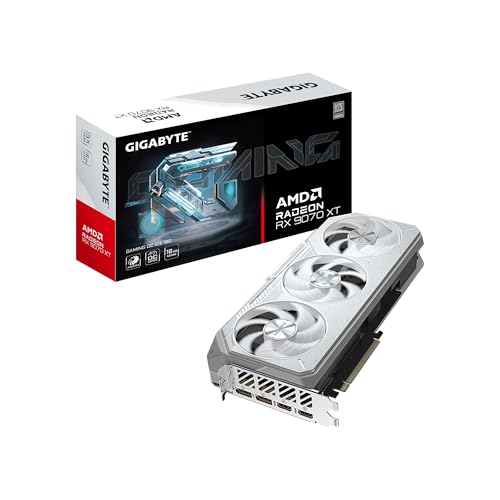
The GIGABYTE RX 9070 XT is built for 4K gaming with 16GB of GDDR6 memory and a 256-bit interface. It supports PCIe 5.0 and DisplayPort 2.1, enabling high-bandwidth display setups and future-proofing for demanding titles. The WINDFORCE cooling system combines server-grade thermal gel, Hawk fan technology with alternate spinning, copper heat pipes, and a solid copper plate to optimize thermal performance. RGB lighting offers customizable effects, which can be synchronized with other GIGABYTE devices via the Control Center.
Best for: Enthusiasts who want the top-end Radeon experience with advanced cooling and future platform compatibility. Caution: The large cooler and power needs may require ample case space and a strong power supply.
XFX Swift AMD Radeon RX 9060 XT OC Triple Fan Edition

The XFX RX 9060 XT OC features 16GB of GDDR6 with a triple-fan cooling system, designed to sustain higher clocks in 4K workloads. It leans into the OC edition, aiming for higher performance while maintaining stable thermals. This card is well-suited for gamers who want robust cooling without compromising space inside a mid-to-large chassis.
Best for: Gamers seeking aggressive cooling and strong 4K performance in a mid- to full-tower build. Caution: OC settings may require careful power management and proper airflow in smaller cases.
ASRock Radeon RX 9060 XT Steel Legend 16GB OC

The Steel Legend variant emphasizes silent operation with a triple-fan cooling approach and a 0dB mode under low loads. With a 3275 MHz boost clock and 16GB VRAM on an RDNA 4 architecture, it targets 4K gaming with strong frame consistency while keeping acoustics low in idle-to-medium load scenarios.
Best for: Users who want quiet 4K gaming without sacrificing performance. Caution: Verify chassis clearance and power supply headroom due to its 3-slot-like design and high boost clocks.
ASRock Radeon RX 7700 XT Challenger 12GB OC

The 7700 XT Challenger offers a solid RDNA 3 architecture with 12GB of GDDR6 memory and a 192-bit bus. It reaches high clock speeds (boost up to 2584 MHz) and includes 2.1 DisplayPort and HDMI 2.1 outputs, making it suitable for 4K gaming and content creation at a strong price-to-performance ratio. It is a good option for those who want robust 4K capabilities without the extreme VRAM requirements of higher-end RDNA 4 cards.
Best for: 4K gamers who want reliable 4K performance with good future-proofing in a compact footprint. Caution: 12GB may be limiting for extreme 4K workloads with heavy asset streams in the very latest titles.
XFX Swift AMD Radeon RX 9060 XT OC Triple Fan (Alternative)

This XFX variant resembles the OC edition with triple fan cooling and 16GB of GDDR6. It targets 4K performance with stable thermals and clock boosts that support demanding titles. This can be a strong choice for those who prioritize cooling headroom and stable 4K output.
Best for: Users who want an aggressive cooling profile for long gaming sessions at 4K. Caution: Availability and exact performance can vary by model revision and cooling configuration.
Buying Guide: Key Considerations For 4K-Gaming GPUs
- Memory capacity and bandwidth: For 4K gaming, 14–16 GB GDDR6+ is preferable to handle high-resolution textures and future titles.
- Architecture and features: RDNA 4 and RDNA 3 offer feature sets optimized for 4K and AI acceleration; consider DisplayPort 2.1 and HDMI 2.1 compatibility for high-refresh-rate displays.
- Cooling and acoustics: Look for triple- or dual-fan solutions and options like 0dB modes for quiet operation during light loads.
- Power and compatibility: Verify power supply capacity and case clearance, especially for larger, multi-slot cards and PCIe 5.0 readiness.
- Future-proofing: PCIe 5.0 support and AI-enabled features can help maintain performance with upcoming games and software.
Frequently Asked Questions
- What makes a GPU good for 4K gaming?
- Is RDNA 4 better than RDNA 3 for 4K?
- Do I need 16GB of VRAM for 4K gaming?
- What cooling setup should I look for in a 4K GPU?
- Is PCIe 5.0 important for 4K gaming?
- Which GPU would you choose for a compact build?
A GPU with ample VRAM (ideally 16 GB), modern architecture, strong cooling, and support for high-bandwidth display interfaces like DisplayPort 2.1 or HDMI 2.1 is well-suited for 4K gaming.
RDNA 4 generally offers improved performance and AI acceleration features over RDNA 3, which can translate to better 4K frame rates in modern titles.
While not strictly necessary for all titles, 16GB helps with future-proofing and higher texture resolutions, especially in open-world or texture-heavy games at 4K.
Triple- or dual-fan designs with heat pipes, reinforced copper components, and low-noise operation modes are favorable for long 4K sessions.
PCIe 5.0 provides higher bandwidth that can be beneficial for next-gen GPUs and CPUs, but PCIe 4.0 remains capable for current 4K gaming in many setups.
For a compact build, consider a 2-slot or slim-profile variant like the ASRock RX 9060 XT Challenger, which balances performance with chassis compatibility.