Answering the question, these GPUs are optimized for solid 1080p gaming, streaming, and light creative work. The top picks below balance price, cooling, and performance for mainstream 1080p setups. Best for budget upgraders, entry-level gamers, and compact builds seeking steady frame rates at 1080p with low-noise operation.
| Product | |||
|---|---|---|---|
| OKAMUS RX 590 8GB | RX 590 | 8GB GDDR5 | Mid-range 1080p gaming, streaming |
| AeXdream RX 590 8GB | RX 590 | 8GB GDDR5 | Budget 1080p gaming, multimedia |
| XFX RX 7600 SWFT210 | RX 7600 | 8GB GDDR6 | 1080p with modern DX12 titles |
| 51RISC GTX 1660 Ti | GTX 1660 Ti | 6GB GDDR6 | 1080p esports and mainstream games |
| ASRock RX560 Phantom | RX 560 | 2GB GDDR5 | Budget 1080p classics and light esports |
OKAMUS RX 590 8GB: Smooth 1080p Gaming
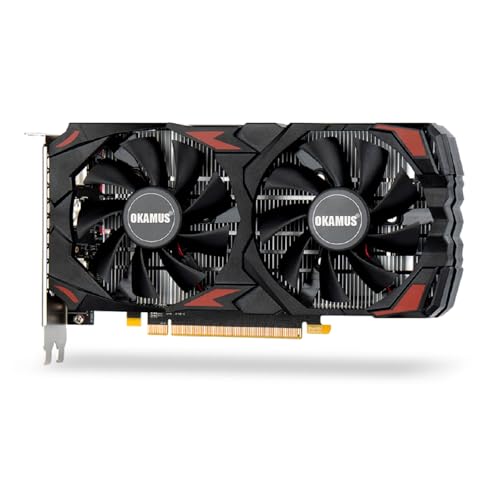
Best for: Budget-conscious gamers upgrading from older cards who want reliable 1080p performance in popular titles. This RX 590 model uses 2304 stream processors and 8GB of GDDR5 memory to deliver stable frame rates at high settings in many 1080p games. Dual fan cooling helps maintain cooler operation and lower noise, suitable for mid-tower builds and home setups where silence matters.
Why chosen: It balances memory capacity with a robust GPU core, providing solid 1080p performance without high power demands. The dual-fan design is a practical improvement for thermals and acoustics in compact or quieter builds. It also supports multiple outputs for versatile display setups.
Caution: Availability and driver support can vary; ensure your motherboard and power supply are compatible with PCIe 3.0 x16 and an 8-pin input requirement. May underperform at the highest settings in the latest AAA titles at 1080p.
AeXdream RX 590 8GB: Solid 1080p Value
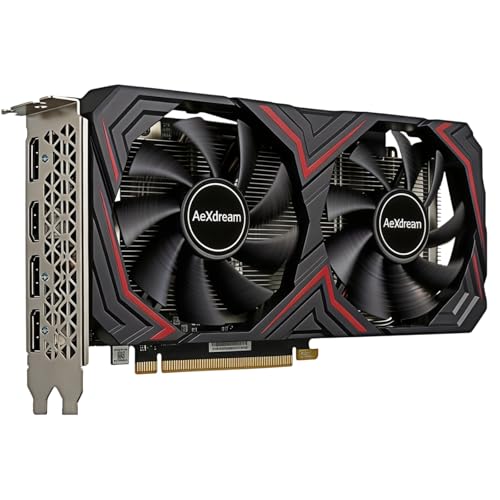
Best for: Budget builds needing dependable 1080p performance and smooth video playback. This RX 590 card features 8GB VRAM and dual-fan cooling to help maintain stable performance during longer gaming sessions and multimedia tasks.
Why chosen: The 8GB VRAM helps with higher texture settings and multitasking workloads common in 1080p gaming and streaming setups. Dual fans improve cooling and potentially reduce noise compared to single-fan designs.
Caution: The card is a generation behind newer RDNA offerings; expect diminishing returns on newer titles at the highest settings. GPU power and driver support may require periodic updates for optimal results.
XFX Speedster SWFT210 RX 7600: Modern 1080p Performance

Best for: Gamers who want a newer architecture for 1080p gaming, with faster ray tracing and efficiency. The RX 7600 with 8GB GDDR6 and the SWFT cooling solution is well-suited for recent titles at high settings in 1080p.
Why chosen: RDNA 3 technology in the RX 7600 commonly yields better efficiency and feature support, along with multiple DisplayPort/HDMI outputs for multi-monitor setups. This makes it a strong all-around option for 1080p gaming and light content creation.
Caution: A compact 2-slot design may limit clearance in smaller cases. Check PCIE slot availability and PSU headroom before purchase.
51RISC GTX 1660 Ti: Budget Upgrader

Best for: Budget gamers seeking a noticeable jump in 1080p performance without a large power draw. The GTX 1660 Ti is a solid choice for esports titles and many modern 1080p games with medium to high settings.
Why chosen: It offers a balanced combination of price-to-performance, efficient power usage, and broad compatibility with PCIe 3.0 systems. Display outputs include DVI, HDMI, and DisplayPort for flexible monitor setups.
Caution: It’s older than the RX 6000/70-series and may struggle with newer AAA titles at the highest settings in 1080p. Driver support and feature set are not as robust as newer generations.
ASRock RX560 Phantom: Entry 1080p Card

Best for: Absolute budget builds, older systems, or users prioritizing energy efficiency. The RX 560 is capable of 1080p gaming in esports titles and lighter modern games at reduced settings.
Why chosen: The card provides a cost-effective upgrade path for 1080p gaming with a low-power footprint. Its smaller size and modest cooling needs suit compact desktops or office PCs converted for gaming.
Caution: 2GB memory in real-world gaming is limiting for newer titles; ensure the card meets your minimum memory needs for the titles you play.
Buying Guide: Key Considerations For 1080p GPUs
- Performance targets: If you want consistently high frame rates in latest titles at 1080p, prioritize cards with 6GB–8GB VRAM and modern architectures (Rx 5600/7600, GTX 1660 Ti, or RX 590 lineage).
- Memory and bandwidth: 8GB GDDR5/6 is more flexible for textures and multitasking; 2GB options are strictly for very light workloads or esoteric retro titles.
- Cooling and noise: Dual-fan designs typically offer better thermal management and quieter operation than single-fan variants, especially in small or quiet builds.
- Power and compatibility: Check power supply capacity and available PCIe power connectors. Some cards require 6-pin/8-pin inputs; ensure your system can support them.
- Display setup: If planning multi-monitor configurations, ensure the card provides enough outputs and supports 1080p across displays.
- System balance: For older CPUs or limited RAM, pairing with a strong 1080p GPU won’t reach its full potential. Consider a balanced overall upgrade.
Frequently Asked Questions
- Is a GTX 1660 Ti good for 1080p gaming? Yes, it offers solid 1080p performance in many titles, especially esports and mid-range games, with moderate power usage.
- Is it worth upgrading to a RX 7600 for 1080p? For newer titles at higher settings, the RX 7600 provides better efficiency and newer features, making it a strong 1080p choice.
- Do 2GB GPUs work for modern 1080p gaming? They can run older or less demanding titles, but you may need to lower textures or resolution for newer games.
- What’s the advantage of dual-fan cooling? It helps sustain higher performance by reducing thermal throttling and lowers noise during longer gaming sessions.
- Should I consider a prebuilt PC with a 1080p target? Prebuilts can offer a bundled solution with compatible components, but compare your budget and upgrade path carefully.