If you need a reliable way to locate keys, wallets, luggage, or bags, this guide highlights five top GPS/tracker tags designed for different ecosystems. The list covers Android-friendly trackers, Apple Find My-compatible tags, and cross-platform options. Buyers are advised to pick based on device compatibility, network reach, and whether you prefer Find My or Google Find Hub ecosystems. The top picks suit practical buyers like Android-only users, iPhone households, and travelers seeking luggage trackers with long battery life.
| Product | Best For | Key Benefit |
|---|---|---|
| Air Tags for Android, Air Tags-4 Pack (Vodyfu) | Android users needing Google Find Hub integration | Long battery life up to 2 years; loud alert; IP65 waterproof |
| Tracker Tag (4 Pack) – Apple MFi Certified (MSEBENT) | iPhone/Find My users needing multiple trackers | Works with Find My network; no subscription; replaceable battery |
| Air Tags for Android, Air Tags-4 Pack (KIUP) | Mixed Android/iOS environments seeking cross-ecosystem use | Up to 105dB alert; long battery life; supports Find Hub and Find My |
| Apple AirTag (2nd Gen) – 4 Pack | Apple ecosystem users seeking reliable Find My integration | Expanded precision finding; louder speaker; easy one-tap setup |
| Air Tracker Tags-4 Pack (aowoka) | iOS-only users needing Find My integration | Lost Mode and privacy-focused; Bluetooth plus Find My network |
Note: The table summarizes only selected products from the list to align with the article’s focus on cross-ecosystem and platform-specific trackers. Availability and compatibility may vary by region and device model.
Air Tags for Android — Vodyfu (4 Pack)

Overview: This Android-focused tag claims compatibility with Google Find Hub, offering global cloud positioning and a loud 85dB alert. Its strongest selling point is battery life, advertised up to two years, making it a practical choice for everyday items such as keys or wallets. The device is IP65 waterproof, which suits travel and luggage use. It does not claim GPS but relies on device networks for locating items when connected.
Who it’s best for: Android users who want Google Find Hub integration and a long-lasting battery for luggage, keys, and wallets. It is ideal for travelers who need a robust buzzer alert to quickly pin down misplaced items in busy environments.
Why selected: It balances cross-network tracking (Google Find Hub) with a strong battery life and a clear speaker. The IP65 rating adds practical durability for travel and daily mishaps.
Caution: Android-only Find Hub integration means it does not support iOS Find My; users should ensure their devices can access Google’s Find Hub for updates.
Tracker Tag (4 Pack) — Apple MFi Certified (MSEBENT)
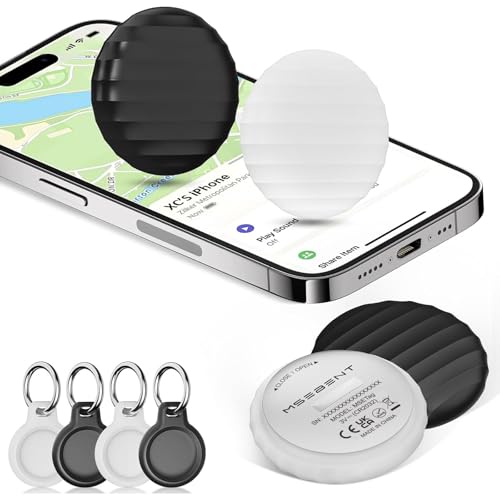
Overview: A 4-pack designed for Apple Find My network. The tags are iOS-focused and include a slim form factor with replaceable batteries, providing a practical no-subscription solution for tracking keys, luggage, wallets, and bags.
Who it’s best for: iPhone or iPad users who want to share Find My access with family members and track multiple items without monthly fees. It’s a logical choice for households deeply integrated into Apple’s ecosystem.
Why selected: It leverages Find My network sharing and a compact design for everyday carry, emphasizing easy setup via Find My and no ongoing costs.
Caution: Not compatible with Android devices; set expectations accordingly if you have mixed device use in your household.
Air Tags for Android — KIUP (4 Pack)

Overview: KIUP’s Android-friendly tags promise compatibility with Google Find Hub and Apple Find My, offering a broad reach if you frequently switch between platforms. The 105dB alarm helps locate items quickly, and the two-year battery life complements frequent travelers or urban dwellers who misplace items in public spaces.
Who it’s best for: Users who want to cover both Android and iOS devices, or households with mixed devices, and who value a strong audible alert.
Why selected: The cross-ecosystem appeal is a practical advantage for multi-device households, while the higher-decibel alarm helps in noisy settings.
Caution: Some features rely on using Find Hub in Android or Find My in iOS; check platform support in your area before purchase.
Apple AirTag 2nd Gen (4 Pack)
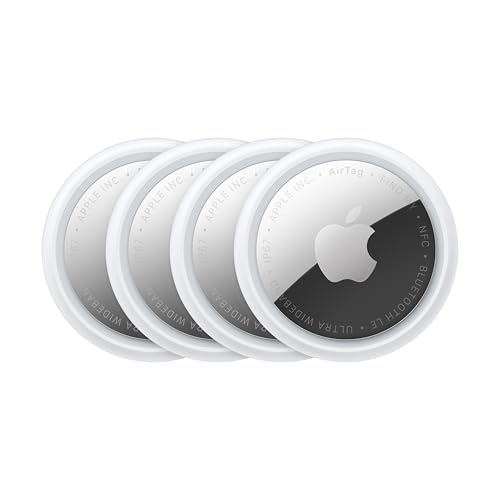
Overview: Apple’s AirTag 2nd generation remains a central option for those heavily invested in the Find My network. It features expanded precision finding, a louder speaker, and a simple setup with iPhone or iPad, making item recovery easier and more intuitive in Apple-centric environments.
Who it’s best for: Apple ecosystem users seeking the most seamless integration with Find My and Apple Watch support for on-wrist access to lost-item directions.
Why selected: It’s a mature solution with strong ecosystem support, improved hardware, and an emphasis on reliable, out-of-range tracking through the Find My network.
Caution: Best experience requires Apple devices; Android users may find limited cross-platform functionality compared to other options.
Air Tracker Tags-4 Pack — aowoka (iOS Only)

Overview: The aowoka Air Tracker Tags are positioned for iOS users who want to leverage the Find My network without a subscription. The package includes four tags designed for keys, luggage, and bags, with features like Lost Mode and privacy-focused design.
Who it’s best for: iOS-only households that want a multi-tag solution integrated into the Find My ecosystem, with privacy-conscious communication and location sharing capabilities.
Why selected: It emphasizes Find My-based location sharing and item alerts while avoiding subscription complexity, aligning with users who value privacy and ease of use.
Caution: Not compatible with Android devices; ensure your devices and apps are updated for the latest Find My features.
Buying Guide: How To Choose The Right GPS Tracker Tag
- Platform compatibility: Decide whether you primarily use Android, iOS, or both. Some tags work only in one ecosystem, while others offer cross-ecosystem support.
- Network dependencies: Some trackers rely on Google Find Hub, Find My network, or Bluetooth range with crowd-sourced location. Consider your typical environments (home, office, travel).
- Battery life: Look for long-life batteries (2 years in some models) for low-maintenance use. Battery type (replaceable vs built-in) affects convenience and cost over time.
- Alerts and sounds: A louder alert helps locate items in noisy settings. Check the advertised dB level and consider whether you need a loud alarm in airports, halls, or car trunks.
- Durability: IP ratings (like IP65) indicate water resistance and dust protection. This matters for luggage, backpacks, and outdoor use.
- Size and weight: Slim tags are easier to attach to keys, wallets, or luggage handles. Ensure the form factor fits your items without snagging.
- Subscription costs: Most Find My-based solutions do not require ongoing fees, but confirm whether any optional features carry costs in your region.
FAQs
- Do all trackers work with both Android and iPhone? The answer: Not always. Some tags are Android-only or iOS-only, while others support cross-platform use. Verify compatibility with your devices before buying.
- Can I share a Find My tag with family? For iOS Find My tags, yes. You can share access with other people via Find My app. Android-based trackers may have different sharing options.
- What happens if the item is out of Bluetooth range? Some tags use a crowd-sourced network (Find My or Google Find Hub) to provide the latest location when nearby devices detect the tag.
- Is there a subscription fee for these trackers? In general, most Find My-based trackers do not require ongoing subscriptions, but verify regional terms and any optional services.
- Which tracker is best for luggage? Look for IP65 or higher water/dust resistance, long battery life, and a loud alert. Apple AirTag and cross-ecosystem KIUP/Aowoka tags are common luggage choices.
- What’s the best choice for Android users? Android-friendly trackers with Google Find Hub integration and strong battery life are ideal, such as the Vodyfu and KIUP Android-compatible options.