Answering the question, these are the best phone gimbals that deliver stable, cinematic-looking footage for both beginners and creators on the go. They’re ideal for vloggers, travel shooters, and social media enthusiasts who want steady video without a heavy rig. Top picks are best for solo creators, quick setups, and those who value tracking features. The following selections emphasize portability, ease of use, and reliable stabilization to help you capture clearer footage in dynamic environments.
Summary Table: Picked Phone Gimbals
- DJI Osmo Mobile 7 — Best for overall balance of stability and foldable design
- DJI Osmo Mobile 8 — Best for built-in lighting and faster tracking
- Hohem iSteady X3 SE — Best for long-distance remote control and travel
- COMITOK L7C Pro — Best for AI tracking and professional-style shots
- AOCHUAN Smart XE — Best for all-day shooting and versatile modes
DJI Osmo Mobile 7 Gimbal Stabilizer

Best for everyday creators seeking a compact, foldable 3-axis gimbal with solid stabilization. The Osmo Mobile 7 emphasizes lossless stability and cinema-like results, making it a reliable choice for mobile filmmakers who want a ready-to-shoot kit without extra gear. Its integrated tripod and foldable design simplify travel and solo shoots.
Who it’s best for: solo vloggers, travel creators, and social media content producers who value a simple setup and robust stabilization in a portable package. Why selected: combines strong 3-axis stabilization with a practical foldable form and built-in tripod for flexible shooting.
Caution: Some users may prefer more advanced features found on newer models; ensure the app supports your phone’s OS for best results.
DJI Osmo Mobile 8 Gimbal Stabilizer

Best for creators who want enhanced tracking and lighting integration. The Osmo Mobile 8 combines native tracking with audio and lighting improvements, plus seamless 360° pan rotation. It suits shoots where subject tracking and lighting are critical, such as interviews or vlogs in varied environments.
Who it’s best for: interviewers, on-the-go reporters, and creators needing flexible lighting and reliable tracking. Why selected: built-in lighting and refined tracking provide a more polished look in diverse scenes.
Caution: The added features may increase setup time slightly; ensure you have space for the 360° pan range in tight spots.
DJI Osmo Mobile 7P Gimbal Stabilizer

Best for creators who want a compact setup with advanced tracking in a single package. The 7P adds a multifunctional module that packs intelligent tracking, wireless microphone reception, and lighting. This makes it a strong all-in-one solution for stylized shoots and quick edits.
Who it’s best for: creators who want integrated accessories for better sound, lighting, and tracking in one unit. Why selected: it streamlines production workflows with ShotGuides and One-Tap Edit in the DJI ecosystem.
Caution: The additional module adds weight and cost; consider if you primarily need core stabilization without extras.
COMITOK L7C Pro 3-Axis Phone Gimbal

Best for AI-driven tracking and lightweight professional workflow. The L7C Pro highlights upgraded 3-axis stabilization and a 6-inch folded size for portability. It targets those who want intelligent tracking and smooth footage without carrying heavy gear.
Who it’s best for: aspiring videographers and content creators who value AI tracking and a compact, foldable design. Why selected: emphasizes professional-grade stability with advanced tracking and a compact footprint.
Caution: The app-based controls and tracking rely on software updates; verify compatibility with your phone and app marketplace before purchase.
AOCHUAN Smart XE 3-Axis Gimbal
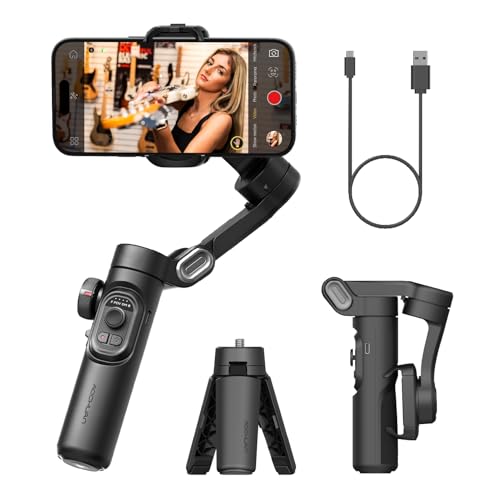
Best for all-day shooting with versatile foldable design and quick mode switching. The Smart XE supports a broad range of smartphones and offers a one-click switch between horizontal and vertical modes, which is ideal for quick social media content without fiddling with settings.
Who it’s best for: vloggers and mobile filmmakers who need fast mode changes and a compact, travel-ready stabilizer. Why selected: strong balance between stability, compatibility, and ease of use.
Caution: Payload and phone size may affect balance; check compatibility with your specific device model before buying.
Buying Guide: How To Choose The Right Phone Gimbal
- Stabilization Quality: Look for 3-axis gimbals for the best stabilization across pans, tilts, and rolls. Consider how well the gimbal handles fast movements and low-light scenarios.
- Weight And Portability: If you travel often, prioritize foldable designs and lighter models. A compact stabilizer reduces fatigue during long shoots.
- Tracking Features: AI tracking and subject-follow modes help keep subjects in frame. Evaluate the responsiveness and accuracy of tracking in real-world use.
- Additional Features: Built-in tripods, lighting, or detachable remotes can add value. Consider whether you need these extras or prefer a leaner setup.
- Phone Compatibility and App Support: Confirm compatibility with your phone model and operating system. Check app updates and features like One-Tap Edit or ShotGuides if you plan to edit on device.
- Battery Life: Longer battery life supports longer shoots. Consider whether you’ll be charging on-location and how that integrates with your setup.
Frequently Asked Questions
- What is a phone gimbal and how does it help my videos?
- Do I need a gimbal with AI tracking?
- Can I use any smartphone with these gimbals?
- Are built-in lighting and remotes worth it?
- How important is battery life for on-the-go filming?
- Should I choose a gimbal with a tripod or selfie stick built-in?
A phone gimbal is a motorized stabilizer that keeps your phone’s camera steady by compensating for shakes and movements. It produces smoother, more professional-looking footage, especially during walking shots or dynamic scenes.
AI tracking helps keep a subject centered automatically, which is useful for solo shooting. It’s especially helpful for dynamic environments where you can’t constantly adjust framing.
Most listed gimbals support a wide range of phones, but always check the weight, width, and compatibility specs for your model before purchasing.
Built-in lighting can improve shots in low-light conditions; remotes allow distant control for self-recording or group shots. Consider your typical shooting scenarios when deciding.
Battery life matters for long shoots or travel days. Look for models with at least several hours of continuous use and convenient recharging options.
A built-in tripod or selfie stick adds versatility for static shots or group selfies. If you film primarily on the move, a flexible design may be more practical.