If you’re seeking a convenient, plug-and-play game emulator console to enjoy classic titles on a TV, these options deliver large game libraries, 4K HDMI output, and wireless controllers. This guide highlights five models that balance breadth of games with ease of use, helping you choose the right fit for solo gaming, family gatherings, or retro game marathons.
Product snapshot:
| Product | Library | Output | Best For |
|---|---|---|---|
| HRYYDS 2026 Retro Gaming Console Pro | 40,000+ games, 23 emulators | 1080P & 4K | Players who want a zero-setup, couch-co-op experience |
| ATGSZVL Retro Gaming Console Stick Pro | 40,000+ games, 23 emulators | 1080P & 4K | Family gaming with longer wireless range |
| Kinhank 4TB Retro Game Hard Drive | 75,000+ games, 200+ collections | 4K HDMI via external drive setup | Hard-core retro fans with large libraries |
| TEFELE 2026 New Retro Game Console | 40,000+ games, 23 simulators | 4K HDMI | Compact plug-and-play with modern storage |
| MUSBOY Wireless Retro Game Console | 25,250+ games, 9 emulators | 4K HDMI | Casual gatherings and quick-start nostalgia |
HRYYDS 2026 Retro Gaming Console Pro

The HRYYDS Pro offers a plug-and-play setup with 40,000+ pre-installed games across 23 emulators on a 64GB system. It supports 1080P and 4K HDMI output and includes wireless controllers with stable 2.4GHz connectivity up to 40 feet. Best for solo players who want immediate access to a broad game catalog without configuration, and for households prioritizing couch co-op sessions. Caution: with many titles preloaded, some titles may require storage management to maintain performance over time.
ATGSZVL Retro Gaming Console Stick Pro

The ATGSZVL Stick Pro mirrors the HRYYDS library with 40,000+ games across 23 emulators on a compact stick. It features 2.4GHz wireless controllers with up to 50 feet range, offering solid performance for living-room multiplayer. Best for families and friends who want a sleek, space-saving console with broad compatibility. Consideration: wireless range is impressive, but environments with many wireless devices could introduce occasional interference.
Kinhank 4TB Retro Game Hard Drive 6 In 1

The Kinhank 4TB drive uses a 3.5-inch form factor for 75,000+ games across 6 game front ends and 200+ collections. It supports Windows 7 and newer systems and includes a high-speed SATA 3.0 to USB 3.0 interface. Best for power users who want a massive library and flexible front-end options. Limitation: setup may be more involved, and performance depends on host system specs for large titles.
TEFELE 2026 New Retro Game Console

The TEFELE model ships with 128GB storage and 23 simulators, delivering 4K HDMI output with an extended HDMI cable for larger displays. It emphasizes a straightforward plug-and-play setup, letting users switch on and start playing quickly. Best for buyers who want strong modern storage with a robust retro library. Caution: extensive 3D titles may demand careful storage management to keep load times optimal.
MUSBOY Wireless Retro Game Console

The MUSBOY console features 25,250+ built-in games across 9 emulators and supports 4K HDMI output with dual 2.4GHz wireless controllers. It’s best for casual players who want quick access to a broad nostalgic catalog and comfortable multiplayer sessions. Limitation: more complex emulation setups or niche titles may require additional tweaks beyond plug-and-play use.
ANGFA Wireless Retro Gaming Console
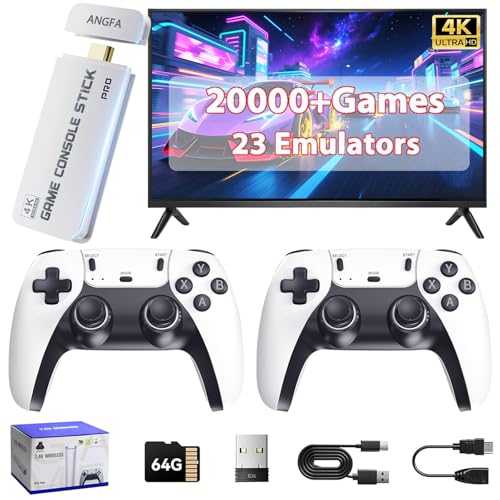
The ANGFA stick offers 20,000+ games and 23 emulators with 4K HDMI output and 2.4GHz wireless controllers for up to 40 feet. It’s a solid pick for buyers who want a cost-effective option with a solid library and multiplayer capability. Caution: the library is substantial but not as expansive as the top-end 75,000+ game drives, so set expectations accordingly.
Kinhank Retro Game Console Pro

The Kinhank Pro blends a dual-system approach with 37,000+ games across 55+ emulators on a 4K-capable setup. It also highlights a future-friendly Linux-based open environment and 64-bit capable performance with the S905X chip. Best for experienced users seeking a versatile, multi-emulator experience and the ability to save game progress. Limitation: may require more technical setup compared to plug-and-play sticks.
Buying Guide
What should you look for in a game emulator console?
- Library size vs. emulation breadth: more games are great, but reliable emulation across the core classics matters for playability and compatibility.
- Output quality: 4K versus 1080p; ensure your TV or projector supports your preferred resolution for crisp visuals.
- Storage and expandability: built-in storage ranges from 64GB to 128GB; consider models with expandable storage or large preloads if you want to access thousands of games quickly.
- Wireless controllers and range: longer ranges reduce interruptions during couch play and multiplayer sessions.
- Ease of setup: plug-and-play options are ideal for immediate use, while others may require more configuration but offer customization.
- Platform ecosystems: some devices offer a mix of emulation front ends and Linux-based flexibility for advanced tweaks.
FAQ
- What is a game emulator console? – A device that runs classic video games via pre-installed libraries and emulators, often outputting to a TV via HDMI.
- Do these devices require internet to play? – Many are plug-and-play with offline libraries, but some models may benefit from occasional updates or additional downloads for emulators or titles.
- Is 4K HDMI necessary for retro games? – Not strictly, but 4K output can improve image quality on modern TVs and displays.
- Can I add more games to these consoles? – Some devices support adding games through external storage or software upgrades; check compatibility for each model.
- Are all emulators legal to use? – Emulation itself is generally legal when using legally obtained games, but store and manage games responsibly within local laws.
- Which console is best for multiplayer? – Models with dual wireless controllers and longer range are better for couch co-op sessions.