Answering the buyer’s search: these fingerprint clocking devices offer reliable time tracking for small teams, with options ranging from fully standalone systems to cloud-connected clocks. They’re best for small businesses needing accurate hours, reduced buddy punching, and simpler payroll. The top picks below cover 4-in-1 biometric models, standalones, and cloud-based solutions to fit different IT setups and budgets.
| Product | Best For | Data Handling | Connectivity |
|---|---|---|---|
| NGTeco APP Time Clock (4-in-1) | Smaller teams needing flexible verification | Local + App exports | WiFi optional (local network) |
| NGTeco Standalone Time Clock | Without IT setup or network | Local storage | USB export |
| KUIIYER 4 in 1 Time Clock | Medium teams needing high capacity | Local storage | USB/optional network |
| NGTeco Cloud Time Clock | Teams needing remote access | Cloud/Remote reports | WiFi required |
| TimeRalo Standalone Time Clock | High capacity, offline setup | Local storage | USB reporting |
NGTeco APP Time Clock for Small Business, 4-in-1 Mode
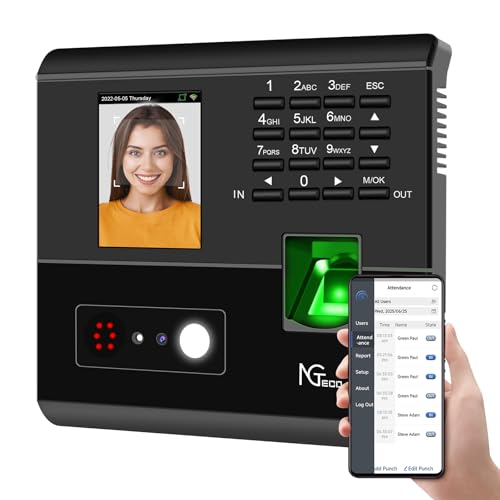
Best for offices that want four verification modes in one device: facial recognition, fingerprint, RFID card, and PIN. This model auto-calculates work hours, reduces manual entry errors, and supports fair payroll. It’s ideal for small teams with frequent shift changes or multi-role staff. The accompanying app enables remote attendance management and detailed export with one click. A potential limitation is reliance on a stable local network for full features.
NGTeco Standalone Time Clock

Best for small teams needing zero setup and offline operation. This standalone clock runs without WiFi and exports data via USB with ready-to-use Excel reports for payroll. It supports up to 500 user profiles and 50,000 punches, making it suitable for growing businesses that prefer local storage over cloud. A caveat is that it may require physical data transfer for updates and reports, and scalability depends on the unit’s internal memory.
KUIIYER 4 in 1 Employees Time Clocks

Choose this if you need a high-capacity, multi-mode biometric clock. It supports up to 1000 faces, 1000 palms, 3000 fingerprints, and 1000 PINs, with overall records up to 160,000. It combines face, palm, fingerprint, and PIN recognition in one device and works well for medium-sized teams with varied shift patterns. A potential limitation is the complexity of setup to optimize the 4-in-1 features and capacity planning for peak periods.
NGTeco Cloud Time Clock for Small Business

Best for managers who need real-time access remotely. Cloud features include a mobile app and web portal with real-time clock-ins and reports, plus dual-band WiFi for stable connectivity. It’s suitable for multi-department or part-time teams needing flexible scheduling. A limitation is reliance on cloud connectivity and data security relies on external servers and network access.
TimeRalo Standalone Time Clock

Best for growing businesses needing a large storage footprint offline. It stores up to 500 fingerprints and 50,000 punch records, suitable for teams up to 500 employees. It provides a straightforward USB reporting path. Avoid this if your team relies on continuous remote access, as it lacks built-in cloud features.
Buying Guide
What to consider when choosing a fingerprint clocking system:
- Verification methods: Do you need multiple biometric options (face, fingerprint, palm) plus PIN or cards?
- Connectivity: Is a cloud-enabled solution preferred, or is a standalone device sufficient for your IT setup?
- Capacity: How many employees and punches per month can the device handle without performance loss?
- Data export: Do you require Excel-ready reports or real-time remote access for payroll?
- Security and privacy: Does the device store data locally or in the cloud, and what encryption is used?
- Ease of use: How simple is the initial setup, daily operation, and reporting process for managers?
Practical Comparisons
- Best for flexible workflows: NGTeco APP Time Clock (4-in-1) offers multiple verification modes and remote control via app.
- Best for offline, no-setup deployment: NGTeco Standalone Time Clock and TimeRalo Standalone provide local storage and USB export.
- Best for high capacity and mixed biometrics: KUIIYER 4 in 1 supports large face/palm/fingerprint catalogs and multiple punch modes.
- Best for remote management and cloud data: NGTeco Cloud Time Clock emphasizes real-time access and automated reports.
FAQ
- What is the advantage of a 4-in-1 clock? Answer: It provides multiple ways to verify attendance, reducing buddy punching and accommodating different employee preferences.
- Can standalone clocks work without internet? Answer: Yes, most standalones store data locally and export via USB for payroll.
- Which device is best for remote managers? Answer: Cloud-based clocks with web/app access allow real-time monitoring from anywhere.
- Is higher capacity better for all small businesses? Answer: Higher capacity helps growing teams, but consider future growth and data management needs.
- Do these devices support Excel-ready reports? Answer: Several models include Excel-compatible export for payroll integration.
- What security features should I look for? Answer: End-to-end encryption, secure cloud storage, and robust local data protection.