Answering the need for extra PS5 storage, these external hard drives offer reliable capacity, easy setup, and clear trade-offs for different gaming and work scenarios. This guide helps identify who each drive is best for, from casual gamers to power users who juggle PS4 and PS5 games. The top choices below include options for high capacity, quick data transfers, and robust portability to suit living rooms, desks, or on‑the‑go setups.
Summary of recommended drives
- Seagate Portable 2TB — Best for casual PS5/PS4 players who want simple plug‑n‑play storage.
- Avoluxion PRO-T5 4TB — Best for expanding PS5 storage with fast transfers and 24/7 gaming reliability (PS5 data must be moved for PS5 games).
- Seagate Game Drive 5TB — Best for PS5 and PS4 owners seeking high capacity with official PS compatibility.
- YOTUO 1TB External — Best for mixed-device households needing versatile cross‑platform storage and protection.
- Tianken Ultra Slim 1TB — Best for ultra‑portable setups with broad compatibility and fast USB 3.0 speeds.
Seagate Portable 2TB External Drive — USB 3.0

Features: 2TB capacity, USB 3.0, works with Windows or Mac, drag‑and‑drop backup, automatic recognition with no software required.
Best for: Players who want straightforward expansion for PS4 and PS5 use, minimal setup, and reliable daily access. It’s a solid all‑round choice for backups and game libraries.
Why selected: It emphasizes simplicity and broad compatibility, making it a practical option for households with mixed devices. The drag‑and‑drop workflow reduces friction for quick storage expansion. A potential limitation is that it doesn’t offer the high transfer efficiency of newer USB standards used by some gaming drives.
Avoluxion PRO-T5 Series 4TB USB 3.0 Drive

Features: 4TB capacity, USB 3.0 external gaming HDD, designed for 24/7 operation, PS4 compatibility and optional use to free PS5 internal storage for PS5 games (data must be moved back to internal SSD for PS5 play).
Best for: PS5 owners who want to store PS4 games for temporary off‑console space and need a robust drive for long‑term gaming libraries. Better for frequent PS4‑to‑PS5 game transfers than casual play from USB storage.
Why selected: It is purpose‑built for gaming with a 7200RPM drive profile and a focus on continuous operation. A caution: PS5 games can’t run directly from USB drives; they must be moved to internal SSD for play, which adds a step when launching PS5 titles.
Seagate Game Drive for PS4/PS5 — 2TB
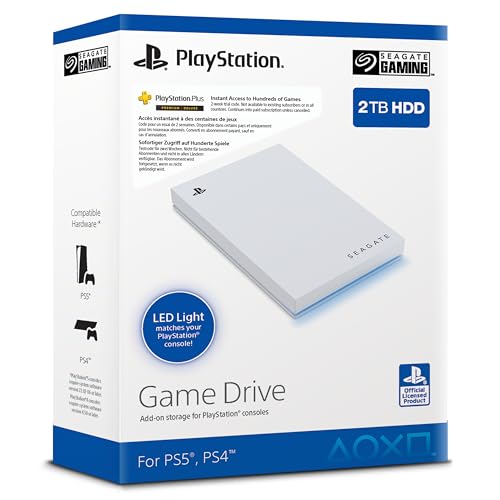
Features: Officially licensed, 2TB capacity, USB 3.0, blue LED accents, designed to work with PS4/PS5 models.
Best for: PS5 owners who want official‑looking, plug‑and‑play storage for growing game libraries and a consistent, familiar experience.
Why selected: The official firmware alignment helps ensure minimal compatibility issues across Sony consoles. Limitation: It is a 2TB option, so larger libraries may require an additional drive for expansion.
YOTUO 1TB External Drive — USB 3.0 & USB-C

Features: 1TB capacity, USB 3.0 & USB-C, cross‑device compatibility, shock‑resistant silicone sleeve, works with Windows, Mac, Linux and major consoles.
Best for: Households with multiple devices or a need for portability, plus protection against drops. Great for backing up files and carrying essential games and documents together.
Why selected: The silicone sleeve adds physical protection and the dual USB interfaces provide flexible connectivity. Limitation: 1TB may be too small for big PS5 game libraries, requiring careful management of space.
Tianken Ultra Slim 1TB Portable USB 3.0 Drive

Features: 1TB capacity, USB 3.0, slim profile (0.6 inch), broad compatibility including Xbox, PS4, PS5, PC, Mac, Linux, and mobile devices.
Best for: Travelers or gamers who want a discreet, pocketable drive without sacrificing much capacity or versatility.
Why selected: Ultra‑slim form factor makes it easy to carry. Caution: USB 3.0 performance, while fast, isn’t as high as USB 3.2 Gen 1/Gen 2 drives offered in some newer models, so transfer speeds may be lower in practice.
Buying Guide: How to Choose the Right PS5 External Drive
Capacity needs vary by user. Casual players may be fine with 1–2TB for a mix of PS4 and PS5 titles; power users may prefer 4–5TB to store many PS4 classics and future PS5 downloads. Transfer speed matters for quick game transfers and backups; USB 3.0 is common, while USB 3.2 Gen 1+ offers faster throughput. Portability and build quality affect room‑to‑room gaming and travel. Some drives are optimized for gaming with cooling or higher RPMs, while others emphasize backup simplicity.
What matters most for PS5 storage?
- Game type: PS5 games generally require moving data back to internal SSD for direct play; USB storage is best used for PS4 games or to hold extra PS5 titles not currently in use.
- Compatibility: Look for drives marketed as PS4/PS5 compatible or officially licensed for Sony ecosystems to reduce setup friction.
- Durability: If you move the drive between rooms or travel with it, consider models with protective sleeves or robust housings.
How to manage PS4 vs PS5 data
Store PS4 and PS5 games separately on the drive when possible. Copy or move PS5 data to internal SSD for playing, then archive PS4 titles to free space. For frequent swapping, a larger capacity drive minimizes management time and avoids constant reorganization.
FAQ
- Can I play PS5 games directly from an external drive? No, PS5 games must be run from the internal SSD. You can store and move data between USB storage and the internal drive as needed.
- Is USB 3.0 enough for PS5 storage? Yes for basic storage and PS4 game libraries; for faster transfers, USB 3.2 Gen 1 or higher provides better performance.
- How much capacity should I get? If you plan to keep a large PS4 collection plus some PS5 titles, 2–4TB is a practical starting point; 4–5TB is ideal for extensive libraries.
- Are these drives plug‑and‑play with PS5? Most drives are plug‑and‑play, but some require formatting or firmware alignment. Officially licensed drives tend to have smoother setup.
- Should I choose HDD or SSD for PS5 storage? HDDs offer higher capacity at lower cost, suitable for PS4 games and backups. SSDs deliver faster transfer speeds but at higher price per TB and are less common as external PS5 data storage solutions.
| Drive | Best Use Case | Approx. Capacity | Notes |
|---|---|---|---|
| Seagate Portable 2TB | Casual PS4/PS5 library expansion | 2TB | Simple, reliable; USB 3.0 |
| Avoluxion PRO-T5 4TB | Extended PS4 library; frequent transfers | 4TB | Designed for 24/7 use; data move required for PS5 gameplay |
| Seagate Game Drive 5TB | High‑capacity PS4/PS5 storage | 5TB | Officially licensed; PS5 data management still needed |
| YOTUO 1TB External | Cross‑device use; portable storage | 1TB | Silicone sleeve; USB‑C support |
| Tianken Ultra Slim 1TB | Travel and quick access | 1TB | Very slim; broad compatibility |
These options cover common use cases from minimal, portable storage to high‑capacity libraries for PS4 classics and PS5 titles managed across devices. When selecting, align capacity and speed with your gaming habits, room layout, and whether you primarily store games or also back up media and documents.