Answering the common question, an electricity usage monitor helps you track real-time power, energy, and cost right at the outlet. This guide focuses on user-friendly meters ideal for homes, offices, and small setups. It highlights models best for monitoring individual devices, saving energy, and spotting overload risks. Each pick suits different households, from tech enthusiasts wanting detailed data to casual users wanting simple cost estimates. A quick comparison table below summarizes the five top options.
| Product | Brand | Key Benefit |
|---|---|---|
| Upgraded Watt Power Meter Plug Home Electrical Usage Monitor | MECHEER | 7 display modes, backlight, cost tracking |
| Upgraded Watt Meter Power Meter Plug Home Energy Monitor | MECHEER | 8 display modes, overload warning |
| Emporia Vue 3 Home Energy Monitor | EMPORIA | Professional-grade home energy management |
| HBN Watt Meter Plug with Backlight | HBN | 9 display modes, automatic backlight off |
| Ketotek Watt Meter Power Meter Plug | KETOTEK | 5-button quick access, multi-alarm indicators |
Upgraded Watt Power Meter Plug Home Electrical Usage Monitor
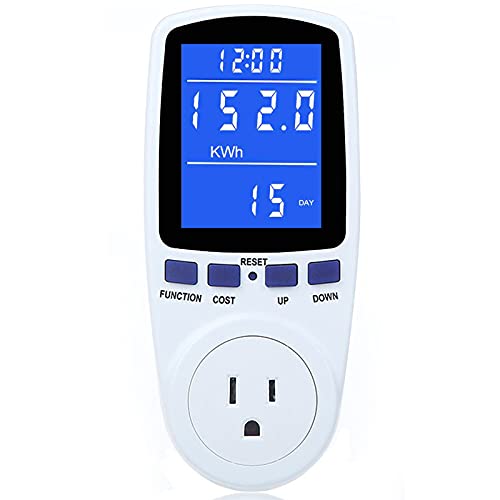
This MECHEER model provides comprehensive monitoring of power (W), energy (kWh), volts, amps, hertz, power factor, cost, and min/max power. It offers 7 display modes and a backlit LCD for easy reading day or night. It also shows cumulative cost over time, helping households project yearly electricity expenses. Best for single-appliance tracking where detailed parameter view is desired, such as entertainment centers or home office setups.
Who it’s best for: individuals who want a detailed breakdown of several electrical parameters for one device or a few devices and appreciate a bright, easy-to-read display. Why selected: the wide parameter set and 7-mode display provide actionable insights without requiring additional software. Caution: data accuracy depends on proper connection and calibration; ensure compatible outlets and safe usage around heat-sensitive devices.
Upgraded Watt Meter Power Meter Plug Home Energy Monitor

This MECHEER model emphasizes a larger display and 8 display modes to show parameters like power, energy, voltage, current, and cost. It includes overload protection with a backlit readout to alert users when a device draws beyond safe levels. Best for households needing a robust overload warning and a clear display that remains legible in bright rooms. Better for homes with high-wattage appliances or devices prone to power surges. Limitation: default overload threshold may require adjustment for some equipment; check the manual before use.
Who it’s best for: those who want a bright, multi-mode monitor with a strong safety alert. Why selected: the combination of overload protection and multiple display modes makes it suitable for frequent monitoring of various devices. Caution: ensure the outlet and device can tolerate frequent alerts without nuisance warnings.
Emporia Vue 3 Home Energy Monitor
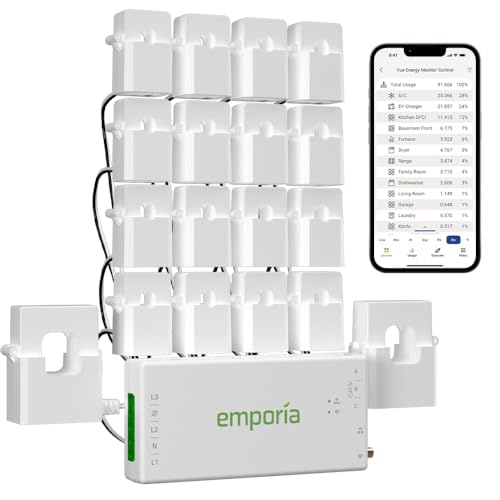
Emporia Vue 3 is designed for in-panel energy management and wider home automation. It supports real-time monitoring, solar and net metering integration, and multiple wiring configurations. The system is UL-certified and aimed at homeowners seeking a scalable, professional-grade energy management setup. Best for households planning solar, net metering, or more integrated energy dashboards. Best for long-term energy management with future expansion in mind. Caution: installation involves circuit panel access and may require professional electrical work for certain homes.
Who it’s best for: users seeking a robust, expandable energy monitoring ecosystem with professional reliability. Why selected: its UL certification and panel-based installation provide safety and scalability for larger homes or solar setups. Limitation: installation complexity may be higher than plug-in meters.
HBN Watt Meter Plug with Backlight

This HBN model offers 9 display modes and a backlit LCD with a wide viewing angle. The display turns off after 15 seconds to save energy, yet remains accessible when needed. It measures power, VA, kWh, time, frequency, PF, voltage, current, and cost. Best for readers who want quick, dialed-in data across many parameters in one compact unit. Choose this if you want a broad set of metrics in a single plug-in device. Limitation: backlight auto-off means reading requires a quick glance when glancing away.
Who it’s best for: users who value a broad data set and energy-saving backlight controls in a single socket meter. Why selected: the 9 modes cover most consumer needs without external software. Caution: the automatic shutoff could be inconvenient for very quick readings in some setups.
KETOTEK Watt Meter Power Meter Plug

KETOTEK presents a 5-button interface for quick parameter access, including watt, VA, RMS voltage, RMS current, Hz, PF, and accumulated time. Its protection features include a default overload setting (adjustable) and clear visual or audible alarms when limits are exceeded. Best for users who want fast parameter checks and clear overload indicators without scrolling through many modes. Choose this if you want straightforward operation with strong overload signaling. Caution: some users may prefer more display modes for deeper analysis.
Who it’s best for: people who prefer quick data access and explicit safety alerts. Why selected: the direct button layout and clear alarms reinforce simple, reliable monitoring. Limitation: not as many display modes as some competitors.
Buying Guide
What to consider when selecting an electricity usage monitor
- Display and readability: Look for backlit LCDs and wide viewing angles for easy readings in different lighting conditions.
- Display modes and parameters: Choose a device that shows the most relevant data for your needs, such as wattage, energy, cost, voltage, current, and PF.
- Overload protection: If you run high-wattage devices, a model with adjustable overload thresholds and clear alarms is beneficial.
- Mounting and installation: Plug-in meters are simplest, while in-panel monitors (like Emporia Vue) require more technical setup but offer broader integration, especially with solar or smart home systems.
- Durability and safety: Opt for devices with sturdy housings and heat resistance; check for UL or equivalent safety certifications where applicable.
- Ease of use: Consider whether you prefer quick-access buttons or multiple display modes for deeper analysis.
FAQ
- What is an electricity usage monitor? It measures real-time electrical parameters like wattage, voltage, current, and energy usage to help manage power consumption.
- Do I need professional installation for in-panel meters? Yes, in-panel monitors may require wiring into your electrical panel, so consult a qualified electrician if unsure.
- Can these devices calculate my electricity bill? Some models offer cost estimates based on a user-input rate; others show energy usage that you can translate into cost with your kWh rate.
- Are plug-in meters accurate for high-wattage appliances? They can monitor many devices, but verify the overload threshold and ensure it matches the appliance’s load to avoid nuisance alarms.
- Which monitor is best for solar or net metering? In-panel systems like Emporia Vue 3 are designed for broader integration with solar and home energy management systems.
- Can I use these for office devices? Yes, plug-in meters work well for computers, printers, and other office electronics to track energy use and costs.