Answering the question “which DVD ripper for Mac should I choose?” this guide highlights five practical options that help Mac users rip, read, or burn discs with minimal hassle. These picks suit different buyers: portable travelers needing light drives, MacBook owners seeking simple plug-and-play, and users who want both reading and burning capabilities. The summary table below compares core strengths to help quick decision-making.
| Product | Best For | |
|---|---|---|
| ASUS ZenDrive Black 13mm External 8X DVD/Burner | Mac & Windows users needing slim portability | Ultra-slim design with M-Disc support |
| Amicool External USB-C USB 3.0 CD/DVD Drive | Travelers who want dual USB-C/USB-A compatibility | Very slim, plug-and-play, broad media support |
| iFunia DVD Ripper Pro for Mac V.2 | Mac users focused on ripping DVDs to devices | Three-step ripping workflow |
| ORIGBELIE External CD DVD Drive | Editors and data backup on diverse systems | Multiple ports and robust burning speeds |
| NOLYTH USB-C SuperDrive for Mac | Mac users wanting a slot-in, space-saving option | Slot-in design with USB-C power |
ASUS ZenDrive Black 13mm External 8X DVD/Burner Drive

The ASUS ZenDrive is an ultra-slim external optical drive designed for Mac and Windows. It supports burning and reading CDs and DVDs, including M-Disc for durable backups. The drive ships with both USB Type-C and USB 2.0 cables for flexible setup. Best for: Mac users who need a compact, portable burner that works with multiple operating systems and keeps a low profile on laptops or desks. Limitation: It may be slower than some higher-end drives on large multimedia projects due to its 8X DVD speed. This makes it a solid travel-friendly option for routine disc tasks rather than heavy media production.
Amicool External USB-C USB 3.0 CD/DVD Drive Burner
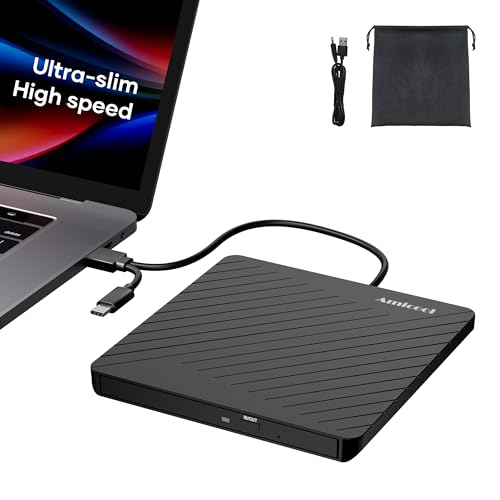
The Amicool drive prioritizes portability with an ultra-slim profile and lightweight build. It supports both USB-C and USB-A connections and a broad range of CD/DVD formats, plus fast USB 3.0 data transfer. Best for: On-the-go users who need a compact drive that works with laptops, desktops, and mobile setups. Caution: Blu-ray discs are not supported, so this is limited to standard CD/DVD formats and may not meet every high-def media need.
iFunia DVD Ripper Pro for Mac V.2

iFunia DVD Ripper Pro for Mac Version 2 provides a straightforward ripping workflow. It focuses on converting DVD content into popular video or audio formats suitable for playback on devices like iPad, iPhone, Apple TV, and other portable players. Best for: Mac owners who want a dedicated ripper that emphasizes ease of use and compatibility with common Apple devices. Limitation: The listing references a download, indicating a software purchase rather than a physical drive; ensure system compatibility before purchase.
ORIGBELIE External CD DVD Drive

The ORIGBELIE drive emphasizes versatility with USB 3.0 speed, USB-C compatibility, and support for CD and DVD burning and reading. It includes multiple port options and a carrying case for mobility. Best for: Users who need a flexible external drive for various devices and frequent data backup tasks. Limitation: While it covers many formats, Blu-ray support is not listed, which may limit high-capacity disc tasks.
NOLYTH USB-C SuperDrive for Mac

The NOLYTH SuperDrive features a slot-in design in Space Grey, tailored for Mac environments. It uses a USB-C connection that delivers power and data through a single cable, with read/write speeds up to 24x CD and 8x DVD. Best for: Mac users who want a sleek, space-saving external drive that blends with Apple aesthetics. Limitation: Slot-in design means you must align discs precisely, which can take a moment longer for first-time users.
Buying Guide
What should you consider when choosing a Mac-compatible DVD ripper or external drive?
- Interface and compatibility: USB-C vs USB-A, or dual options. If your Mac lacks built-in optical drives, USB-C solutions with Power Delivery are convenient.
- Read vs burn speed: Look for drives with 8x DVD or faster and 24x CD write/read where you plan to back up or create discs.
- Portability: Ultra-slim drives are ideal for travel, while slot-in designs save desk space but require careful disc insertion.
- Software or ripping focus: Some options emphasize ripping DVDs to common formats; others are hardware-centric with broad reading/writing capabilities.
- Media compatibility: Ensure support for CD-R/RW, DVD-R/RW, and if needed, M-Disc or other archival formats.
- Power and drivers: Most modern drives are plug-and-play with macOS and Windows; check for driver requirements if you’re using older systems.
FAQ
- Can I rip DVDs on a Mac without a dedicated drive?
Answer: No. You need an external drive or a built-in optical drive to read DVD discs before ripping. - Is USB-C necessary for ripping on modern Macs?
Answer: Not strictly, but USB-C with power delivery offers simpler setup and charging alongside data transfer. - Do these drives support Blu-ray discs?
Answer: Most listed drives do not; verify Blu-ray support if that format is required. - Will ripping DVDs violate copyright law?
Answer: Ripping copy-protected content can violate laws depending on jurisdiction and usage; consult local regulations. - Can I burn discs as well as rip them?
Answer: Some drives include burning capabilities; check the product features for each model’s write speed and supported formats. - Are any of these drives compatible with Linux or Chrome OS?
Answer: Several list broad OS support; confirm compatibility with your exact distribution or version if needed.