If you’re new to scuba diving, your dive computer is your personal underwater navigator and safety coach. This guide highlights beginner-friendly models that simplify setup, display essential data clearly, and support easy learning. The top picks here are best for new divers who want reliable performance without a steep learning curve. The buyer-friendly choices below cover common needs like Nitrox support, gauge modes, and straightforward interfaces.
| Product | Best For | Key Benefit |
|---|---|---|
| Cressi Leonardo 2.0 (Black/Blue) | Absolute beginners | Single-button operation with Air/Nitrox/Gauge modes and clear CNS indicator |
| Cressi Leonardo 2.0 (White/Black) | All-around learners | Same intuitive controls, high visibility screen |
| Garmin Descent X30 | Tech-friendly divers | Vibrant color display and long battery life |
| Mares Puck Pro Ultra | Budget-conscious newbies | Clear screen with Nitrox support and solid algorithm |
| SCUBAPRO Aladin ONE Matrix | Entry-level simplicity | Beginner-focused features and straightforward setup |
Cressi Leonardo 2.0 Dive Computer – Black/Blue

The Cressi Leonardo 2.0 is designed for beginners and casual divers who want a simple interface without sacrificing essential features. It supports Air, Nitrox, and Gauge modes with a single-button control, making underwater navigation easier. Adjustable FO2 (21%–50%) and PO2 (1.2–1.6 bar) provide room to grow as your training progresses. A CNS oxygen toxicity indicator helps with safety awareness, and three conservatism levels offer adaptable risk management. Best for new divers who value a straightforward, reliable computer with configurable gas mixes.
Who it’s best for: New divers seeking a user-friendly, backlit dive computer with clear alarms and basic data presentation. Why selected: Easy operation, robust backlight, and essential safety indicators. Caution: The single-button interface may feel slow for divers who prefer multi-button quickly navigated menus.
Cressi Leonardo 2.0 Dive Computer – White/Black

Similar to the Blue variant, this Leonardo 2.0 model provides intuitive dive management with Air, Nitrox, and Gauge modes, plus adjustable FO2 and PO2 ranges. The display remains backlit for visibility in low-light conditions, and CNS toxicity indicators support safety awareness. Best for learners who prefer a lighter color option and consistent performance across variants.
Who it’s best for: Beginners who prioritize a clean, high-contrast display and dependable, simple operation. Why selected: Identical core features to the Blue version with a different colorway. Caution: Visuals vary by color option; ensure the display is easy to read under your preferred lighting.
Garmin Descent X30
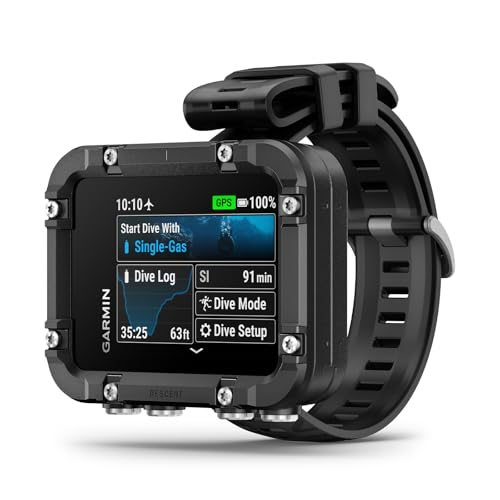
The Garmin Descent X30 targets divers who want a larger, info-rich interface with a 2.4-inch color display. It operates with GPS outside the water and includes multiple dive profiles, including single- and multi-gas configurations. Its larger screen makes data easier to read during ascent and descent, which is helpful for beginners building confidence. Best for users who want a modern display and extensive customization options. Caution: Heavier and more feature-rich devices may require a longer learning curve for new divers.
Mares Puck Pro Ultra

The Mares Puck Pro Ultra emphasizes readability with a clear, high-contrast screen and straightforward gas options, including single-gas Nitrox (21%–50%). It uses a reputable decompression algorithm to support safer dives and is well-suited for beginners who want dependable performance without complexity. Best for divers who want a balance of visibility and safety calculations in a compact package. Caution: Some users may prefer more modern color screens and richer data presentation found in newer models.
SCUBAPRO Aladin ONE Matrix Nitrox – Beginner Friendly

The SCUBAPRO Aladin ONE Matrix focuses on essential, beginner-oriented features with easy installation and diver-adjustable inhale resistance for regulators compatibility. It supports Nitrox blends and provides basic algorithms to help new divers manage decompression. Best for new divers who want a simple, reliable entry point with clear Nitrox support. Caution: May lack some advanced features found on higher-end models, like multi-gas planning and color screens.
Buying Guide: Key Considerations For Your First Dive Computer
What data should your first dive computer display? Look for a large, high-contrast screen with legible typography. For beginners, a model with Air, Nitrox, and Gauge modes is typically sufficient. Consider a backlit display, straightforward controls (ideally a single button or intuitive button layout), and audible alarms for safety reminders. Battery life is important for extended trips, so review battery type and expected life per charge.
What gas options do you need?
Most beginner-friendly computers offer Air and Nitrox modes. If you anticipate deeper dives or more technical training soon, choose a model with multi-gas support (e.g., trimix) or flexible PO2/FO2 settings. Adjustable gas mixes expand your options as you advance.
How important is display readability?
A bright, high-contrast screen ensures quick data reading at depth. Larger displays reduce cognitive load during ascent or in low-light conditions. If you wear gloves, ensure button placement is accessible and easy to press.
What about size, weight, and wearability?
Compact, lightweight watches are ideal for beginners who want a comfortable, daily-wear underwater companion. If you prefer a rugged, ruggedized design for frequent saltwater use, consider models with reinforced casings and water resistance suitable for your dive profiles.
Which safety features matter most?
Look for CNS oxygen toxicity indicators, audible alarms, and conservatism settings. These features help beginners stay aware of dive risk and adapt plans in real time. Clear, repeatable alerts reduce the chance of missed data in noisy environments.
How should you compare data presentation?
Some models offer multiple data screens that you can customize. Favor devices that let you tailor at least three data fields per page to show critical metrics such as depth, bottom time, NDL, or gas mix. This helps you focus on essential information during dives.
Frequently Asked Questions
- Do beginner dive computers require regular maintenance? Yes. Rinse after saltwater use, store in a cool dry place, and follow the manufacturer’s maintenance guidelines to extend life.
- Is Nitrox necessary for beginners? Not always. Many beginners dive on air, but Nitrox offers longer no-decompression times and is useful as you advance. Choose a model that supports Nitrox if you expect to train in or around enriched air.
- Can I use a dive computer as a watch? Some models are designed as sport watches with dive data; others are dedicated dive computers. If you want both, select a model marketed as a dive watch with readability for underwater use.
- Should I choose a large screen for better readability? Generally yes for ease of data reading, especially for new divers who are still learning to process information quickly under water.
- Are there safety features I should not overlook? Look for CNS oxygen toxicity indicators, audible alarms, and conservatism controls to adapt to learning curves and training progress.