Answering the demand for reliable, high-bandwidth DisplayPort cables, this guide highlights top choices for gaming, content creation, and multi-monitor workspaces. Each product targets a specific buyer: hardcore gamers seeking ultra-high refresh and HDR, professionals needing pristine 8K display support, and budget-conscious users wanting reliable multipacks. The table below compares a core selection to help you pick quickly.
| Product | Ideal For | Key Benefit |
|---|---|---|
| IVANKY 8K DP Cable | Gamers and power users | VESA certified, 8K/60Hz with HDR |
| Capshi DP Cable 1.4 | Enthusiasts seeking flexible, durable cables | VESA certified, 6.6 ft, high refresh |
| URELEGAN 8K DP Cable 5-Pack | Multi-monitor setups and replacements | 5-pack value, 8K/60Hz support |
| Highwings 80Gbps DP Cable | Future-proof, 16K/8K workflows | 80Gbps bandwidth, strongest specs |
| Amazon Basics 6 ft DP Cable | Everyday 4K+ setups | Reliable, budget-friendly 1.4 option |
IVANKY VESA Certified 8K DisplayPort Cable 1.4, 6.6ft

The IVANKY DisplayPort 1.4 cable is designed for demanding setups that require maximum bandwidth and long-term reliability. It is officially VESA certified and supports 8K at 60Hz, 5K at 60Hz, and 4K at up to 240Hz with Dynamic HDR and HDCP 2.2. This makes it a strong choice for gamers and content creators who push frame rates and image quality. It also works with FreeSync and G-Sync, which helps reduce screen tearing.
Best for: gamers and professionals who need high-resolution output and stable HDR presentation without HDMI adapters. It’s a solid pick if you want a single, long cable that minimizes signal loss with a 30AWG copper core and 24K gold-plated connectors. Caution: not compatible with HDMI devices; ensure your PC and monitor both have DisplayPort inputs to avoid compatibility issues.
CEFOJQAO DisplayPort Cable 10-Pack, 6ft DP Cable
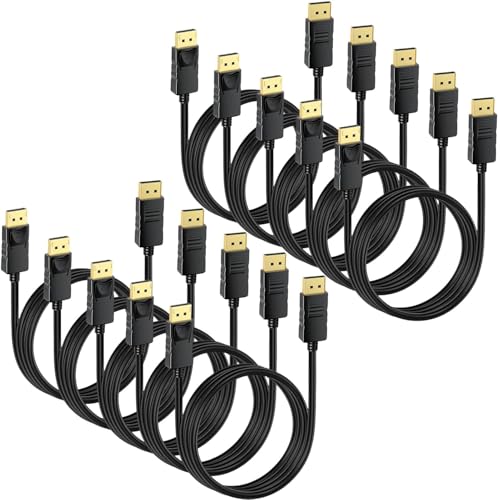
This 10-pack from CEFOJQAO is aimed at users who frequently replace cables, deploy multi-monitor setups, or outfit classrooms and offices. The 6-foot cables support 4K up to 3840×2160 at 60Hz and 2K at higher refresh rates, with compatibility for FreeSync and G-Sync. The package-oriented offering helps keep cables consistent across machines and reduces downtime when swapping devices.
Best for: IT admins or power users who value bulk purchasing and consistent DP-to-DP connections. Choose this if you run several displays or want spare cables for future upgrades. Caution: while versatile, this is a multi-pack; individual cable performance will mirror standard DP 1.4 specs, so verify your device compatibility per unit.
URELEGAN VESA Certified 8K DisplayPort Cable 5-Pack

URELEGAN markets a five-pack of 8K DisplayPort 1.4 cables designed for reliability in larger setups. They support 8K at 60Hz and 4K at high refresh rates, plus HDCP 2.2 and HDR. The cables use DSC technology for reduced flicker in fast-action content, which helps maintain image fidelity during FPS gaming or cinematic sequences.
Best for: users who need spare cables for multiple systems or a straightforward solution for a consistent, high-bandwidth link. This is a practical choice for offices or studios with several displays. Limitation: the data notes up to 8K/60Hz in practice depends on the host device’s capabilities; ensure your GPU and monitor align with 8K specs.
Highwings 80Gbps DisplayPort Cable 2.1, 6.6ft

Highwings pushes toward future-proof performance with an 80Gbps bandwidth figure and DP 2.1 support, claiming compatibility with 16K at 60Hz via display stream compression (DSC). It also covers 8K at 120Hz and high-end 4K/240Hz configurations, plus full support for FreeSync and G-Sync. The build uses 28AWG conductors, triple-layer shielding, and 24K gold connectors for durability and EMI resistance.
Best for: enthusiasts who want the highest possible bandwidth and the most extended future-proofing for multi-monitor and immersive gaming setups. Better for: systems planning to run extreme resolutions or frame rates that push standard 1.4 cables. Caution: real-world performance depends on pairings with GPU output and monitor capabilities; verify your hardware supports DP 2.1 features like DSC on your specific displays.
Amazon Basics DisplayPort 1.4 Cable, 6 Foot

Amazon Basics presents a straightforward 6-foot DP 1.4 cable that supports up to 8K at 60Hz and 4K at 120Hz, with Dynamic HDR and 3D. The Gold-plated plugs and robust copper conductors emphasize reliability for daily use in home offices or multimedia rooms. It’s a practical, no-frills option for users prioritizing compatibility and value.
Best for: users seeking dependable DP 1.4 performance without extra features. Choose this for standard 4K/60–120Hz setups or as a budget-friendly, dependable spare for home or small office use. Caution: not designed for HDMI devices; ensure your monitor and GPU have DisplayPort inputs to maximize results.
Buying Guide: Key Considerations For DisplayPort Cables
- Resolution and refresh rate: Match the cable to your monitor’s native resolution and desired refresh rate (8K/60Hz, 4K/120Hz+, etc.).
- Version and bandwidth: DP 1.4 supports higher bandwidth than DP 1.2/1.1; DP 2.1 exists for future-proofing but requires compatible hardware.
- HDR and color depth: If you want Dynamic HDR, verify HDR support and compatibility with your GPU/monitor.
- Cable construction: Look for robust shielding (triple-layer or better) and gold-plated connectors for durability and signal integrity.
- Length and flexibility: Shorter cables tend to perform better; choose slimmer, flexible builds if you need tight routing behind desks.
- Multi-pack vs. single: Bulk packs suit IT deployments; single high-quality cables suit performance-focused buyers.
- Compatibility: DisplayPort cables require DisplayPort sources and monitors; adapters can degrade performance or introduce issues.
FAQ
- What is the difference between DP 1.4 and DP 2.1 cables?
– DP 2.1 supports higher practical bandwidth and potential DSC-driven resolutions, but only if both devices support DP 2.1 features. - Can a DP cable affect gaming performance?
– Yes, a cable with insufficient bandwidth or poor shielding can cause frame drops, flicker, or color artifacts on high-refresh setups. - Do I need an 8K cable for 4K displays?
– Not necessarily. DP 1.4 cables reliably handle 4K at high refresh rates, but 8K content benefits from newer capabilities if your devices support them. - Are bulk packs better than individual cables?
– Bulk packs reduce downtime and simplify replacements, but individual cables may be selected for specific length or feature needs. - Will these cables work with HDMI monitors?
– No. DisplayPort cables are not compatible with HDMI inputs without an adapter, which can degrade performance.