If you want to turn a non-smart TV into a smarter viewing hub, these RCA/AV-to-HDMI adapters and wireless display options are practical choices. They’re best for anyone upgrading an older TV, a retro gaming setup, or someone who wants simple, plug-and-play connectivity without replacing hardware. The top picks below suit different needs—from straightforward AV-to-HDMI converters to wireless screen mirroring.
| Product | Best For | Notes |
|---|---|---|
| Tengchi RCA to HDMI Converter | Older analog devices to HDMI TVs | RCA input, HDMI 1080p output; USB power required |
| PASOW RCA to HDMI Converter | VHS/DVD/VCR and classic game consoles | All-in-one cable kit; USB power needed |
| GINGIN RCA to HDMI Converter | Wide compatibility with classic AV gear | 720p/1080p output; plug-and-play |
| SmartSee Anycast HD Wireless Display | Wireless screen mirroring for phones and laptops | Mirrors via Miracast/AirPlay/DLNA |
| BD&M RCA to HDMI Converter | Retro devices to modern displays | 720p/1080p HDMI output |
Tengchi RCA to HDMI Converter

Best for: Users with legacy AV gear who want a simple HDMI upgrade without extra components. This adapter converts analog RCA input to HDMI 1080p output, suitable for older TVs, monitors, and projectors. It is a straightforward, plug-and-play device powered by USB.
Why chosen: It directly converts RCA to HDMI, minimizes clutter, and supports standard definition-to-HDMI conversion that many older setups require.
Caution: Requires a USB power source to operate; do not attempt operation without supplying power.
PASOW RCA to HDMI Converter

Best for: Viewers who want a versatile, all-in-one AV-to-HDMI kit for VHS, DVD, or gaming consoles. It includes RCA and HDMI cables plus a USB power cable for quick setup.
Why chosen: The built-in converter chipset and bundled cables reduce the need for extra purchases, making it easy to connect classic devices to a smart TV.
Caution: The converter only supports AV to HDMI; it cannot convert HDMI to AV.
GINGIN RCA to HDMI Converter

Best for: Users who want a compact, plug-and-play option for PS1/PS2/PS3, N64, WII, and other AV devices. Outputs 720p or 1080p to modern displays.
Why chosen: Lightweight and straightforward, with broad compatibility for classic consoles and media players that rely on composite inputs.
Caution: Not all devices may output compatible signals; some gaming systems require specific output modes to work correctly.
SmartSee Anycast HD Wireless Display
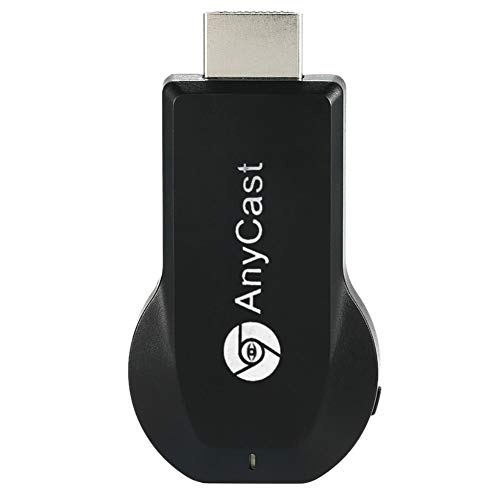
Best for: Those looking to wirelessly mirror phones, tablets, or laptops to a TV or projector. Ideal for streaming photos, videos, and presentations on a bigger screen.
Why chosen: No drivers or apps needed; users can mirror via Airplay, Miracast, or DLNA, depending on their device, making it a flexible solution for multi-device households.
Caution: Some encrypted streaming apps may restrict screen mirroring; performance depends on network conditions.
BD&M RCA to HDMI Converter

Best for: Viewers upgrading retro equipment like VHS, VCR, DVD players, and older gaming consoles to modern displays with HDMI input.
Why chosen: Supports PAL/NTSC formats and delivers 720p/1080p HDMI output for broad compatibility with various old devices.
Caution: Performance may vary by device; ensure your source device provides standard RCA outputs for reliable results.
Buying Guide
What to consider before buying an AV-to-HDMI adapter
- Input compatibility: Ensure the adapter accepts RCA/AV inputs from your device (yellow video, red/white audio).
- Output resolution: Check if 720p or 1080p fits your TV’s native resolution for the best image quality.
- Power requirements: Many adapters need USB power; verify you have a spare USB port or power adapter.
- One-way vs two-way: These devices are typically AV to HDMI; they do not convert HDMI to AV unless specified.
- Bundled cables: Some kits include RCA, HDMI, and USB cables—these save setup steps and cost.
Wireless options vs wired adapters
- Wireless adapters (like Anycast) are practical for sofa-centric setups and multi-device mirroring but rely on a stable Wi-Fi network.
- Wired adapters generally offer consistent, low-latency playback, suitable for gaming and streaming from older devices.
Which product should you choose?
- Best for classic AV gear and minimal setup: PASOW or GINGIN adapters with included cables.
- Best for retro gaming with the simplest connection: Tengchi or BD&M adapters.
- Best for wireless flexibility: SmartSee Anycast for iPhone, Android, and laptop mirroring.
FAQ
- Can these adapters convert HDMI to AV? In most cases, no; check each product’s features to confirm.
- Do I need extra drivers for these adapters? No, most are plug-and-play and require no software.
- Will this upgrade my TV to a smart TV? It enables smart-like capabilities by connecting legacy devices, but it does not add a full smart OS to the TV.
- Is 1080p the maximum? Some adapters support 720p or 1080p; verify the output resolution listed in features.
- Do I need to disable anything on my TV? Generally, no; select the HDMI input that corresponds to the adapter’s port.
- Are there latency concerns with wireless mirroring? Wireless solutions may introduce slight delay depending on network conditions.