Answering the common search for all-in-one PC bundles, this guide highlights five desktop PC packages that include monitors and peripherals. Each option is suited to different buyers: students and home offices, small businesses needing reliable performance, multimedia enthusiasts, and those who want easy out-of-the-box setup. The selections balance processor power, storage, and bundled displays to help you pick the right fit quickly. Compare specs, monitor size, and expandability to decide which bundle best meets your needs.
| Product | CPU / RAM / Storage | Monitor | Best For |
|---|---|---|---|
| Dell OptiPlex Computer Desktop PC Bundle with 22″ Monitor | Intel Core i5, 16GB RAM, 2TB HDD | New 22″ LED monitor | Home office users needing strong multitasking |
| HP EliteDesk 800 G3 SFF Bundle with 21.5″ Monitor | Intel Core i5-6500, 8GB RAM, 256GB SSD | 21.5″ FHD monitor | Budget-conscious multitaskers and students |
| Dell OptiPlex 5040 SFF Desktop PC Bundle with 24″ Monitor | Intel Core i5-6500, 8GB RAM, 256GB SSD | 24″ FHD monitor | Multitaskers needing ample display space |
| Dell OptiPlex 5040 SFF with 23.8″ Monitor | Intel Core i5-6600, 8GB RAM, 256GB SSD | 23.8″ FHD monitor | Users who want a larger display for productivity |
| Dell Optiplex 5040 SFF Setup with 24″ Monitor | Intel Core i5-6500, 8GB RAM, 256GB SSD | 24″ FHD monitor | Office tasks with easy setup |
Dell OptiPlex Computer Desktop PC Bundle With Monitor

Best for: Home office users who need strong multitasking with a bundled display. This Dell package pairs an Intel Core i5 processor with 16GB RAM and a large 2TB HDD for ample storage. The included new 22-inch LED monitor delivers Full HD visuals with a wide viewing angle, making it ideal for document editing, web research, and streaming. The RGB keyboard and mouse add a light, gamer-friendly aesthetic. A potential limitation is the HDD-based storage, which may be slower for demanding tasks compared to an SSD option.
What to know
- Strength: High RAM and large HDD capacity support multiple tasks and media libraries.
- Trade-off: No SSD may mean longer boot times for boot drives and software launches.
- Best for: Users prioritizing total on-desk bundle value and multitasking capability.
Dell Optiplex 7050 SFF Desktop PC With 32GB RAM

Best for: Small businesses and power users who need more memory. This refreshed OptiPlex 7050 SFF provides a robust Core i7-7700 with 32GB DDR4 RAM, ideal for heavy multitasking and virtualization workloads. It comes as a renewed unit, often bundled with a monitor and essential peripherals. Note that the configuration emphasizes RAM over storage, with 1TB SSD support in some listings. This could be a better fit when your tasks demand memory headroom more than raw disk space.
Dell OptiPlex 5040 SFF Desktop With 24″ Monitor

Best for: Users seeking a balanced bundle with a new 24-inch monitor and reliable Core i5 performance. This Dell 5040 SFF bundle offers 8GB RAM and 256GB SSD, which supports quick boot times and snappy multitasking. The included monitor provides a crisp, large viewing area for productivity tasks. Caution: The system may feel limited if you run memory-heavy applications simultaneously or store large media locally without upgrading RAM or SSD capacity.
Dell OptiPlex 5040 SFF Setup With 23.8-Inch Monitor
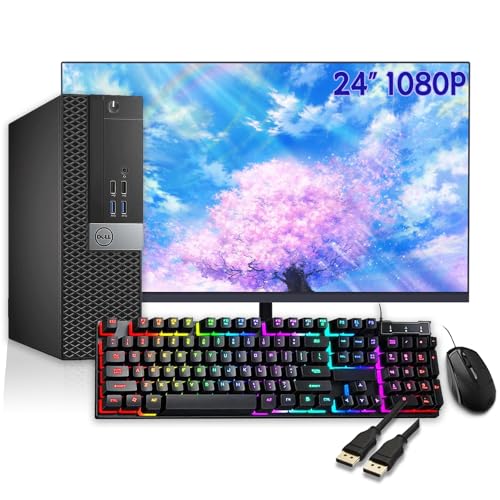
Best for: Users who want a larger display for spreadsheets, design work, and multitasking. This bundle pairs an Intel Core i5-6600 with 8GB RAM and 256GB SSD with a 23.8-inch 1080p monitor. The larger screen can improve productivity and reduce eye strain during long sessions. Limitation: Storage remains modest; consider adding external or internal storage if you handle large media libraries regularly.
Dell OptiPlex 5040 SFF Computer And Monitor Bundle
Best for: Office workflows requiring dependable performance and a second display option. This bundle emphasizes a 24″ FHD monitor with an 8GB RAM, 256GB SSD configuration and Windows 11 Pro. It provides strong everyday performance, straightforward setup, and wired keyboard/mouse. Caution: Renewed units may vary slightly in performance versus new models; verify the condition and peripherals upon receipt.
Buying Guide
What should I consider when choosing a desktop PC package?
Assess processor power, RAM, and storage to match your daily tasks. For multitasking and future-proofing, aim for at least 16GB RAM and a solid-state drive. If you primarily work with documents, spreadsheets, and light media, 8GB RAM with an SSD is typically sufficient.
Is a bundled monitor important, or should I buy separately?
Bundled monitors add value and simplify setup, especially for first-time buyers. Look for monitor size, resolution, and adjustability. If you work with detailed graphics or video editing, a larger monitor and higher resolution can improve accuracy and comfort.
What about renewals and refurbished models?
Renewed or refurbished PCs can offer substantial savings. Check the configuration details (CPU, RAM, storage) and ensure the bundle includes essential peripherals. Confirm return policies and any included warranty when available.
How important is upgradeability?
Consider future expansion: RAM slots, available PCIe or NVMe options, and the ability to add external storage. Small form factor (SFF) units save space but may limit internal upgrade options compared to larger towers.
Which features help with daily productivity?
Key features include a fast CPU, sufficient RAM, SSD storage for quick boot times, and a reliable wireless or wired network option. USB-C or DisplayPort connectivity enhances compatibility with newer peripherals and displays.
FAQ
- Q: Do these bundles include Windows 11 Pro? A: Several listed bundles mention Windows 11 Pro; verify the exact edition in the product listing before purchase.
- Q: Is 8GB RAM sufficient for multitasking? A: For basic multitasking, 8GB can suffice, but 16GB is preferable for heavier workloads.
- Q: Are these machines suitable for home offices? A: Yes, most bundles are designed for office tasks, web browsing, and multimedia use, with easy setup.
- Q: Can I upgrade storage later? A: Most bundles allow adding or upgrading SSD/HDD, depending on the chassis and motherboard.
- Q: Should I avoid reneweds if I need maximum reliability? A: Renewed units can offer strong performance at lower cost, but check return policies and warranty where available.
- Q: Do these come with peripherals other than keyboard and mouse? A: Bundles typically include keyboard and mouse; monitor is included in the package as shown.