If you’re new to digital command control (DCC) for model trains, this guide points you to beginner-friendly options that simplify setup and operation. The featured products are chosen for ease of use, clear documentation, and solid basic functionality. Ideal buyers include casual hobbyists upgrading from analog, hobbyists buying a first DCC system, and parents introducing children to model railroading with straightforward controls. Below is a quick comparison table and five accessible DCC-related products that fit beginner needs.
| Product | Best For | Why Pick It |
|---|---|---|
| Bachmann Trains – DCC Control Box with Turnout DECODER | Entry-level DCC turnout control | Turnout decoder already installed; simple upgrade path from analog |
| Bachmann Trains Power Pack W/Speed Controller | Basic throttle and power management | Includes speed control; versatile for multiple scales |
| The Digitrax Big Book of DCC | Learning and reference | Guides and explanations for beginners and beyond |
| Bachmann Trains Echo Valley DCC Sound Ready to Run HO | All-in-one ready-to-run with sound | Comprehensive set for quick setup and immediate use |
| JMRI Interface for Prodigy DCC Systems | Software interface for DCC systems | Compatibility and control flexibility for hobbyists who prefer PC control |
Bachmann Trains – DCC Control Box With Turnout DECODER

This control box is designed for beginners upgrading from analog systems. Its built-in turnout decoder eliminates the need for separate wiring, making DCC upgrade straightforward. The unit is best for modelers who want a compact, all-in-one solution to control both locomotives and turnout operations.
Who it’s best for: Beginners who want a simple, plug-and-play upgrade path and a compact control box. Why selected: It combines turnout control with DCC readiness, reducing complexity for first-time users. Caution: If you plan extensive expansion with many decoders, you may eventually need a more scalable system.
Bachmann Trains Power Pack W/Speed Controller
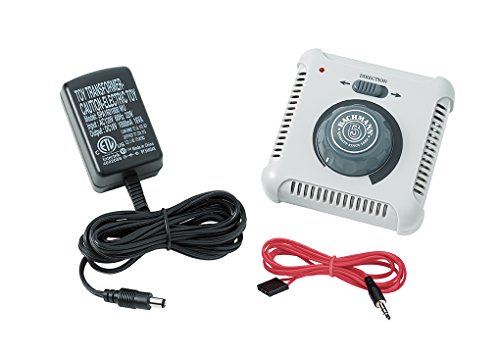
This power pack provides a basic throttle and power management option compatible with N, HO, and On30 scales. It includes a speed control knob, making it accessible for beginners who want hands-on control without additional hardware. Best for: Hobbyists seeking a straightforward way to regulate speed and power during initial DCC experiments.
Limitations: It is a general power pack, not a dedicated DCC system; users should ensure compatibility with their current locomotives and track layout before upgrading.
The Digitrax Big Book Of DCC
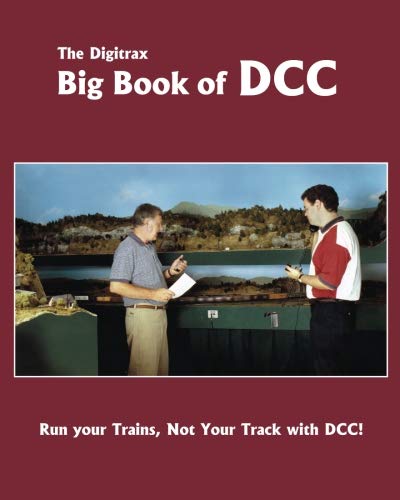
This reference work is suited for beginners who want a foundational understanding of DCC concepts, terminology, and practical setup steps. It serves as a structured guide for new users to learn at their own pace. Best for: Readers who prefer a detailed, instructor-like reference to build confidence with DCC concepts over time.
Limitation: It’s a book, not a hardware controller; practical experiments with real layouts are necessary for hands-on familiarity with DCC operations.
Bachmann Trains Echo Valley DCC Sound Ready to Run HO

This all-in-one set includes a DCC sound-equipped locomotive, a tender, and several cars, providing immediate play value. The sound-ready train helps beginners understand the impact of DCC sound features alongside basic control. Best for: Beginners who want a complete starter set with sound for a more immersive experience. Caution: The set is more complex than a barebones controller and may require additional learning for full operation of advanced features.
JMRI Interface For Prodigy DCC Systems

This interface targets hobbyists who prefer PC-based control through JMRI software, enabling customized scripts and broader control options. It supports Prodigy DCC systems and is best for users comfortable with computer interfaces looking to extend control with software. Caution: Requires compatible hardware and basic software setup knowledge to reach its full potential.
Buying Guide
What should you consider when choosing a beginner DCC controller?
- Ease of upgrade: If you’re moving from analog, a product that includes decoders or turnouts in a single box reduces wiring complexity.
- Future scalability: Consider whether you want to expand to multiple locomotives, more decoders, or PC-based control later on.
- All-in-one vs. modular: All-in-one starter sets are quick to begin, whereas modular systems offer more customization as you learn.
- Sound vs. no sound: Sound-equipped trains provide realism, but add cost and complexity; consider your priorities as a beginner.
- Documentation and support: Beginner-friendly manuals and community support can significantly shorten the learning curve.
What is DCC and why start with a beginner-friendly option?
DCC (Digital Command Control) standardizes control over trains and accessories on a layout via digital signals. Beginner-friendly options emphasize straightforward setup, intuitive controls, and clear wiring guidance, enabling quick success without advanced electrical knowledge.
Which setup is best for a small layout?
For a compact layout, an all-in-one control box with an integrated turnout decoder (like the Bachmann DCC Control Box) often provides the simplest path to start with both locomotive control and turnout management in one place.
How important is sound for beginners?
Sound adds realism but increases complexity and cost. Beginners may start with non-sound locomotives and optionally add sound later as confidence grows.
Is PC control worth it for beginners?
PC control via JMRI can be powerful for customization, but beginners may prefer stand-alone hardware first. Start simple, then explore PC-based options if interested in automation and scripting.
What should I avoid when starting?
Avoid purchasing multiple incompatible interfaces at once. Choose a system with clear upgrade paths and documented compatibility to minimize frustration and additional purchases.
Frequently Asked Questions
- What is DCC, and how does it help beginners?
- Should I buy a complete starter set or individual components?
- Is sound necessary for a first DCC system?
- Can I use PC software like JMRI with any DCC system?
- What’s easier for a true beginner, a fixed box or a modular system?
- How do I know if a decoder is needed for a turnout?
DCC is a digital method to independently control locomotives and accessories on a model railroad, allowing realistic operation and simple upgrades for beginners.
Starter sets offer quick setup and fewer compatibility concerns, while individual components provide customization. Beginners often start with a starter set and expand later.
No. Sound can enhance realism but adds cost and complexity. Start with non-sound locomotives to learn basic control first.
Support depends on the DCC hardware. Some systems offer direct interfaces or official support for JMRI, while others do not. Check compatibility before purchasing.
A fixed, all-in-one box is typically easier for beginners, offering fewer setup steps. A modular system becomes advantageous as you grow and want more control options.
Turnout decoders are needed when controlling track switches via DCC. Some control boxes include decoders inside, while others require separate installation.