Answering the question most PC audiophiles ask: which Digital-to-Analog Converter (DAC) and headphone amp best improve desktop sound? This guide highlights five reliable options that are well-suited for different user needs—from entry-level desktop setups to gaming rigs and devoted headphone listening. Each pick is evaluated for who it’s best for, why it stands out, and any notable limitations to consider.
| Product | Best For | Key Benefit |
|---|---|---|
| Fosi Q4 DAC Headphone Amp | Entry-level listenings, casual PC users | Versatile inputs and simple plug-and-play |
| Fosi K5 Pro Gaming DAC Amp | Gamers and home desks | Low distortion with rich details for gaming |
| Fosi C3 Gaming DAC Amp | FPS players and competitive gamers | StepSense footsteps and 7.1-like surround |
| Fosi K7 DAC Headphone Amp | HiFi enthusiasts and power-hungry headphones | High output and broad connectivity |
| AIYIMA DAC-A2 | Compact upgrade for PCs and Macs | Independent tone controls and versatile I/O |
Product selections focus on clarity, compatibility, and ease of use. For buyers who want the simplest setup, the Q4 offers quick improvements without software. For gamers who need precise positional audio, the C3 and K5 Pro provide notable advantages. Power users with demanding headphones will prefer the K7, while AIYIMA’s A2 adds flexible tone control to a compact form factor.
Fosi Q4 DAC Headphone Amp For PC

The Fosi Q4 is an entry-level DAC and headphone amp with USB, optical, and coaxial inputs plus RCA and 3.5mm outputs. It drives headphones from 16Ω to 200Ω and connects to speakers or powered amps for versatile desktop use. Its plug-and-play nature means no driver installation is required, making it suitable for TVs, computers, and home audio systems. Bass and treble controls let you tailor the sound, while a compact metal chassis fits tight spaces. Best for listeners who want noticeable upgrades without a complex setup. Caution: advancements depend on source quality and headphone impedance.
Fosi K5 Pro Gaming DAC Headphone Amplifier

The upgraded K5 Pro adds a dedicated microphone function and is designed for gaming setups, PCs, and consoles. It converts USB Type C/Optical/Coaxial signals to 3.5mm AUX and RCA with low distortion and a broad dynamic range. The 2-in-1 USB Type C charging/Audio port ensures compatibility with smartphones, while the RCA output is ideal for powered speakers. It suits gamers and multi-device desks looking for crisp audio and easy control. Caution: microphone integration may require configuration on some systems.
Fosi C3 Gaming DAC Amp For PC

The Fosi C3 targets FPS gamers with StepSense Footstep Radar for faster audio cues and a native 7.1 surround feel. Its HiFi USB DAC supports 32-bit/384kHz PCM and DSD256, delivering up to 320mW per channel into 16–300Ω headphones for precise, immersive sound. This model is best for players who rely on audio cues and want a compact, single-box solution. Limitation: the effect depends on headset compatibility with the software encoding and output options.
Fosi K7 DAC Headphone Amp

The K7 serves HiFi enthusiasts with a robust 2100mW output and comprehensive connectivity, including USB-C, coaxial, optical, Bluetooth aptX HD/LL, mic input, 4.4mm balanced, 3.5mm single-ended, and RCA outputs. It’s designed to build a flexible desktop system for music, gaming, and movies, driving demanding headphones with high fidelity. Best for power-hungry headphones and multi-source desks. Caution: more features mean a steeper setup learning curve for casual users.
AIYIMA DAC-A2 Headphone Amplifier
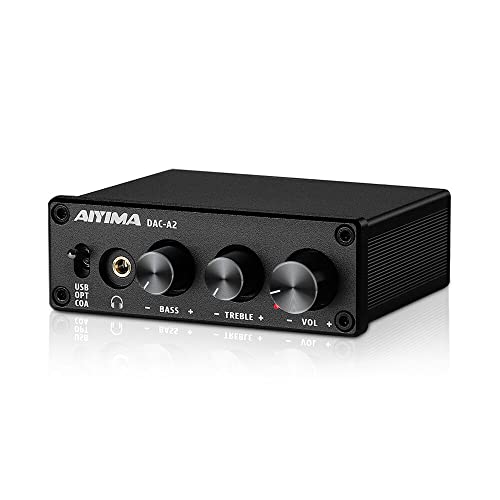
The AIYIMA DAC-A2 is a plug-and-play desktop DAC and headphone amp. It converts optical, coaxial, and USB digital audio to RCA or 3.5mm analog outputs with independent bass and treble controls for personalized tone shaping. This option is well-suited for users who want a compact upgrade to improve desktop listening without complex software installations. Limitation: tone controls may not replace higher-end calibration in critical listening contexts.
Buying Guide: Key Considerations for PC DACs
What should I look for in a PC DAC?
Connectivity matters: ensure USB, optical, and coax inputs align with your devices. Output options should cover your headphones (single-ended 3.5mm or RCA) and powered speakers. If you plan gaming use, consider models offering surround features or gaming-specific enhancements.
When is a dedicated DAC better than a USB sound card?
A dedicated DAC can lower noise floors and improve detail, especially with high-impedance headphones. A USB sound card may offer convenient features like built-in mic inputs and virtual surround sound, but often with trade-offs in noise and resolution.
Which features justify higher price?
High-resolution DAC chips (e.g., 32-bit/384kHz and DSD support), powerful headphone amplification for demanding impedance ranges, balanced outputs, and robust build quality are indicators of higher-end models. Look for low distortion, stable power supply, and compliance with your source formats.
Do you need a microphone input?
Only if your desktop setup requires speaking to teammates or using voice chat directly through the DAC unit. Many gaming setups benefit from micro input, but it can be optional for purely audio listening.
How do tone controls affect sound?
Bass and treble adjustments let you tailor the output to your room and headphones. They are helpful, but they do not replace accurate source material or proper headphone matching. Use them to suit personal taste without overemphasizing frequencies.
What about voice and percussion clarity?
Look for DACs with low noise floors and good dynamic range to preserve subtle cues in music and footsteps in games. Chips from Cirrus Logic, TI, or AKM/AK4493 family are common references in mid-to-high tier units.
What are common setup tips?
- Use a direct USB connection to your PC when possible for best signal integrity.
- Match headphone impedance with the amplifier’s output capability for cleaner levels.
- Disable any onboard PC enhancements that color the sound before feeding the DAC.
- Update firmware if available, and verify that the DAC is selected as the default output device.
FAQ
- What is a DAC and why does it matter for PC audio?
DA converts digital audio to analog for better sound quality, reducing digital artifacts and noise compared to built-in audio solutions.
- Can a DAC improve gaming sound?
Yes; many gaming DAC/amplifiers enhance positional cues, dialogue clarity, and overall fidelity, especially with good headphones.
- Do I need a separate microphone with a DAC?
Only if you require direct mic input from the DAC. Some models include mic interfaces; others do not.
- Are USB-C DACs better than USB-A?
Not inherently; USB-C can offer convenience and power delivery, but performance depends on internal design and DAC chipset.
- Is 32-bit/384kHz support necessary for casual listening?
Not strictly; many listeners cannot hear the difference. It benefits high-resolution sources and critical listening.
- Should I consider a DAC with Bluetooth?
Bluetooth adds convenience but may introduce compression. Use wired connections for the best fidelity when possible.