Answering buyers seeking vibrant, easy-to-use colour label printers, this guide spotlights five top options ideal for home offices, small businesses, and hobbyists. Each pick supports clear black-and-colour labels, quick setup, and reliable connectivity. Best for high-volume shipping, personalised branding, or creative labeling, these models balance performance with value. Read on to see who each product suits best, including potential limitations to consider before buying. A compact summary table helps compare core strengths at a glance.
| Product | Brand | Best For |
|---|---|---|
| Brother QL-800 High-Speed Professional Printer | Brother | High-volume shipping and dual-colour labels |
| Liene PixCut S1 Inspire Kit | Liene | All-in-one print-and-cut projects |
| NIIMBOT B1 Label Maker | NIIMBOT | Home organization and simple Bluetooth labeling |
| SVANTTO Bluetooth Thermal Label Printer | SVANTTO | Portable Bluetooth shipping labels |
| ETIKEZ Bluetooth Thermal Shipping Label Printer | ETIKEZ | Mobile-friendly shipping labels and broad compatibility |
Brother QL-800 High-Speed Professional Printer

The Brother QL-800 is a fast, dedicated label printer designed for high-efficiency labeling. It delivers up to 93 labels per minute at 300 dpi, making it a strong choice for shipping departments, warehouses, and busy home offices. The dual-color capability supports black and red printing, enabling attention-grabbing labels suitable for branding and category differentiation. This model is best for buyers needing rapid, professional labels across a variety of tasks, including shipping, file organization, and name badges. A potential limitation is that it relies on compatible DK pre-sized labels and a USB connection, which may affect setup flexibility for users seeking wireless options.
Best for: High-volume label creation, professional branding, and quick turnaround labeling tasks.
Why selected: It combines speed, durable 300 dpi output, and dual-color printing to create clear, legible labels that stand out in packaging and office organization. The included USB cable simplifies immediate setup.
Caution: Consider whether a wired connection fits your workspace layout and whether you require broader media compatibility beyond DK pre-sized labels.
Liene PixCut S1 Inspire Kit

The Liene PixCut S1 Inspire Kit is an all-in-one colour label printer and cutting machine. It uses thermal dye-sublimation printing at 300 dpi with 16.7 million colors, delivering vivid photos, stickers, and labels. The kit includes 180 sheets (36 photo papers + 144 sticker papers) and supports Bluetooth printing from a smartphone with AI-driven image extraction and precision cutting. This option is best for crafters, hobbyists, and small studios that want a compact, integrated workflow. A limitation is that advanced features rely on app software and Bluetooth connectivity, which may introduce setup steps for first-time users.
Best for: Creative label making, sticker design, and photo-quality outputs in a single device.
Why selected: Its all-in-one capability, AI-assisted cutting, and generous paper bundle streamline projects from concept to finished label or sticker.
Caution: Bluetooth-dependent workflows may require phones or tablets for full feature access; ensure your devices are compatible.
NIIMBOT B1 Label Maker
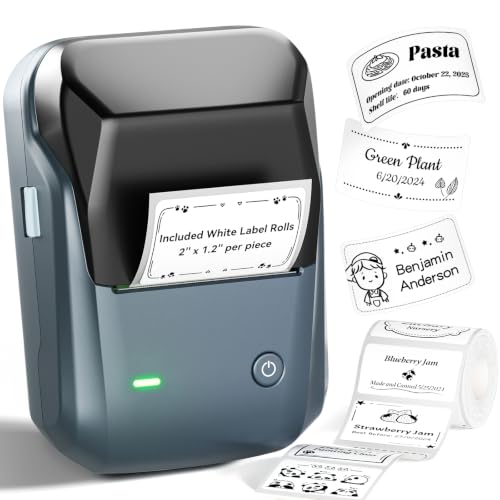
The NIIMBOT B1 is a compact 2-inch Bluetooth label printer designed for home use and small offices. It connects easily to iOS and Android devices via the NIIMBOT app and supports USB connections for PC use with drivers available from the official site. The device offers over 30 fonts, 100 borders, and 1500 symbols, enabling customizable labels with clean typography. Best for: organizing home, school, or small workspace items quickly. Limitation: Bluetooth range and app-based setup can limit use in older devices or restricted network environments.
Best for: Quick, personalised home or small-office labeling with a flexible mobile workflow.
Why selected: Simple, wireless labeling with a robust library of templates and multilingual support helps non-technical users get started fast.
Caution: If you need extensive desktop workflows without Bluetooth, consider models with stronger USB-first support.
Liene PixCut S1 Color Sticker Printer & Cutting Machine (Alternative)

This alternative PixCut S1 model emphasizes all-in-one sticker creation with advanced AI auto-cutting and high-quality 300 dpi prints. It mirrors the Inspire Kit’s strengths in a more direct sticker production workflow, making it a solid pick for hobbyists and small studios focusing on labels and gifts. Best for: users needing precise edge-cutting and vibrant color labels in one device. Limitation: It relies on similar Bluetooth/app-based workflows, so ensure your environment supports mobile-friendly operation.
Best for: Projects requiring precise die-cut stickers with vibrant color output in a single device.
Why selected: The AI-to-cut workflow and high-resolution prints support creative projects with consistent results.
Buying Guide
What to consider when choosing a colour label printer:
- Print quality and color depth: Look for 300 dpi output for sharp text and photos. Consider dye-sublimation for richer colors on photos and labels.
- Connectivity: Bluetooth and USB are common. Wireless models are convenient for mobile workflows, but wired options can offer reliability in fixed workspaces.
- Label types and sizes: Ensure the printer supports the label dimensions you use most (1.5″ to 4″ wide is typical for shipping labels).
- All-in-one capabilities: If you need cutting or die-cutting, consider machines like PixCut S1 that combine printing and cutting in one device.
- App ecosystem and ease of use: App-driven workflows can speed up design, but may require regular updates and compatibility checks with your device.
- Guest-friendly vs. professional use: For home-task labeling, simple apps and templates work well; for branding, dual-color printing and higher durability may matter more.
- Caveats and limitations: Some models rely on specific label media or driver software. Factor in potential setup steps and compatibility with your computer or mobile device.
Frequently Asked Questions
- Q: Do these printers require special label media? A: Some models are optimized for specific DK pre-sized labels or media types; verify compatibility with your preferred labels.
- Q: Can I print in colour on plain, non-label media? A: These labelled printers typically print on label stock designed for thermal or dye-sublimation, not plain paper.
- Q: Is Bluetooth printing secure for business labels? A: Bluetooth provides convenient mobile printing; ensure your devices use secure connections and trusted apps.
- Q: Do these devices support USB-C or newer interfaces? A: USB and Bluetooth are most common; some models may offer USB-A or older standards, so check the exact specs for your setup.
- Q: Are replacement parts and media readily available? A: Major brands offer compatible labels and print media, but availability varies by model and region.
- Q: Which model is best for small-batch random label designs? A: All-in-one options with cutting and flexible app tools are well-suited for creative, small-batch projects.