Chromebooks offer a simple, fast, and affordable option for students who mainly need web-based tools, cloud storage, and reliable battery life. This guide highlights five practical choices suited to different student needs—from elementary to college—while explaining who benefits most from each device. Read on for clear, comparison-friendly assessments and practical buying tips.
Product Quick Reference
| Product | Ideal For | Why It Stands Out |
|---|---|---|
| HP 14″ HD Chromebook Laptop for Students | Budget-conscious middle/high schoolers | Solid quad-core performance, 14″ HD display, decent battery life. |
| Dell Chromebook 11 3100 11.6″ (Renewed) | Low-cost option for younger students | Compact, lightweight, affordable entry point with Chrome OS. |
| HP Chromebook 14 Laptop (14a-na0226nr) | Home, work, and school balance | All-day performance with 14″ display and long battery life. |
| Acer Gateway Chromebook 314 | Students needing bigger screen and storage | Full HD display, 64GB eMMC, modern Chrome OS features. |
| ASUS 2026 15″ FHD Chromebook | Students who want a larger, brighter screen | 15″ display, multiple ports, renewed option for savings. |
HP 14″ HD Chromebook Laptop for Students

Key features: Intel Celeron N4120 with 4 cores, 4 GB RAM, 64 GB eMMC, 14″ HD anti-glare display, and up to a long battery life suitable for class days. Chrome OS provides fast boot times and integrated Google apps. The device supports essential multitasking for research, notes, and Zoom calls commonly required by students.
Who this is best for: Students who need a reliable, budget-friendly Chromebook for daily assignments, streaming lectures, and online collaboration. Why chosen: balanced processor, RAM, and storage for standard school workloads in a slim form factor.
Caution: 4 GB RAM can limit heavy multitasking with many tabs; consider upgrading to a higher-memory model if your coursework involves numerous simultaneous apps.
Dell Chromebook 11 3100 11.6″ (Renewed)

Key features: 11.6″ display, Chrome OS, Celeron N4020, 4 GB RAM, 16 GB flash memory. The smaller footprint emphasizes portability and simple student tasks such as browsing, typing assignments, and educational apps.
Who this is best for: Very budget-focused students or younger learners who prioritize light-weight travel and straightforward functions. Why chosen: low cost and compact design can reduce everyday friction for limited use cases.
Caution: Storage is minimal; consider cloud storage reliance or external options for large files or media-heavy projects.
HP Chromebook 14 Laptop (14a-na0226nr)

Key features: Intel Celeron N4120, 4 GB RAM, 64 GB eMMC, 14″ HD display, long battery life, Chrome OS. Designed for a balance between portability and screen real estate, with all-day capability for classes, writing, and research tasks.
Who this is best for: Students who want a versatile all-around Chromebook that can handle school tasks and light entertainment during commutes. Why chosen: larger 14″ screen improves readability and reduces eye strain on long reading or writing sessions.
Caution: If you frequently run many browser tabs, you may outgrow the 4 GB RAM quickly; monitor usage and close unused tabs when possible.
Acer Gateway Chromebook 314

Key features: 14″ Full HD display, Intel Celeron N4500, 4 GB RAM, 64 GB eMMC, Wi-Fi 5, Chrome OS. The full HD panel and modern ports support productive study sessions, collaborative work, and multimedia coursework.
Who this is best for: Students who want sharper visuals for reading, note-taking, and content creation on a mid-sized screen. Why chosen: Full HD resolution and compact 14″ chassis strike a balance between portability and productivity.
Caution: Renewed or refurbished models may vary in battery health; verify warranty or return terms when purchasing renewed units.
ASUS 2026 15″ FHD Chromebook
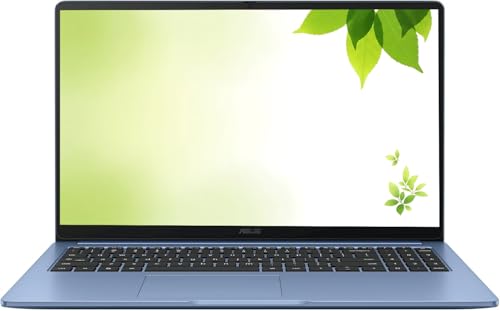
Key features: 15″ FHD IPS display, Intel processor up to 2.80GHz, 4 GB RAM, 128 GB storage, HDMI, multiple USB ports, and renewed option. A larger screen enhances readability and multitasking for extended study sessions and group work.
Who this is best for: Students who value a bigger display for spreadsheets, research, and document editing, with enough storage for offline work. Why chosen: bigger screen and 128 GB storage provide more comfortable productivity while staying within a Chromebook ecosystem.
Caution: Renewed devices may vary in battery endurance; plan for a potential shorter daily runtime than new models.
HP 2026 Lightweight Portable Chromebook

Key features: 14″ HD IPS display, Intel Quad-Core N processor up to 3.70GHz, 4 GB RAM, 128 GB SSD, USB-C and USB-A ports, Chrome OS. Combines portability with ample local storage and modern connectivity for academic tasks.
Who this is best for: Students who want fast performance for multitasking, better storage for offline projects, and flexible connectivity. Why chosen: higher-speed processor and 128 GB SSD improve responsiveness and file handling.
Caution: As a renewed device, battery life and overall wear should be checked prior to purchase.
Lenovo 100E Chromebook 2nd Gen (Renewed)

Key features: 11.6″ display, Chrome OS, 4 GB RAM, 16 GB eMMC, MediaTek MT8173C processor. Lightweight and straightforward for basic tasks and classroom use.
Who this is best for: Younger students or those who primarily use web apps and typing tasks. Why chosen: compact size and simple configuration minimize distractions and cost.
Caution: Limited storage may require frequent cloud storage reliance or external backups for larger coursework.
Buying Guide
What should you consider when buying a Chromebook for students?
- Display size and readability: Larger screens help with reading and note-taking, but weigh against portability and weight.
- Performance and RAM: 4 GB RAM is common for student tasks; if you multitask heavily or keep many tabs open, look for models with 4–8 GB RAM.
- Storage: 64 GB eMMC is standard for budget Chromebooks; assess whether cloud storage or local storage better fits your workflow.
- Battery life: Aim for a full school day of use between charges; verify typical battery performance in real-world use.
- Ports and connectivity: USB-C and USB-A ports, plus HDMI, improve compatibility with external displays and peripherals.
- Renewed vs. new: Renewed devices save money but may have variable battery health; check return policies and battery guarantees.
- Use case alignment: For writing, research, and online coursework, Chromebooks with responsive keyboards and strong Chrome OS integration are ideal.
Practical buying questions
- Is a larger Chromebook worth it for readability? Yes, for multitasking and long study sessions, a 14″–15″ display improves comfort and productivity.
- Should I prioritize more storage or more RAM? For cloud-based work, RAM is more important for multitasking; storage matters if you work offline or store large files locally.
- Are renewed devices a good idea for students? They can be cost-effective, but check battery health and return terms before buying.
- Do Chromebooks run Windows software? No, but most coursework uses web apps and Google Docs; Chrome OS supports Android apps and Linux (on some models) for broader tasks.
FAQ
- What is a Chromebook best used for in school? Web-based tasks, document editing, online collaboration, streaming lectures, and note-taking.
- Do Chromebooks work offline? Some apps support offline work; many tasks rely on cloud storage and internet access.
- Can Chromebooks run Microsoft Office? You can use web-based Office Online or Android versions on many Chromebooks.
- How long do Chromebook batteries last in school use? Many models last a full school day; actual endurance depends on brightness, tasks, and background apps.
- Is 4 GB RAM enough for students? It is sufficient for standard tasks; upgrade to 8 GB if you frequently multitask with many tabs.
- Are renewed Chromebooks reliable for students? They can be, with careful seller selection and a clear return policy.