Answering the need for affordable, compact laptops, this guide highlights small-screen options that are ideal for students, light daily tasks, and travel. The top picks emphasize reliability, portability, and value, with clear guidance on who each device suits best. Whether you need a durable school laptop, a compact work companion, or a budget-friendly Chrome OS machine, these options help you compare quickly and choose confidently.
Summary table of selected products:
| Product | Screen | OS | Best For | Why Picked |
|---|---|---|---|---|
| Lenovo 100E Chromebook 2nd Gen | 11.6″ | Chrome OS | Students on a budget | Small form factor, renewed value |
| Dell Latitude 3190 | 11.6″ | Windows 11 Pro (Renewed) | Classroom use | 2-in-1 option with touch |
| HP Chromebook 11A G8 Education Edition | 11.6″ | Chrome OS | School settings | Rugged design, student-friendly |
| Dell Chromebook 11 3100 | 11.6″ | Chrome OS | Budget learners | Compact and easy to manage |
| Amzboy 15.6” Laptop | 15.6″ | Windows 11 | Light multitasking on the go | Large display, expandable storage option |
Lenovo 100E Chromebook 2nd Gen

The Lenovo 100E Chromebook 2nd Gen is a compact, 11.6-inch Chrome OS notebook designed for budget-conscious students and light everyday use. It emphasizes essential computing with Chrome OS, which is simple for web-based tasks, schooling apps, and cloud storage. This model is best for users who favor quick boot times, long battery life, and minimal software maintenance.
Best for: Students and travelers who need a small, reliable Chrome OS laptop. Better for web-centric tasks and classroom apps rather than heavy software or offline media editing. Caution: Renewed units may show visible wear; confirm battery health and keyboard function before use.
15.6″ Laptop With Win 11, N4020 CPU

This 15.6-inch Windows 11 notebook uses an entry-level N4020 CPU with 4GB RAM and 128GB storage. It’s a solid option for basic tasks like browsing, document editing, and streaming. The larger screen is better suited for multitasking and multimedia, albeit at the expense of portability and battery life compared with smaller models.
Best for: Budget-friendly learners who prefer a bigger display for reading and writing. Choose this if you value screen real estate over ultralight portability. Limitation: Not as compact as 11.6″ models, which reduces travel convenience and one-handed portability.
HP 14″ Laptop Computer, 2026 Edition

The HP 14″ model provides a 14-inch desktop-class experience in a portable chassis, powered by a modern AMD processor and DDR5 memory for improved responsiveness. It ships with Windows 11 and Copilot AI, aiming to streamline tasks like research, summaries, and daily productivity. It’s a mid-size option that balances performance and mobility.
Best for: Users needing a dependable Windows machine with AI-assisted productivity features on a budget. Better for those who can trade some portability for a larger display. Caution: Slightly heavier and larger than 11.6″ options, which affects travel convenience.
Dell Latitude 3190 11.6″ HD 2-in-1

The Dell Latitude 3190 is an 11.6-inch 2-in-1 notebook designed for classroom and on-the-go use. It features a multilingual keyboard and a touchscreen option, enabling flexible note-taking and presentations. This renewed device is optimized for everyday productivity, light multitasking, and cloud-based work tasks.
Best for: Students and professionals who value versatility in a small Windows device. Choose this if you want a 2-in-1 capability for notes and tablet-like interaction. Caution: Renewed units vary in battery life and hinge wear; verify if you need robust hinge reliability.
HP Chromebook 11A G8 Education Edition
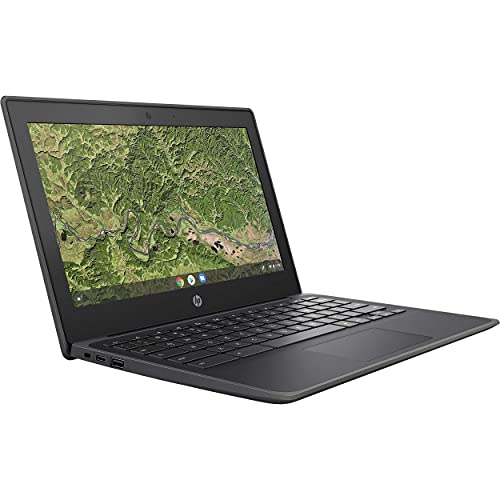
The HP Chromebook 11A G8 Education Edition is built for classroom resilience with Chrome OS, 4GB DDR4 RAM, and a 11.6-inch display. It includes features geared toward students, such as spill-resistant keyboards and classroom-friendly durability. This model emphasizes security, easy management, and long-term value for schools or families prioritizing Chrome OS.
Best for: K-12 and budget-minded students who need a rugged, simple Chrome OS device. Better for cloud-based work and browsing than heavy offline software. Caution: Chrome OS limits some professional software options and offline storage is modest with 32GB micro storage in some configurations.
Dell Chromebook 11 3100

The Dell Chromebook 11 3100 offers an 11.6-inch display and Chrome OS, focusing on simple use, fast boot times, and easy maintenance. It’s an approachable option for classrooms and students who primarily rely on cloud-based apps and web services. The compact footprint makes it easy to slide into backpacks or small desks.
Best for: Budget-conscious students needing a straightforward, secure Chrome OS device. Choose this if you want predictable Chrome OS performance with minimal setup. Caution: Limited local storage; consider cloud storage or external expansion for large files.
Amzboy 15.6” Laptop

The Amzboy 15.6” laptop brings a larger screen with a practical 1920×1080 FHD display and an Intel-based setup. It emphasizes portability with a light weight for a 15.6-inch form factor and offers a 128GB SSD and 4GB RAM for everyday tasks. The fanless design is a notable quiet feature for shared spaces.
Best for: Users who need a bigger display for reading, basic productivity, and multimedia on the go. Better for home or campus use where a larger screen compensates for reduced portability. Limitation: The larger chassis reduces all-day portability compared with 11.6″ models.
Buying Guide
- Screen size and portability: If you travel often or carry the device daily, an 11.6″ model is typically the best balance of portability and usability.
- Operating system: Chrome OS is lightweight and fast for web-based tasks, while Windows 11 offers full software compatibility and AI features for productivity tasks.
- RAM and storage: 4GB RAM is common on budget models; pair with at least 32GB or 64GB of cloud storage or local storage if you need offline files.
- Durability vs. price: Education-focused models often emphasize rugged keyboards and spill resistance—worth considering for students or shared devices.
- Battery life: Look for devices marketed for all-day use if your schedule includes long classes or travel without charging opportunities.
- Upgradability: Some models offer expandable storage or external expansion options—useful if you anticipate growing data needs.
- Consider warranties and renewed options: Renewed devices can offer substantial savings but verify battery and hinge condition when possible.
Frequently Asked Questions
- What is a cheap small laptop best used for?
Best for basic browsing, document editing, streaming, and school projects with lightweight software and cloud storage.
- Are Chromebooks a good fit for students?
Yes, especially for cloud-based workflows, fast boot times, and easy device management in education settings.
- Is Windows 11 necessary for a small laptop?
Not always; Windows 11 suits users needing desktop software, while Chrome OS covers everyday web tasks efficiently.
- Should I buy a renewed model?
Renewed units can offer significant savings, but check battery life, keyboard function, and hinge reliability.
- What should I prioritize for a budget laptop?
Prioritize screen size, weight, battery life, RAM, and storage balance to fit your daily tasks and portability needs.
- Can a larger screen be a downside?
Yes, larger screens add weight and reduce portability; choose based on your primary use and travel frequency.