Yes — these card payment machines let you accept credit and debit cards anywhere, quickly and securely. This guide highlights five top options for different business needs, from portable handheld POS devices to full terminal solutions. Best for storefronts, on-the-go sellers, restaurants, and service providers seeking reliable, low-friction payment processing. The top picks balance ease of use, offline capability, and accessibility for buyers evaluating compact mobile solutions or more robust terminals.
Summary table of selected products:
- Square Terminal — All-in-one countertop/mobile payment and receipt printer for complete in-store sales.
- Square Reader (2nd Gen) — Compact, versatile reader with contactless and chip support for quick taps and dips.
- Square Handheld — Slim, pocketable POS with tableside capability and durability for busy environments.
- SumUp Solo — Full touchscreen card reader with reliable connectivity and included data options for flexible processing.
- VeriFone MX915 — Versatile multimedia transaction terminal with comprehensive card and contactless support for larger operations.
Square Terminal: All-In-One Credit Card Machine

Best for: Retailers and service businesses that need a single device to process payments, print receipts, and ring up sales. Square Terminal combines payment acceptance with a built-in printer, reducing the need for separate hardware. It supports all major cards and aims to keep pricing simple with a straightforward rate.
Why chosen: This option is ideal for counter service or mobile selling, where a single device handles checkout, receipts, and payment processing. The two-second chip card processing speed helps keep lines moving. Since it’s a Square product, it integrates well with Square POS software and existing accounts, making reconciliation easier for small businesses.
Caution: Some users may prefer standalone terminals with broader enterprise features; ensure your back-end integrations match your store workflows. No long-term contracts or hidden fees are highlighted by the product description.
Square Reader for Contactless and Chip (2nd Generation)
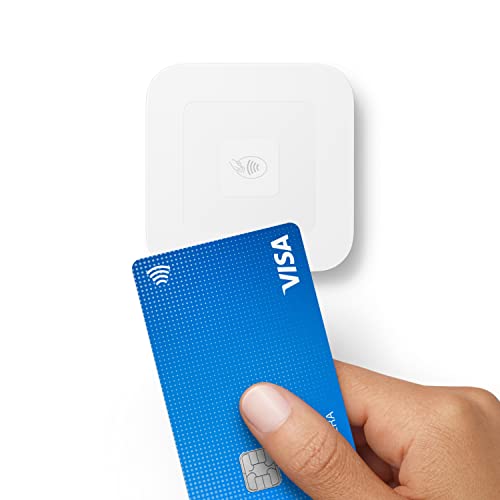
Best for: Small businesses or mobile vendors who need a lightweight, portable reader that supports contactless payments and mobile wallets. Suitable for pop-ups, markets, or on-the-go service models where a full POS is unnecessary.
Why chosen: The 2nd Generation Reader emphasizes improved connectivity, longer battery life, and offline payment capability up to 24 hours. It accepts contactless, chip cards, and wallet payments like Apple Pay and Google Pay, with a simple, low-rate pricing model and no monthly fees.
Caution: While portable, this device is a reader; businesses with heavy POS needs may still require a full terminal or additional accessories for receipts or inventory management. Ensure your network reliability aligns with offline-to-online workflows.
Square Handheld: Portable POS For On-The-Go Payments

Best for: Restaurants, retail floors, and service teams needingTable-side payments, barcode scanning, and a compact, durable device. The handheld design enables operations like taking tableside orders or mobile checkout without returning to a station.
Why chosen: The device is built to withstand dust and splashes, with offline payments and a long-lasting battery. Its slim, pocketable form makes it easy to carry for remote or busy environments. The built-in barcode scanner and palm-friendly grip support quick, efficient transactions.
Caution: While versatile, its durability suggestions should be verified against your specific use case; consider additional protection if you operate in harsh environments or heavy exposure settings.
SumUp Solo Card Reader With Full Touch Screen

Best for: Vendors and small business owners who want an all-in-one touchscreen experience with reliable Wi-Fi and mobile data. The included data option supports processing in areas with limited connectivity, which helps maintain sales during travel or events.
Why chosen: The Solo provides a strong balance between a modern touchscreen interface and dependable connectivity. It comes with a charging station to help manage downtime in busy settings and supports a variety of payment methods through a single interface, making it easy to train staff and scale operations.
Caution: SumUp Solo relies on data services; assess data plan costs and coverage for your selling areas. If you mainly operate in low-connectivity zones, verify performance with the model’s offline capabilities.
VeriFone MX915: Multimedia Transaction Terminal

Best for: Larger retail environments or service operations requiring a sophisticated card terminal with multiple interfaces and robust security features. Ideal where diverse payment methods and secure PIN entry are priorities.
Why chosen: The MX915 is positioned for high-volume settings with a focus on security, PCI 4.x compliance, and a color touchscreen. It supports EMV, MSR, NFC, and PIN entry, making it adaptable to complex payment scenarios.
Caution: This option may require more setup and ongoing configuration compared to portable readers. Ensure your network infrastructure and service environment can support a full-featured terminal.
Buying Guide: Card Payment Machines — What To Consider
- Payment Methods: Decide whether you need support for contactless, chip cards, magnetic stripe, and wallets like Apple Pay or Google Pay. Some devices offer broad compatibility, others are more basic.
- Portability: Choose handheld or countertop devices based on your sales model. Portable units suit mobile vendors; fixed terminals work well in a steady storefront.
- Connectivity: Consider offline capability and data plan requirements. Vendors in busy environments or with intermittent internet may require devices that process offline and sync later.
- Power and Battery Life: For on-the-go use, long battery life and quick charging reduce downtime. Some devices include charging docks or spare batteries.
- Security and Compliance: Look for devices that support modern security standards and PCI compliance. PIN entry and data encryption are essential for higher-risk transactions.
- Software Integration: If you already use a POS system, ensure the card reader integrates smoothly with your software for unified reporting and inventory management.
- Pricing Structure: Compare per-transaction rates, monthly fees, and any long-term commitments. Some solutions offer flat rates with no contracts, others include bundled services.
- Durability and Use Case: Consider environments like restaurants, events, or outdoor markets. Durable housings and dust/water resistance help long-term reliability.
Frequently Asked Questions
- What is a card payment machine? A device that accepts card payments through chip, magnetic stripe, or contactless methods, often connected to a payment processor and, in many cases, integrated with a POS system.
- Do these machines require a internet connection? Many do, but some offer offline processing and later syncing. If you sell in areas with unreliable internet, offline-capable devices are advantageous.
- Are there hidden fees beyond the listed rates? Look for contract terms, monthly fees, and additional charges for refunds or chargebacks. Some devices offer simple, predictable pricing.
- Can I use these devices for more than one store location? Yes, many devices support multi-location setups with centralized reporting, though some features depend on the software ecosystem you choose.
- Is a SIM card included? Some readers include or offer a free SIM card with mobile data for on-the-go processing, while others rely on your existing network or Wi-Fi.
- What should I consider when choosing between a reader and a terminal? Readers are compact and portable; terminals provide more features, higher-volume processing, and often full receipt printing. Your business size and workflow determine the best fit.