Want a reliable card machine for a small business? This guide compares practical, mobile-friendly options to help you choose. It highlights devices for counter use, tableside service, and on-the-go sales. Each pick is suited to a different buyer type, from brick-and-mloor retailers to service providers and food venues. The following table shows key at-a-glance details for quick scouting.
| Product | Best For | Connectivity | Key Benefit |
|---|---|---|---|
| Square Terminal | Retail counters and mobile staff | Wi‑Fi / Ethernet | All‑in‑one POS with receipts |
| Square Reader (2nd Gen) | Businesses needing flexible setup | Bluetooth / offline mode | Tap, chip, or wallet payments anywhere |
| Square Handheld | Tableside service and small teams | Wi‑Fi / offline capable | Portable, durable, barcode scanning |
| Symcode POS PDA | Inventory‑driven selling | Mobile data (4G/Wi‑Fi) | Integrated printing and inventory control |
| SumUp Plus Card Reader | Budget‑oriented mobility | Bluetooth | Low, transparent rates |
Square Terminal – Credit Card Machine to Accept All Payments

Square Terminal is an all‑in‑one device that handles sales, payments, and receipts from a single unit. It’s ideal for storefront counters and staff who need to ring up customers anywhere in the store. It accepts all major credit and debit cards with a simple, low rate and no long‑term contracts. Chip cards process in about two seconds, which helps maintain fast service at busy times.
Best for: Small retail counters or mobile staff who want an integrated, single‑device solution. Limitations: Requires network access for full functionality; offline mode is limited to essential payments only.
Square Reader for contactless and chip (2nd Generation)
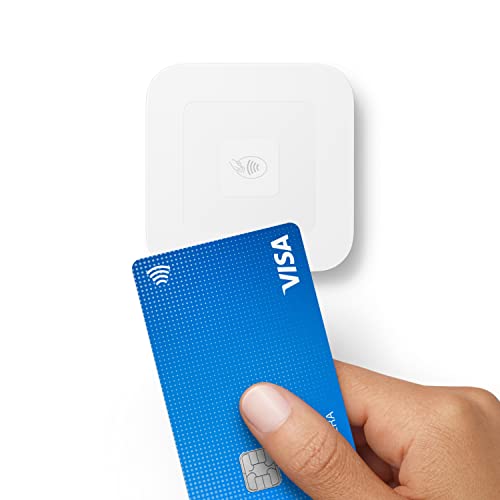
This reader supports contactless, chip cards, Apple Pay, and Google Pay with a streamlined POS app. It offers improved connectivity, extended battery life, and enhanced security. There are no long‑term commitments or monthly fees, and offline payments are supported for up to 24 hours, making it suitable for mobile or pop‑up setups.
Best for: Vendors who need a flexible, low‑friction payment setup without ongoing fees. Caution: Offline payments vary by app capability and may require online sync later.
Square Handheld – Portable POS for Tableside Service

Square Handheld combines a slim design with a sturdy grip, letting staff accept payments, take tableside orders, and scan barcodes on the go. It’s built to withstand common shop environments with splash and dust resistance, and it supports offline payments so sales aren’t interrupted by connectivity issues.
Best for: Restaurants, retail, or service pros who need a palm‑size device for on‑the‑spot transactions. Limitation: Optional protective case recommended for drops and rough handling.
Symcode POS PDA Mobile POS with Printer

The Symcode handheld POS integrates a high‑resolution 5.99″ touchscreen with a 40mm receipt printer and built‑in NFC. It supports 4G/3G/2G connectivity and offers inventory control features, user management, and barcode capabilities. It’s designed for on‑the‑floor sales and quick ticketing in fast‑moving environments.
Best for: Businesses needing integrated printing and strong inventory features in a handheld device. Limitation: Android‑centric ecosystem; may require specific apps for full functionality.
Square Reader for Magstripe (USB‑C)

The USB‑C magstripe reader integrates with the Square POS app for quick payments and next‑business‑day settlement. It’s simple to set up without long‑term commitments or monthly fees, making it a practical option for businesses that primarily deal with magstripe transactions and want a straightforward solution.
Best for: Businesses transitioning to card payments with a budget‑friendly, plug‑and‑play option. Limitation: Does not support newer contactless or chip‑only cards as the primary method without an accompanying reader.
SumUp Plus Card Reader – Bluetooth NFC

SumUp Plus supports all major cards with a simple, low rate and no long‑term contracts. The mobile card reader works with smartphones and tablets, enabling payments anywhere and anytime. Its appeal lies in transparent pricing and a compact design for small teams or on‑the‑go sales.
Best for: Small businesses seeking predictable costs and mobile flexibility. Limitation: Some merchants may require a compatible app ecosystem to maximize features.
Buying Guide
What should I look for when choosing a card machine?
Consider whether you need an all‑in‑one device, a portable option, or a magstripe‑only solution. Evaluate battery life, offline payment capabilities, and ease of use. For brick‑and‑mortar stores, a counter device with receipts matters; for service businesses, portability and tableside capability are key.
How important is offline payment support?
Offline mode ensures you can complete sales even when internet access is interrupted. Look for devices that offer offline transactions with reliable syncing once connectivity returns. This is critical for pop‑ups, markets, and busy service environments.
What about fees and contracts?
Many options offer no long‑term contracts or monthly fees, charging per‑transaction rates. Compare the true cost of ownership by considering interchange rates, hardware costs, and any ancillary charges for offline or premium features.
Which features drive efficiency the most?
Key features include quick chip processing, contactless support, barcode scanning, inventory management, and integrated printing. Devices with a combination of these features reduce steps in the checkout flow and improve accuracy in inventory and sales records.
Is a single device or multiple devices better?
Single‑device solutions simplify training and maintenance, but modular setups can offer redundancy and specialized roles (front counter vs. mobile sales). Choose based on how your team operates and the environments you serve.
What device fits a specific buyer profile?
Retail counters: prefer an all‑in‑one or robust countertop reader with receipts. Tableside service: prioritize portability, fast processing, and offline payments. Inventory‑driven businesses: value integrated printing and inventory features in a handheld device.
Security and data handling
Ensure the device complies with standard payment security practices and supports tokenization. Regular software updates and secure pairing methods are important for protecting customer data.
FAQ
- Which card types do these devices accept? Most listed devices accept major credit and debit cards, including contactless payments like Apple Pay and Google Pay, depending on the model.
- Do these devices require a subscription? Many have no long‑term contracts or monthly fees; you typically pay per transaction or a low flat rate.
- Can I use these devices offline? Several options offer offline payments for a period, then sync when online. Check each model for offline limits.
- Is printing receipts supported? Some devices include built‑in receipt printing or offer compatible printing options; verify printer availability for each model.
- Which device is best for a small café? A portable, tableside solution like Square Handheld or Square Reader, combined with a reliable offline mode and quick receipts, is often ideal for quick service and mobility.
- Are these devices compatible with iPads or Macs? Compatibility varies. Some printers or readers have Android/Windows focus, while others integrate with Square’s ecosystem on iOS; confirm app compatibility for your setup.