When shopping for laptop accessories, prioritize devices that enhance productivity, portability, and ease of use. This guide highlights five practical picks ideal for everyday laptop users, students, and remote workers. The top picks span a USB lamp for ambient lighting, a multi-port USB hub for peripherals, a rolling desk for flexible setups, a high-quality webcam for clearer video, and a protective camera cover for privacy. The table below summarizes each product’s core purpose and ideal user.
| Product | Best For | Why It Stands Out | What to Know |
|---|---|---|---|
| EBYPHAN Dimmable USB Lamp | Late-night workers, students, multitaskers | Eye-friendly LED light with three brightness levels; USB-powered | Flexible neck; no battery required |
| Onfinio 7-Port USB Hub | People with multiple peripherals | Seven USB 3.0 ports with 5 Gbps transfer; hot-swappable | Power-hungry devices may need an external supply |
| Tossbiss Laptop Tripod on Wheels | Presenters, home office setups | 3-in-1 stand with projector and laptop trays; adjustable height | Mobile with locking wheels |
| XOCLON 1080P Webcam | Remote workers, students | Full HD video with low-light compensation and dual mics | Automatic exposure and color enhancements |
| Gadget Ray Webcam Cover | Privacy-conscious users | No adhesive, easy push-on cover | Thin profile, compatibility with most laptops |
EBYPHAN Dimmable USB Lamp for Laptop

The EBYPHAN USB lamp is designed to provide eye-friendly lighting directly at a laptop workspace. It uses 14 high-quality LED beads to offer energy-efficient brightness without flicker, making it suitable for late-night study or work sessions. The lamp offers three brightness levels and a touch on/off switch for quick control. It is powered via USB, compatible with PC USB ports, phone chargers, or power banks, so there is no separate battery needed. This makes it a compact option for budget-conscious buyers who want better desk illumination without extra bulk.
Best for: students and remote workers who need flexible, glare-free light while using a laptop in dim environments. Choose this if you want easy USB-powered lighting with adjustable brightness and a touch control. Caution: brightness steps may feel small for very bright daylight setups, and it requires a USB port for power; no standalone battery.
Onfinio 7 Port USB Hub with On/Off Switches

This USB hub expands a single USB 3.0 port into seven modern ports, supporting devices like flash drives, keyboards, mice, and printers. It delivers up to 5 Gbps transfer speeds, making it significantly faster than USB 2.0 hubs and capable of transferring large files quickly. The hub supports hot swapping and requires no software installation. For power-hungry peripherals, it’s recommended to use an external power supply to prevent momentary power issues.
Best for: users who need a single compact solution to connect multiple peripherals to a laptop. Better for those who value fast data transfer and plug-and-play simplicity. Caution: for devices with high power needs, rely on an external power source to maintain performance.
Tossbiss Laptop Tripod on Wheels
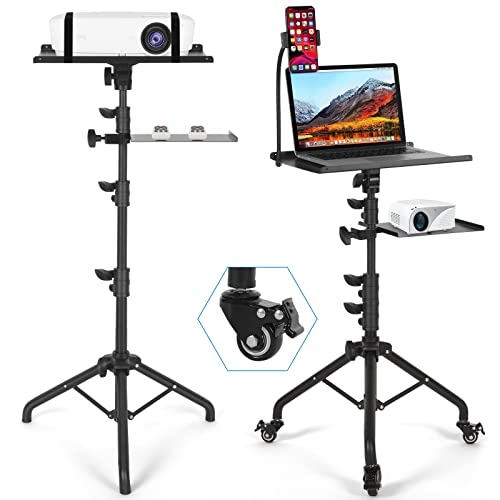
This mobile 3-in-1 projector stand combines a projector tray, a laptop tray, and a flexible phone holder in one setup. It is ideal for presentations, gaming, and home entertainment, and it includes three detachable swivel wheels for easy movement. The height adjusts from 25.5 inches to 57.8 inches, and the top tray tilts up to 180 degrees. The bottom tray also adjusts, allowing you to tailor viewing angles for comfort.
Best for: users who need a versatile workstation that can adapt to living rooms, classrooms, or small offices. Choose this if you value mobility and multi-device organization in one stand. Caution: weight capacity and stability depend on the final configuration; ensure secure placement when tilting the trays.
XOCLON 1080P HD Webcam

The XOCLON webcam records in full HD 1080p with a 5-layer anti-glare lens, delivering clear video for calls and streaming. It includes built-in dual omnidirectional microphones to capture voice while reducing background noise. Automatic low-light compensation and color exposure adjustments help maintain good image quality in varied lighting without manual tweaks. It is suitable for laptop and desktop use and is easy to set as the default microphone during installation.
Best for: professionals and students who need reliable video quality in diverse lighting. Choose this if you want a plug-and-play webcam with noise reduction and automatic image enhancement. Caution: performance depends on lighting; in extremely bright or dark rooms, additional lighting may still improve visibility.
Gadget Ray Webcam Cover Slide (6 Pack)

The Gadget Ray cover provides a no-adhesive, residue-free privacy shield for laptop webcams. Made from flexible TPU, it presses onto the bezel and slides closed when not in use. The thin profile won’t interfere with closing the laptop lid, and no removal is required for sleep mode. This 6-pack is suitable for families or shared devices where multiple users need quick privacy options.
Best for: privacy-conscious users who want a simple, adhesive-free solution. Choose this if you need a reusable cover that won’t gum up the laptop bezel. Caution: some laptop bezels may require precise placement to avoid lid interference on certain models.
WINAZ Small Portable Rolling Standing Desk
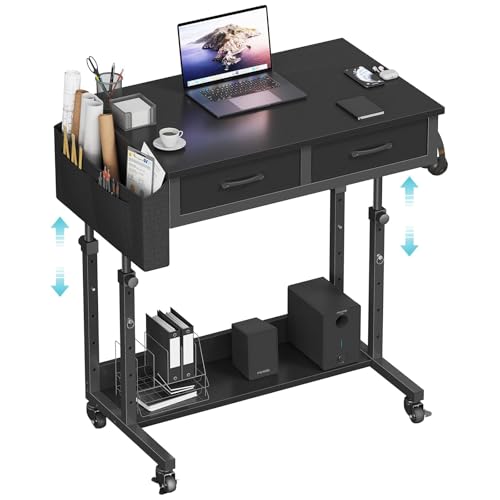
This 32-inch rolling standing desk offers height adjustment from 27.9 to 41.3 inches, with built-in fabric drawers and storage. It moves smoothly on four ball-bearing casters, some of which include brakes for stability. The design supports varied workflows, including standing work, gaming, and study sessions, with ample storage to keep essentials within reach.
Best for: users who want a flexible, mobile workspace with storage. Choose this if you need to switch between sitting and standing and prefer a compact, all-in-one desk solution. Caution: heavier items may affect rolling ease on uneven floors; keep the floor clean and flat for best results.
Buying Guide
What should you consider when buying laptop accessories?
- Compatibility and power: Ensure USB devices draw power from the laptop or an external supply when needed. USB hubs may require powered adapters for high-demand peripherals.
- Portability vs. functionality: Lightweight items help travel, but ergonomics and multi-function designs improve on-desk efficiency.
- Privacy and security: A physical webcam cover can reduce risk in shared spaces without altering software settings.
- Lighting quality: A lamp or proper desk lighting reduces eye strain during late work sessions.
- Ease of setup: Plug-and-play devices save time; avoid products requiring complex driver installations.
How to compare similar products
- Peripherals vs. stands: Decide whether you need more ports, better lighting, or a higher desk surface first.
- Mobility: For frequent relocations, prioritize wheeled stands or lightweight lamp options.
- Privacy features: If webcam privacy is essential, a cover is a cost-effective lifecycle option.
Usage scenarios
- Remote workers and students who rely on video calls benefit from a reliable webcam and a stable lighting setup.
- Home offices with multi-device setups gain from a versatile USB hub and a compact, portable desk.
- Laptop users seeking privacy can combine a cover with good lighting to maintain focus.
FAQ
- Q: Is a USB hub necessary if my laptop has all ports? A: Not strictly, but hubs simplify connecting multiple peripherals and can improve organization.
- Q: Do webcam lights matter for video calls? A: Proper lighting improves image quality and reduces graininess in low-light environments.
- Q: Can I use a camera cover with all laptops? A: Most covers are universal, but confirm fit with your model’s bezel and lid clearance.
- Q: Should I buy a rolling desk for a small space? A: If you need flexibility and storage, a compact rolling desk can optimize space and workflow.
- Q: Will a USB lamp affect laptop battery life? A: USB-powered lamps draw minimal energy; they typically do not impact battery life significantly.
- Q: Are external power supplies required for USB hubs? A: High-power devices (like external hard drives) may benefit from powered hubs to ensure stable performance.