Answer: When choosing a business notebook, prioritize reliable performance, ample memory, solid storage, and a comfortable keyboard. This guide highlights five capable models suited for professionals, students, and remote workers who need smooth multitasking and durable builds. The top picks span mid- to large-screen sizes, with ample RAM, fast SSDs, and security features like fingerprint login. Use the buyer table below to compare at a glance, then read detailed sections to understand who each laptop is best for and why.
| Product | Best For |
|---|---|
| Auusda 15.6″ Silver Laptop | Power users needing large RAM and fast NVMe storage |
| Dell 15″ Touchscreen | Multitaskers who value a responsive touch display |
| HP 17.3″ Ryzen Laptop | Users who benefit from a bigger screen for spreadsheets |
| Auusda 15.6″ Pink Laptop | Mobility with strong RAM and flexible storage |
| Dell Latitude 15.6″ (Renewed) | Budget-conscious professionals needing durable business features |
Auusda 16GB RAM, 1TB NVMe 15.6″ Business Laptop

Best for power users who need robust multitasking. This Auusda model combines 16GB DDR4 RAM, a 1TB NVMe SSD, and a 15.6″ FHD display to support heavy workloads across multiple apps, browsers, and windows. The 16GB RAM can be upgraded to 32GB, which helps with large spreadsheets and data analysis. The device offers a 15.6″ IPS display with wide viewing angles and a backlit keyboard for typing in low light. Caution: The wide feature set may come with a heavier chassis, reducing portability compared with smaller laptops.
Who it’s best for: Professionals who run memory-heavy software, students handling large datasets, and travelers needing substantial local storage. Why selected: Strong memory and fast storage, plus 180° hinge and support for multiple displays enhance productivity in work and study environments.
Dell 15″ Touchscreen Laptop with 20GB RAM
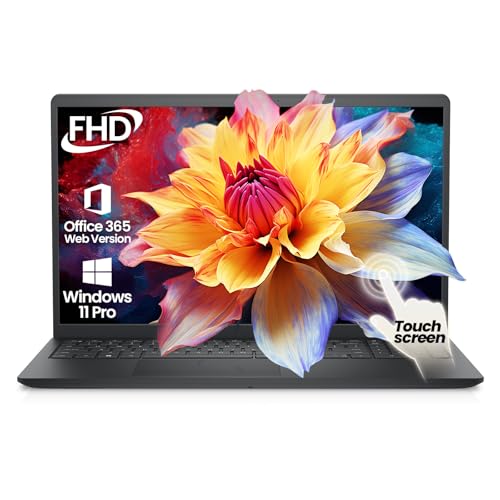
Best for multitaskers who benefit from a responsive touchscreen and strong processing. This configuration features a 15.6″ FHD IPS touchscreen and a 13th Gen i5-1334U with up to 4.6GHz Turbo, plus 20GB RAM and 512GB PCIe SSD. The touchscreen supports smooth navigation during presentations and design work. Caution: Renewed or high-end configurations may have variable battery life depending on usage and settings.
Who it’s best for: Professionals, students, and creatives who rely on quick multitasking and intuitive touch controls. Why selected: High RAM capacity and fast storage enable efficient multitasking, while the touchscreen adds direct interaction for work tasks and learning materials.
HP 17.3″ Touchscreen Laptop with Ryzen 5

Best for users who want a spacious display for complex documents, data analysis, and virtual meetings. The HP 17.3″ model uses an AMD Ryzen 5 7530U (up to 4.5GHz) with 20GB RAM and a 1TB SSD. The large anti-glare touchscreen is ideal for review of dashboards and financial models. Caution: A larger screen means increased weight, which reduces portability for frequent travelers.
Who it’s best for: Real estate agents, educators, and professionals handling sizable spreadsheets or design tasks. Why selected: The big display and robust RAM support enhanced multitasking and readability in busy work environments.
Auusda Pink 32GB RAM, 1TB NVMe Laptop

Best for heavy multitasking and data-heavy workflows. This Auusda model offers 32GB DDR4 RAM and a 1TB NVMe SSD with a 15.6″ display, a backlit keyboard, and a fingerprint ID for security. It supports up to 10TB storage in total, giving flexibility for large files and local backups. Caution: The extra RAM and storage come with a larger chassis, so check portability for frequent travel.
Who it’s best for: Analysts, developers, and students running multiple virtual machines or extensive browser tabs. Why selected: The high RAM and fast SSD deliver smoother performance under heavy workloads and multi-app usage.
Dell Latitude 15.6″ Business Laptop (Renewed)

Best for budget-conscious professionals who need a durable business machine. The Latitude 5590 features an 8th Gen Intel Core i5, 8GB RAM, and 256GB SSD. It includes Windows 11 Pro (renewed) and essential ports for connectivity. Caution: As a renewed model, battery life and cosmetic wear may vary between units.
Who it’s best for: Small- to mid-size businesses, remote workers, and students seeking a reliable, affordable business laptop. Why selected: Balanced performance with portability and enterprise-ready features at a lower price point.
Buying Guide: Key Purchase Considerations
What screen size fits your workflow? Larger displays (15.6″–17.3″) improve productivity for spreadsheets, design, and presentations but add weight. Smaller laptops (13″–14″) offer portability, suitable for commuting and remote work.
How much memory and storage do you need? 16–20GB RAM handles most multitasking well; 32GB is advantageous for heavy multitasking or virtual machines. SSD capacity (256GB–1TB) affects boot times and data storage; consider expansion options for future needs.
Is the keyboard comfortable and is there security? A backlit keyboard helps in low-light settings; fingerprint ID adds quick, secure login. A robust chassis improves durability for daily commuting or travel.
What about display quality and input? An IPS panel with wide viewing angles and adequate brightness enhances clarity during long work sessions. A touchscreen can boost productivity for presentations or design tasks.
Ports and expandability matter. Ensure USB-C, HDMI, and SD card support align with your peripherals. If you need multiple external monitors, confirm GPU support and display output capabilities.
Frequently Asked Questions
- What is the best size for a business laptop?
– It depends on portability versus workspace needs; 15.6″ is a common balance, while 17.3″ suits heavy spreadsheet or design work. - Is 20GB RAM necessary for business use?
– For many professionals, 16–20GB is ample; 32GB is beneficial for heavy multitasking or virtualization. - Should I choose a touchscreen for work?
– Touchscreens help with presentations and certain workflows, but may add cost and glare; non-touch options can be more affordable. - Is renewed or refurbished preferable?
– Renewed models can offer strong value, but verify return policies and battery health before purchase. - What storage setup is best?
– An SSD (256GB–1TB) provides fast boot and file access; consider additional external storage or upgrade paths if needed. - Which features matter most for office software?
– A capable CPU (i5/Ryzen 5 or higher), sufficient RAM (16GB+), and fast SSD storage are the core requirements for smooth performance.