Looking for a reliable way to create professional business cards at home or in a small office? This guide highlights five strong choices across cardstock printers, card cutters, and all-in-one sticker-cutter solutions. It’s ideal for freelancers, sales professionals, and small business owners who want crisp edges, customization, and fast turnaround. Below you’ll find who each product is best for, plus a concise buying guide and a short FAQ.
| Product | ||
|---|---|---|
| Avery Printable Business Cards with Sure Feed Technology | Inkjet printable cardstock | Home printers needing reliable feeding and clean edges |
| Custom Business Cards – 16pt – Made in the USA | Custom-printed cards (bulk capable) | Small businesses needing large quantity options |
| Electric Business Card Cutter for 3.5″x2.1″ | Automatic card cutter | High-volume card production with precise cuts |
| Liene PixCut S1 Color Sticker Printer & Cutting Machine | All-in-one print-and-cut | Stickers and labels with AI-assisted cutting |
| Avery Clean Edge Printable Business Cards with Sure Feed Technology | Inkjet printable with Clean Edge | Cards that separate easily with smooth edges |
Avery Printable Business Cards With Sure Feed

Best for: Individuals who print at home and need dependable feeding and alignment. The Sure Feed Technology helps minimize misfeeds, while the white cardstock provides a clean canvas for branding. The 2″ x 3.5″ size is compatible with standard business card layouts and common printer settings, making it a practical choice for everyday use.
Why selected: This option emphasizes reliability and clean cuts, supported by an economy-friendly 100-card pack. The combination of printer-ready cardstock and a robust cutting edge helps maintain a professional appearance on every card.
Caution: Ensure your inkjet printer’s settings are optimized for heavy cardstock; otherwise, you may experience slower feeding or slight color variation on difficult inks.
Custom Business Cards – 16pt – Made in the USA

Best for: Professionals and businesses needing highly customizable, localized printing options. This product supports uploading your logo and text to tailor each card to your brand identity.
Why selected: It offers a straightforward process to create personalized cards, including multiple quantity options from 50 to 10,000. The flexibility makes it suitable for both solo professionals and growing teams.
Caution: This is a print-ready service rather than a do-it-yourself card cutter; turnaround times and setup complexity may vary based on design specifics.
Electric Card Cutter for 3.5×2.1″ Cards
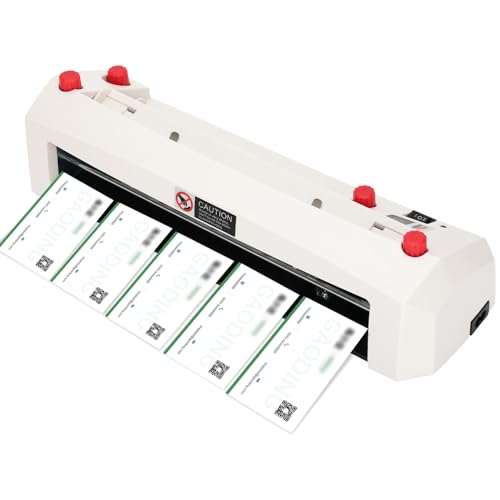
Best for: Businesses or individuals producing large volumes of standard-size cards with consistent edge quality. The nine-blade system and 300gsm capability enable clean, straight cuts without manual effort.
Why selected: The cutter is designed for durability, handling more than 10 million cuts with safety features and automatic waste removal for efficient operation. It’s well-suited for commercial use or serious hobby projects.
Caution: Requires compatible paper sizes (A4) and may not work with US Letter sheets without adjusting layout and margins; check paper stock before purchasing.
Liene PixCut S1 Color Sticker Printer & Cutting Machine

Best for: Creatives who want an all-in-one device for printing photos, labels, and stickers with precise die-cutting. The Bluetooth app enables editing and printing from a smartphone.
Why selected: Its AI-assisted image extraction and precise cutting deliver professional edges quickly, making it ideal for customizable stickers and small-lot labels while maintaining color fidelity with 300 dpi output.
Caution: This device is optimized for sticker and label work; pure text business cards may require additional design steps to ensure legibility and alignment.
Avery Clean Edge Printable Cards

Best for: Users who need crisp, easily separable cards that still print vivid on both sides. Clean Edge Technology ensures smooth, professional edges for a polished final product.
Why selected: The cards are optimized for inkjet printers and designed to minimize jams or smudges, making it a strong choice for print-at-home workflows that demand high visual quality.
Caution: The Clean Edge feature emphasizes clean separation; however, users should still test margins to avoid misalignment when printing dense text or graphics on the back side.
Buying Guide
What should you consider when choosing a business card solution?
- Printer compatibility: If you already own an inkjet or laser printer, choose printable cardstock or a kit engineered for that method. For bulk needs, consider services that offer bulk card options.
- Card thickness and finish: Heavier stock (like 16pt or 250gsm) feels premium but may require a stronger printer feeder. Matte finishes reduce glare, while glossy finishes enhance color depth.
- Cutting method: Manual or electric cutters provide precision; all-in-one printers or sticker-cutting devices offer speed but may limit card formats. Check maximum thickness and sheet compatibility.
- Edge quality: Cards with Clean Edge or Sure Feed reduce jams and ensure clean separations, important for professional presentation.
- Customization needs: If you regularly update branding, options that support easy re-editing (digital templates, drag-and-drop editors) save time.
Quick Tips for Best Results
- Always print a test sheet on plain paper to verify margins before using specialty card stock.
- Match printer profiles to card stock for color accuracy and edge-to-edge printing.
- Store printed cards flat to prevent curling; avoid high humidity to maintain print quality.
FAQ
- What is the best cardstock for home business cards? – Heavier stocks like 16pt (0.016 inch) or 250gsm offer durability and a premium feel, suitable for professional use with inkjet or laser printers.
- Do I need a specialized cutter to make clean-edged cards? – A cutter with a precise blade system or a device designed for business card dimensions helps ensure straight, uniform edges and reduces manual trimming time.
- Can I print both sides of a card at home? – Yes, with the right printable cardstock and compatible printer settings, you can print double-sided designs for a more complete brand presentation.
- Is a digital business card enough in place of printed cards? – Digital cards are convenient for quick sharing, but printed cards remain a common professional courtesy for in-person networking.
- What should I consider when choosing a card cutting device? – Look for compatibility with standard card sizes, thickness limits, cutting speed, safety features, and whether the device supports batch processing.
- Are all-in-one print-and-cut devices worth it for small businesses? – They can be efficient for small runs and customized labels, but verify whether the device handles your preferred stock and size before buying.