Discover reliable, affordable touchscreen laptops that fit everyday tasks. This guide highlights five budget-friendly options, tailored for students, remote workers, casual browsers, and on-the-go professionals who want a responsive touch experience without breaking the bank. Each pick is evaluated for key strengths and a practical drawback to help you decide quickly.
Summary table of selected products
| Product | Best For | Why It Stands Out |
|---|---|---|
| Dell Latitude 5400 (Renewed) | Students and professionals on a budget | Decent performance with 14” FHD touchscreen and Windows 11 Pro |
| HP 14″ HD Touchscreen Notebook | Everyday productivity | Lightweight with long battery life and AI-assisted features |
| Morostron 16″ Touchscreen | Power users on a budget | Large display, 16GB RAM, 1TB SSD, metal body |
| Dell Latitude 3190 11.6″ 2-in-1 | Compact, portable use | 2-in-1 versatility with basic performance and renewals |
| HP 15.6″ Ryzen 3 Laptop | Entertainment and light creative work | Ryzen 3 with 256GB SSD for responsive daily tasks |
Dell Latitude 5400 Laptop Touchscreen
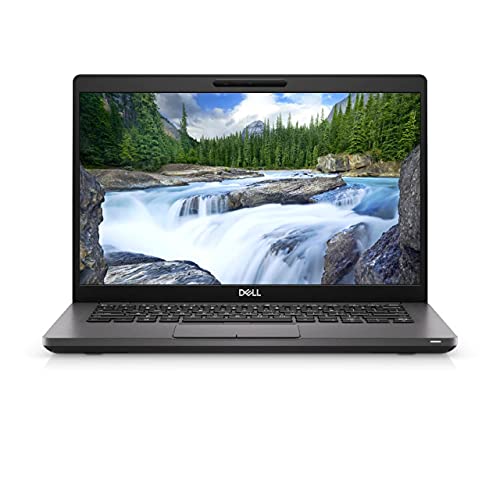
Best for: Students and professionals who need a dependable Windows 11 Pro machine with a compact 14″ touchscreen. The Dell Latitude 5400 offers a balanced build, reliable keyboard, and adequate everyday performance with 8GB RAM and a 256GB SSD. The addition of a touchscreen makes navigating menus more intuitive for note-taking and presentations.
Why selected: It provides a practical blend of form factor, display clarity, and core specifications suitable for daily tasks like web browsing, document editing, and light multitasking within a budget.
Caution: The model is listed as Renewed, which can mean variable wear or battery health. Confirm return options and battery status before purchase.
HP 14″ HD Touchscreen Notebook

Best for: Everyday productivity on the go with a lightweight profile. This HP model emphasizes portable convenience, robust daily-use performance, and a responsive touchscreen for navigating apps and browsers.
Why selected: Combines a thin-and-light design with reliable performance and a display suited for web work, streaming, and light creative tasks. The Copilot Key and AI-assisted features are highlighted in its feature set as productivity aids.
Caution: Memory is listed at 4GB, which may limit heavy multitasking. Upgrading RAM could improve multitasking experience if supported.
Morostron 16-inch Touchscreen Laptop

Best for: Budget-conscious power users who want a larger screen and strong memory for multitasking. The Morostron model offers 16GB RAM and a 1TB SSD, plus a fingerprint reader and backlit keyboard for better day-to-day usability.
Why selected: The larger 16″ display and high RAM/drive capacity make it better for design work, data-heavy tasks, and long browsing sessions without slowdown compared to typical budget laptops.
Caution: The description emphasizes many aspirational claims about speed and heat dissipation; real-world performance depends on workload and cooling efficiency. Verify thermals if using under sustained load.
Dell Latitude 3190 11.6″ 2-in-1

Best for: Students and travelers who need a compact, flexible 2-in-1 with portable footprint. The Latitude 3190 combines a touchscreen with convertible form for notebooks and tablets in one.
Why selected: The 11.6″ size makes it ultra-portable, and the 128GB SSD paired with 4GB RAM is sufficient for light tasks and schoolwork in a compact chassis.
Caution: Renewal status may imply older hardware. Battery life and performance can vary; check the renewal condition details before buying.
HP 15.6″ Ryzen 3 Laptop

Best for: Home entertainment and light creative work on a budget. The AMD Ryzen 3 processor paired with 8GB RAM and a 256GB SSD balances performance for everyday tasks and multimedia.
Why selected: The Ryzen 3 provides responsive performance, while the 15.6″ screen offers a comfortable viewing area for films, documents, and light photo editing. It also includes modern connectivity features for home use.
Caution: The 1366×768 display is lower resolution than Full HD; image sharpness may be reduced for detailed design work or crisp video viewing.
Buying Guide
What screen size matters?
Smaller screens (11–14 inches) are highly portable and good for travel or classrooms. Larger screens (15–16 inches) offer more real estate for work, media, and multitasking but are less portable.
Is RAM and storage enough?
8GB RAM is a solid baseline for everyday use and light multitasking. 4GB is the minimum and can be limiting for multiple browser tabs. An SSD improves boot times and app responsiveness compared with HDDs.
What about processors?
Intel Core i5 or Ryzen 3/5 processors handle common tasks well. Celeron options are more limited for multitasking but can be adequate for simple tasks like word processing and web browsing.
Touchscreen usefulness?
A touchscreen adds navigation convenience for presentations, note-taking, and media control. It also helps with accessibility on some software interfaces.
Renewed vs new?
Renewed devices can offer substantial savings but may have wear or battery variability. Check return policies, warranty coverage, and battery health when buying renewed models.
Portability vs performance
Prioritize portability if you travel often; prioritize performance if you run heavier software or multi-task extensively. Consider upgrading RAM if possible to improve multitasking efficiency.
FAQ
- What is a good budget touchscreen laptop for students? A model with at least 8GB RAM, an SSD, and a 14″ or 15.6″ touchscreen is a strong balance of portability and performance for coursework and light multitasking.
- Are refurbished or renewed laptops reliable? They can offer substantial savings with warranty options. Verify battery health, return policy, and seller reputation before purchase.
- Is a larger screen worth it on a budget laptop? Yes for productivity and media, but it reduces portability and may increase weight and battery consumption.
- What should I expect from a budget Ryzen or Intel CPU? These CPUs handle everyday tasks well, including web browsing, office apps, and streaming. Expect smoother performance with SSD storage.
- Do I need discrete graphics on a budget touchscreen? For typical tasks, integrated graphics are sufficient. If you plan light gaming or design work, check GPU capabilities and RAM.
- What maintenance tips help budget laptops last? Keep software up-to-date, manage startup programs, protect from overheating, and replace aging batteries if possible.