If you’re shopping on a budget, selecting a reliable power supply is essential for system stability and longevity. This guide highlights five affordable yet solid options suited for mainstream builds, office PCs, and entry-level gaming rigs. Best for value seekers, compact setups, and those upgrading from older units, these PSUs balance efficiency, protection features, and affordable price points. Below is a quick summary table of the chosen products to help you compare at a glance.
| Product | Wattage | Efficiency | Best For |
|---|---|---|---|
| Thermaltake Smart 500W | 500W | 80+ Certified | Budget mainstream builds |
| Thermaltake SMART 600W | 600W | 80+ Certified | Mid-range systems with upgrade headroom |
| ARESGAME AGV Series 500W | 500W | 80+ Bronze | Cost-conscious systems with basic protections |
| APEVIA VENUS500W | 500W | Standard protections | Compact builds requiring decent cooling |
| Apevia SPIRIT600W | 600W | Standard protections | Gaming or multitasking on a budget |
Thermaltake Smart 500W 80+ PSU

The Thermaltake Smart 500W provides continuous power at standard room conditions and is designed for compact, budget builds. It adheres to Intel ATX 12V 2.31 and EPS 12V 2.92 standards and carries 80 PLUS certification, indicating efficiency around 80% under typical load. It includes two PCIe 6+2 connectors for modest GPU setups. Best for budget office PCs, small form-factor desktops, or entry-level gaming rigs that don’t demand high power spikes. Limitation: lower peak headroom may limit future GPU upgrades.
Thermaltake SMART 600W ATX PSU

This 600W model offers slightly more headroom for mid-range builds while remaining budget-friendly. It complies with ATX 2.31 and EPS 12V 2.92 standards and carries 80 PLUS certification with about 80% efficiency under typical loads. It supports two PCIe 6+2 connectors for mid-tier GPUs and uses active PFC for better power factor. Best for users planning modest GPU upgrades or larger CPUs without jumping to high-end PSUs. Caution: not ideal for future multi-GPU setups.
ARESGAME AGV Series 500W

The AGV Series 500W from ARESGAME is 80 PLUS Bronze certified, offering higher efficiency than basic schemes and a competitive price point. It provides 500W continuous output with protective features such as OVP/UVP/OPP/SCP. Best for budget builds that require reliable baseline protection and efficiency improvements over non-certified units. Choose this if you want a Bronze-certified unit for steady operation; avoid if you anticipate heavy GPU workloads beyond 500W total draw.
APEVIA VENUS500W

The Venus500W from Apevia emphasizes reliable power with a comprehensive set of connectors, suitable for mid-range builds requiring versatile component compatibility. It uses an auto-thermally controlled 120mm fan to manage temperatures and includes typical protections. Best for compact builds needing a balance of clearance and connector options. Limitation: may lack some modern features found in higher-end budgets units.
Apevia SPIRIT600W
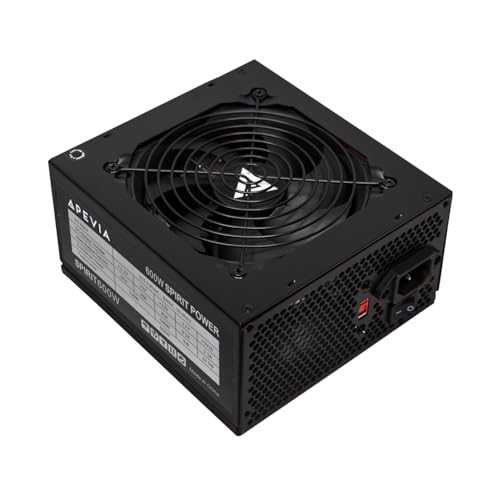
The Spirit600W from Apevia provides 600W with an Auto-thermally controlled 120mm fan and a full set of rails and connectors. This unit supports single 12V rails for consistent power delivery, making it suitable for gaming or multitasking budgets. Best for gaming enthusiasts who need more headroom without stepping into premium pricing. Limitation: not all models of this line include modular cabling, so cable management may be less convenient in some builds.
Buying Guide
- Wattage and headroom: Choose 500–600W for most budget builds; 600W is safer if you plan future GPU upgrades.
- Efficiency rating: 80 PLUS Bronze or Gold offers better energy use and cooler operation; Bronze is common on budget units.
- Modularity: Non-modular units are cheaper but harder to manage; consider semi-modular if available within budget.
- Protections: Look for OVP, UVP, OPP, SCP, and Active PFC for safer operation on power fluctuations and short circuits.
- Connector availability: Ensure enough PCIe connectors for your GPU, plus sufficient SATA and peripheral plugs for storage and fans.
- Cooling: A quality 120mm fan and proper airflow help maintain lower temperatures, especially under load.
- Reliability factors: MTBF estimates give an idea of expected long-term operation; match with your upgrade cycle expectations.
- Future-proofing: If you anticipate next-gen GPUs, verify 12V rail support and connector types align with upcoming components.
FAQ
- Q: Is a Bronze-certified PSU enough for a gaming PC on a budget?
- A: Bronze certification provides decent efficiency and is common on budget units; choose Bronze if you need better power savings but expect modest GPU loads.
- Q: Do I need a modular PSU for a small case?
- A: Non-modular units are cheaper but can clutter cable space; in small builds, consider semi-modular options within your budget.
- Q: How much headroom should I expect for a future GPU upgrade?
- A: Aim for 20–100W extra headroom above current needs when budgeting; 600W units are safer for mid-range upgrades.
- Q: Are 500W PSUs sufficient for most budget PCs?
- A: Yes for common builds with CPUs and GPUs within 150–300W combined draw; check your specific components.
- Q: What protections are essential in a budget PSU?
- A: At minimum OVP, UVP, OPP, SCP, and Active PFC provide essential safety against faults and surges.